Seedance video: from prompt to a finished clip

Seedance is a video model that turns a written description into a finished clip: you say in plain words what should happen on screen, set the duration and format, and the model builds the video with camera movement, lighting and — if you switch it on — sound. On NeuralSpace it lives in the Video section next to Sora, VEO and Kling. This guide walks the whole path from prompt to downloaded file: how to phrase the description, which settings to pick, which scenarios work best, and what to do when a request is rejected.
From prompt to clip: five steps
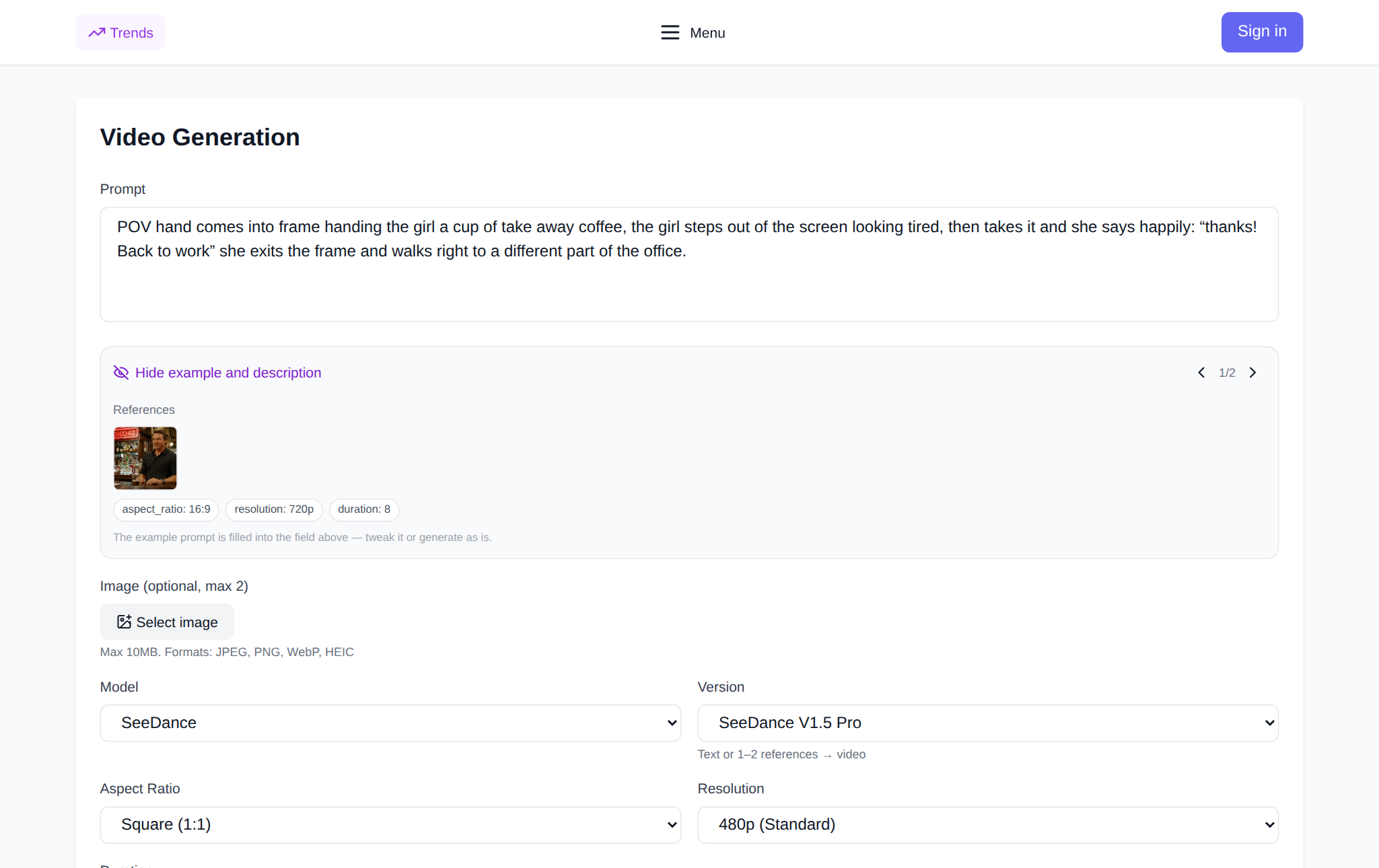
The flow is the same for every Seedance model. Open the Video section and pick the SeeDance group in the model list. Describe the scene in the field that reads "Describe the video you want to create…". Set the parameters on the right: duration, aspect ratio, resolution, audio generation. Hit "Generate video" — the token cost is shown before the run, so there are no surprises on your balance. The finished clip appears in the result block and in Generation history, where you can download it or open it on its own page.
What a working prompt is made of
Seedance responds best to the structure "who or what is in frame + what happens + how the camera moves + light and mood + style". For example: "medium shot, a bartender in a tavern pours a beer, the camera slowly pushes in, warm evening light from the window, cinematic realism". The more specific the action and the camera move, the more predictable the result: "beautiful and atmospheric" is interpreted any way the model likes, while "the camera slowly pushes in" is unambiguous. It helps to name the pace ("slow motion"), the lens ("wide-angle") and the time of day. If someone speaks on screen, put the line in quotes right in the prompt — with audio generation on, the model will voice it.
Scenario examples
Here are four ready-made scenarios for different jobs. Paste them into the prompt field as they are and adjust to taste.
Product ad
"Close-up: a cup of coffee on a wooden table, steam rising, the camera slowly arcs around the cup, soft morning light from the window, warm tones, premium commercial". Settings: 16:9, 5 seconds, 1080p.
Landscape and travel
"Drone flight over a mountain lake at dawn, mist drifting across the water, the camera rises smoothly, cold blue and gold tones, documentary nature footage". Settings: 21:9, 8 seconds, 1080p.
A character with a line
"Medium shot: a girl in headphones walks through a night city, looks into the camera and says, \"Try this track\", neon reflects in the shop windows, the camera follows her, cinematic lighting". Settings: 9:16, 8 seconds, audio on.
Vertical clip for social media
"Vertical frame: sneakers land on wet asphalt, splashes fly in slow motion, the camera tilts up from below, backlight, dynamic sports style". Settings: 9:16, 4 seconds, 720p.
Which settings to choose
Duration runs from 4 to 30 seconds on Seedance 2.5 and from 4 to 15 on 2.0 and V1.5 Pro. Aspect ratio comes from the set 21:9, 16:9, 4:3, 1:1, 3:4 and 9:16: landscape for YouTube and websites, vertical for Reels and Shorts, square for feeds. Resolution is 480p, 720p or 1080p — 480p is fine for a draft, 1080p for publishing. Seedance 2.5 adds its own options: audio generation (on by default), returning the last frame (handy for continuing the scene in the next clip) and MP4 or MOV output.
References: showing the model an example
When you need to repeat a style, a character or a motion, attach references to the prompt. On Seedance 2.5 that means up to 30 images, 10 videos and 10 audio files; you point at them right in the text — @image1, @video1, @audio1 — and the number is printed on each preview. The combined length of video and audio references is capped at 30 seconds. Seedance 2.0 (Omni) uses a different syntax: @image_file_N, @video_file_N, @audio_file_N, and its First/Last Frames mode lets you set the opening and closing frame. The lower-censorship build uses [Image 1], [Video 1], [Audio 1].
Which Seedance model to pick
For quick tests and simple scenes Seedance V1 is enough — it works from text or a single image. V1.5 Pro adds one or two references and a fixed camera. Seedance 2.0 can build a clip from images, video and audio at once, and the lower-censorship build is gentler with shots that include people. Seedance 2.5 is the most flexible: up to 30 seconds, sound, references and resolution up to 1080p. Start with 2.5 when you need audio and a longer clip, and with V1 when you just want to test an idea.
If the generation fails
Three common causes. First, the safety filter: the site tells you the request violates the SeeDance policy and suggests changing the prompt — removing names, brands and overly explicit wording usually helps. Second, not enough tokens: the interface says exactly how many are missing and offers a top-up. Third, a timeout on a long scene: shorten the duration or simplify the action. If the filter blocks a photo of a person, Seedance 2.0 has a Grid and grain tool that overlays a grid on the frame and helps it pass the check while keeping the character.
What a video costs
On NeuralSpace you pay in tokens, with no subscription: the price depends on the model, duration and resolution and is shown before you run it. New users get starter tokens to cover their first tries, and after that the balance is topped up as needed. Drafts are the cheapest: a short 480p scene costs noticeably less than a long 1080p clip, so the sensible order is to test the idea at four seconds first and then re-generate the winner in high quality.
FAQ
How long does a Seedance video take to generate?
Usually from a minute to a few minutes: short 480p scenes come back faster, long 1080p clips with audio take longer. The result lands in Generation history, so you can close the page and come back later.
Can I make a video from my own photo?
Yes. Upload the image as the first frame and describe the motion in the prompt. Seedance 2.0 has a First/Last Frames mode for this, and 2.5 uses references with @image1 links.
Do I have to write the prompt in English?
No, Seedance understands other languages too. English sometimes follows fine details more precisely, but for most scenes a clear description in your own language is enough.
Where can I try Seedance on NeuralSpace?
In the Video section: pick a model from the SeeDance group, describe the scene and run the generation. The token cost is visible before you start, and new users get starter tokens.