Seedance image to video: how to set the motion for your own picture
Seedance does more than build clips from text: it can bring a still picture to life. You upload your own image, add a few words about what should move, and get a short clip where the camera drifts, water flows and a head turns. On NeuralSpace this is a separate mode — the moment you attach an image to the prompt in the Video section, SeeDance V1 switches itself to Image-to-Video. Below: what to enter and where, how to word the motion, which Seedance version holds your frame best, and what to do when the safety filter blocks a photo.
What actually happens to your picture
The model does not repaint the image. It takes it as the first frame and builds motion forward: composition, faces, texture and light stay, and only what you described in words changes. The calmer the scene, the more believable the result. A landscape with drifting clouds, a cup with rising steam, a portrait with a slight turn of the head — those come out great. Fast running, a fight or a hard cut on a single still almost always look unnatural: the model has no idea what happened before or after the shot, so it improvises the motion.
How to run it: five steps
Open the Video section and pick the SeeDance group in the model list. Then:
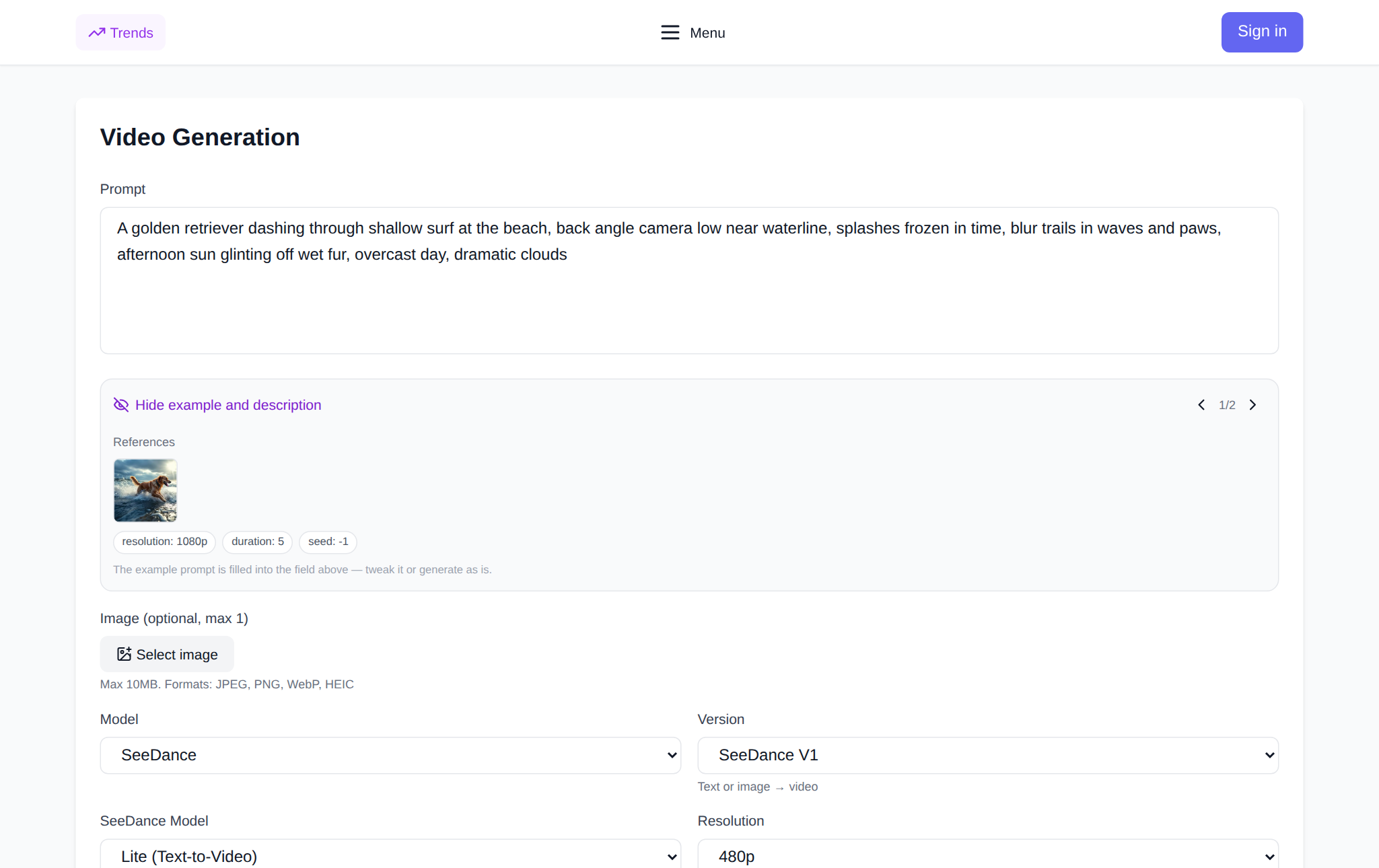
- Click "Select image" and upload a file — JPEG, PNG or WebP up to 10 MB. SeeDance V1 takes exactly one image.
- The model list changes by itself: the text options are replaced by Lite (Image-to-Video) and Pro Fast (Image-to-Video).
- In the prompt field describe the motion — not the whole scene, just what should change in the frame.
- On the right set the duration (5 or 10 seconds), resolution and aspect ratio.
- Hit "Generate video". The token cost is shown before you run it, and the finished clip lands in your generation history, ready to download.
How to set the motion: a working formula
A good image-to-video prompt has four parts: what moves, how the camera moves, what stays still, and the pace and light. Most people skip the last two, and that is a mistake — without them the model starts to drift, wobbling the background, changing the shape of objects and smearing the face.
Here are three ready-made examples you can paste as they are.
Landscape
"The camera slowly pushes in, grass in the foreground sways in the wind, clouds drift from right to left, the building and the horizon stay still, warm evening light." Settings: 16:9, 5 seconds, 480p.
Portrait
"The person in the photo slowly turns their head towards the camera and smiles, hair moves slightly, the background is static and blurred, soft studio light." Settings: 9:16, 5 seconds, 720p.
Object
"The camera arcs around a cup, steam rises upward, the table and background stay still, slow motion, warm tones." Settings: 1:1, 5 seconds, 480p.
If the motion comes out too sharp, add "slow motion" and "smoothly". If the camera jitters, tick the Fixed camera box: then only the subject moves and the shooting point stays put.
Settings that really change the result
Duration. On SeeDance V1 it is 5 or 10 seconds. Start with five: over ten seconds the model tends to get carried away and add motion you did not ask for.
Resolution. Lite (Image-to-Video) runs at 480p, Pro Fast (Image-to-Video) at 720p or 1080p. 480p is enough for tests and drafts; go 720p for anything you publish in a feed.
Aspect ratio. You get 21:9, 16:9, 4:3, 1:1, 3:4 and 9:16. Match the platform: vertical for stories and Reels, 16:9 for a website or YouTube.
Fixed camera. The checkbox locks the camera position — handy when you want to animate the subject only instead of flying around the scene.
Which Seedance version does image-to-video
SeeDance V1 is the simplest and cheapest: one image, a short prompt, almost no settings. SeeDance 2.0 (Ark) takes 0–2 images: one becomes the first frame, two become the first and last frame, and the model builds the transition between them. SeeDance 2.0 (less censorship) animates from the first frame, with an optional last frame. SeeDance 2.5 accepts up to 30 images as references, and you point at them in the prompt with @image1, @image2. SeeDance V1.5 Pro takes one or two references and holds the camera more precisely than the entry version.
A practical rule: to animate a single photo, take V1; for a transition between two frames, 2.0; for a complex scene with several subjects, 2.5.
If the filter blocks your frame
The most common rejection is not your prompt but the model's safety filter. Across 1,290 Seedance generations in 90 days (2 July – 29 September 2026), 568 failed, and 312 of those — 55% — were rejected by the filter itself. Tokens for a failed generation are refunded automatically.
What helps. If a photo of a person is blocked, hover over the preview and click the grid button: the grid and grain break the biometrics while keeping the character. Mark frames with real faces using the "There is a human face in the frame" checkbox — without it the request goes out as an ordinary one and is rejected more often. And drop words about weapons, blood and children from the prompt; they trip the filter even in a harmless context.
What it costs
Seedance is priced per second, and the image-to-video mode is cheaper than the flagships. From the site's generation cost table: 4 seconds at 480p on SeeDance V1.5 Pro averages 7 tokens (201 generations), 8 seconds at 480p is 15 tokens (203 generations), 4 seconds at 720p is 12 tokens (117 generations), June–September 2026. Image-to-video on SeeDance V1 is cheaper still: across three generations in August–September 2026 it came to about 10 tokens for 5 seconds and 18 for 10 seconds at 480p. New users get starter tokens, after that you pay per token with no subscription.
FAQ
Can any photo be animated?
Technically yes, but calm scenes work best: landscapes, portraits, objects. Shots with fast action, a crowd or tricky perspective are reconstructed less convincingly.
How long does generation take?
A short 5-second clip at 480p is usually ready in a couple of minutes. If a job hangs longer, it is not always a failure: over 120 days of support contacts the most frequent topic was "generation throws an error or is not created" (29 mentions), with "generation hangs, long wait" second (16). Tokens for a failed attempt are refunded.
Do I still need a prompt if I uploaded an image?
Yes, and it is the main thing. Without text the model decides on its own what to move and the result is random. One sentence about camera motion already makes it far more predictable.
Where can I try it?
In the Video section on NeuralSpace: upload an image, pick SeeDance V1, describe the motion and run it. Model details are on the SeeDance V1 page, and you can create the source picture in the image generator.