How to Create a Telegram Bot: Code Section, API Key and AI Replies
How to create a Telegram bot that answers like a human instead of reciting scripted lines? Two things are needed: the bot itself and a language model behind it. This guide shows both on our platform: in the Code section the bot is assembled from a template with no server setup, and the API key is issued on the API keys page — after that the bot replies with language-model text and, if you want, draws images, composes music or narrates videos. All the docs are open at neuralspace.pro/v1/docs — no registration needed to read them.
Step 1. Build the bot in the Code section
The Code section is a chat with an AI programmer: you describe what should be built, and it writes the code, edits files and runs the project. There is a separate template for bots: in the “Create project” dialog pick the “Telegram bot” blueprint, edit the highlighted description (“an assistant for my schedule, replies politely and briefly”), pick a model from the catalog and press “Create project”.
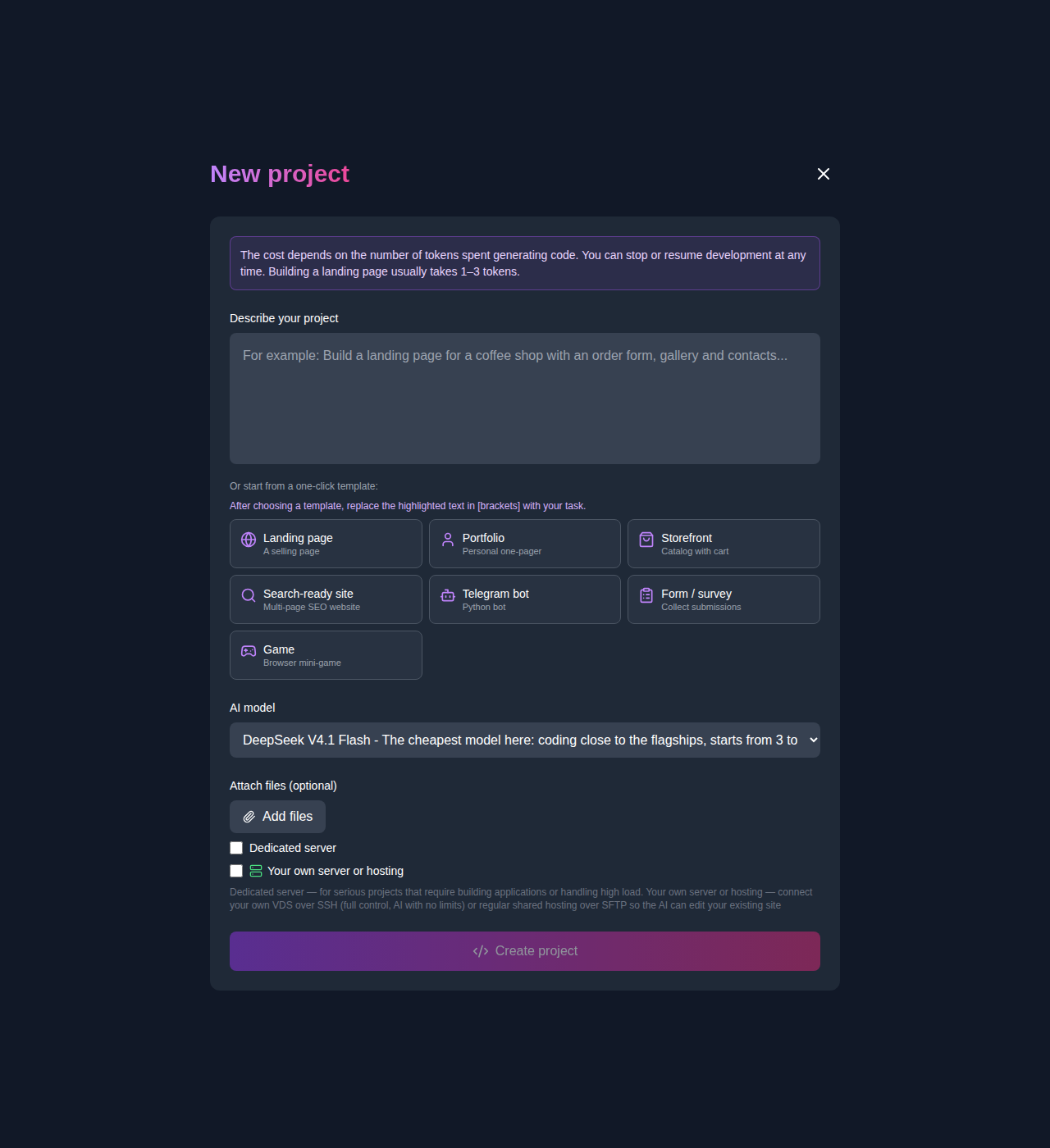
Nothing else needs configuring: hosting on the platform is free — a website project gets an address like *.app.neuralspace.pro, while bots are launched right from the project screen. The project chat stays the place where you ask for changes: “add a button”, “answer as a list”, “fix that bug”. The code can be downloaded as a ZIP archive or rolled back to any earlier version at any time. Tokens are charged only for messages you send to the programmer in the project chat; viewing the project and downloading it are free.
Step 2. Issue an API key
Open the API keys page in your account and create a key: it looks like nsk-… and is shown exactly once, so copy it right away. There is an easier way too: ask the programmer in the project chat to connect an AI model, and it will start the key issue while you confirm it in a dialog — no key is ever created silently.
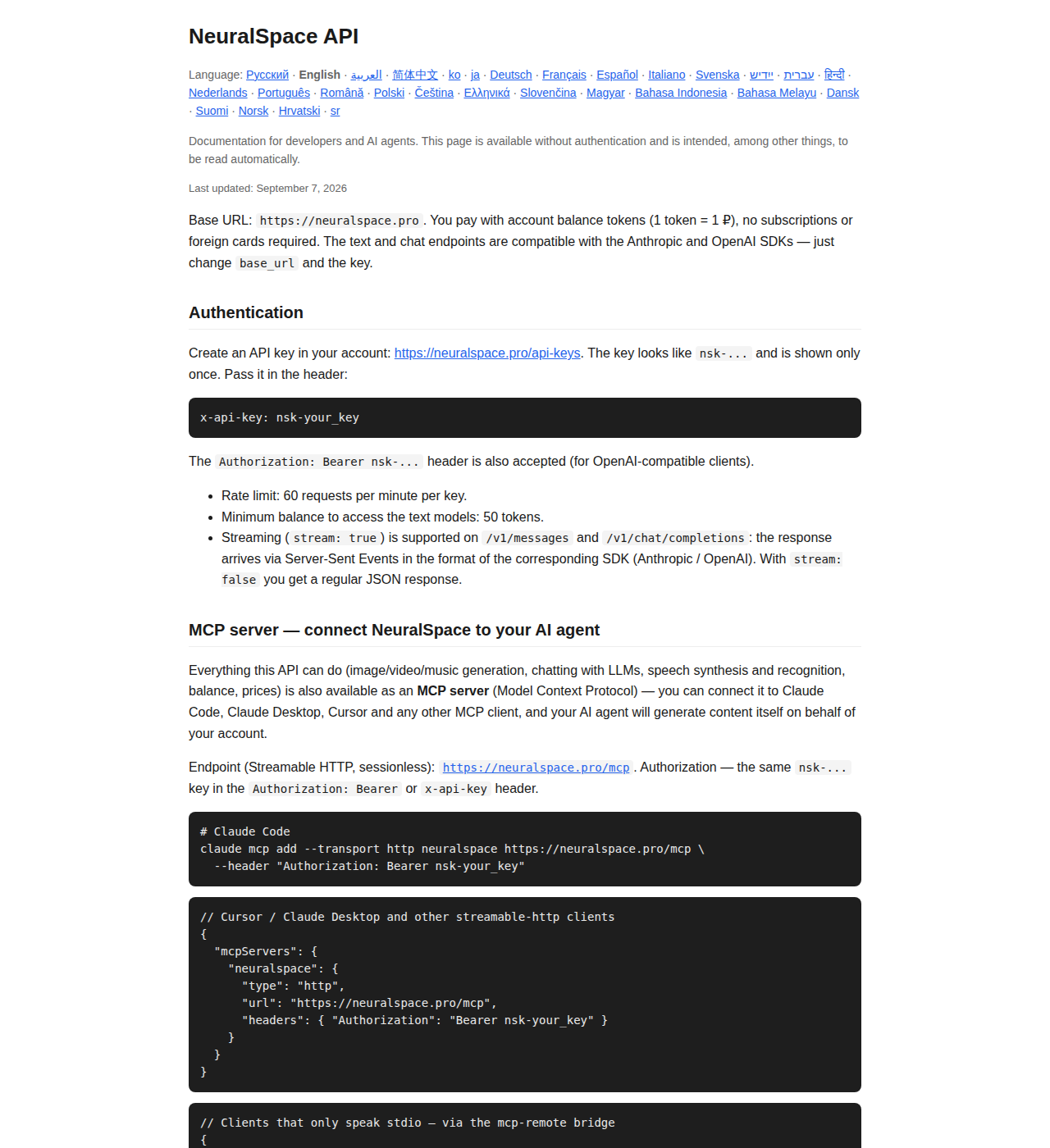
Every API call authenticates with the key. Pass it in the x-api-key: nsk-… header or, for SDK-compatible clients, in Authorization: Bearer nsk-…. The base URL is https://neuralspace.pro: text models are called via POST /v1/chat/completions (compatible with the widespread Chat Completions format) and via POST /v1/messages. If your code already works with another service, changing the base URL and the key is all it takes — the request format stays the same. Streaming replies (stream: true) are supported: answers arrive as Server-Sent Events in the format of the chosen SDK.
Step 3. Teach the bot to answer
The minimal bot logic is one message handler: a phrase arrives, you send it to the model and reply with the answer. A Python example (checked against the live docs):
import requests

def ask_ai(text):
    r = requests.post("https://neuralspace.pro/v1/chat/completions",
        headers={"x-api-key": "nsk-YOUR_KEY"},
        json={"model": "<model>", "max_tokens": 1024,
              "messages": [{"role": "user", "content": text}]}, timeout=120)
    r.raise_for_status()
    return r.json()["choices"][0]["message"]["content"]
Get the model name from the directory: GET /v1/models returns the current catalog with prices, and GET /v1/balance shows your balance. Send the bot’s character description (“you are a polite shop assistant…”) as a system-role message — that keeps the style consistent, and the chat history goes into the message array.
Beyond plain text
With the same key the bot can generate images (asynchronously: create a task via POST /v1/images/generations, poll the status, take the link), music and video, transcribe speech and narrate text — all endpoints with code examples are listed on one table in the documentation. If the bot manages content rather than code (“make an illustration for this post”), the same calls are available through the MCP server: connect https://neuralspace.pro/mcp to your AI agent and it will invoke the needed tools with your account on its own.
What it costs
You pay from your account token balance: one token — one ruble, top-up from any card, no subscriptions and no foreign-card hassle. Model prices in tokens match the ones shown in your account — there is no separate API markup. Limits to know in advance: up to five keys per account, up to 60 requests per minute per key and a minimum balance of 50 tokens for text models. Lost a key? Revoke the old one and issue a new one on the same page.
FAQ
Do I need to know how to program? In the Code section the bot is assembled from a description: a template, the bot’s role, fixes via chat. The handler above is already the minimal logic — the programmer in the chat will finish the rest for you.
Can the bot do more than text? Yes: images, music, video and narration work with the same key, some of them asynchronously (create a task, wait for the status).
The key is shown once — what if I lose it? Issue a new one on the API keys page and revoke the old one: up to five keys can be active.
Do the replies use one format? Two SDK-compatible formats to choose from (Chat Completions and Messages) — code for the known SDKs changes only the base URL and the key.