Video to 3D / Stereo / Camera Move Free
You can now make 3D video for free right in your browser: the Video to 3D / Stereo / Camera Move (free) tool has arrived in the Video section. It reads the depth of every frame, smooths it over time and builds stereo video and a virtual camera move — on your computer and with no tokens spent.
Why it is free
Usually stereo and camera movement in a finished clip are done by shooting again or on a paid server. Here the depth model is loaded into the browser and runs on your device, while the stereo pairs and camera frames are assembled by a shader on the graphics card. The server only serves the tool's code and the model weights — it has nothing to compute, so no tokens are charged and the number of runs is unlimited.
Privacy comes for free too: your file never leaves your computer. That matters when you work with personal videos or client footage.
How to make a 3D video: step by step
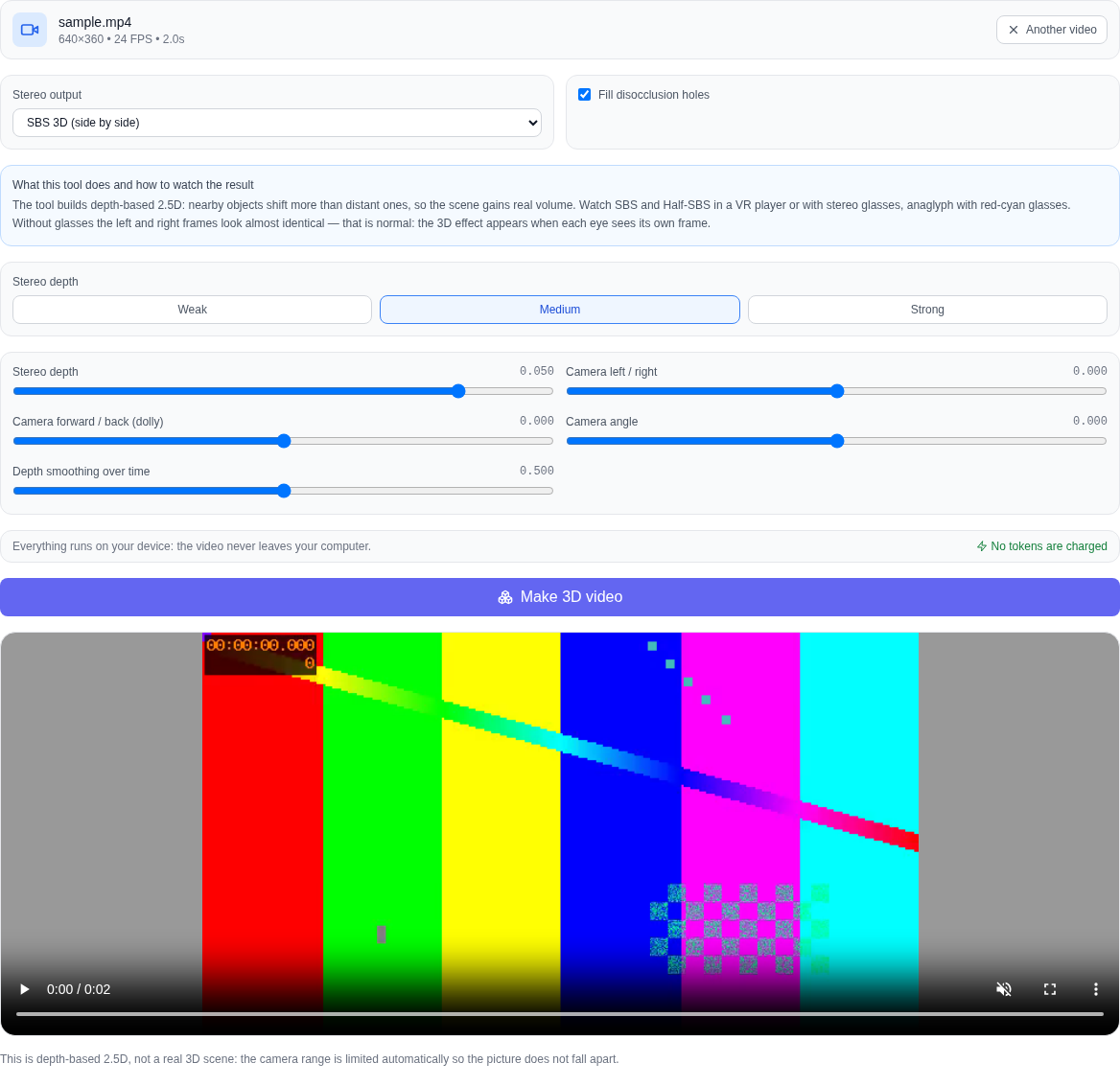
- Open the Video section and pick Video to 3D / Stereo / Camera Move (free) in the model list — it sits at the very bottom, next to the other free tools.
- Upload a video: click the picker or drop the file right into it. MP4, WebM and MOV all work.
- Choose the stereo output: SBS, Half-SBS or anaglyph.
- Set the stereo depth with the Weak / Medium / Strong preset or the slider, and turn on hole filling if you need it.
- Move the camera: left/right, forward/back (dolly) and tilt — each parameter has its own slider.
- Press "Make 3D video", wait for the frames to finish and download the result.
Which stereo formats you get
- SBS 3D — two frames side by side, left and right: the way 3D TVs, projectors and stereo glasses expect it.
- Half-SBS — the pair squeezed to half width: understood by VR players and headsets when you open the clip on a phone.
- Anaglyph — a red-cyan pair: watchable in ordinary red-cyan glasses, even on a regular monitor.
Without glasses the left and right frames look almost identical — that is normal. The volume appears when each eye sees its own frame; so watch SBS and Half-SBS in a VR player or with stereo glasses, and anaglyph with red-cyan glasses.
Virtual camera move
From the same depth map the tool builds a virtual camera move: shifting left and right, moving forward and back (dolly) and tilting. Nearby objects shift more than distant ones, which is how a flat frame gains volume. The camera range is limited automatically: this is depth-based 2.5D, not a real 3D scene, and too strong a shift would break the picture apart into layers. The "Depth smoothing over time" slider removes the shimmer of the depth map between frames, and the "Fill disocclusion holes" checkbox closes the gaps that appear behind shifted objects.
Everything runs on your device
The video is never uploaded: the depth of frames is computed by the Depth Anything V2 Small model through ONNX Runtime Web (WebGPU, with a CPU fallback), the stereo pairs and camera frames are assembled by a WebGL shader, and the finished clip is encoded by the browser itself. There is no paid API, and no tokens are charged.
Original FPS, duration and frame count are kept
The tool reads the exact video-track data from the file's container and assembles the result with the same frame rate, the same duration and the same number of frames as the source. The clip is not sped up and does not lose its tail: 24 frames per second stay 24 frames per second.
What the tool does not do
Honestly about the limits: this is depth-based 2.5D, not a full 3D scene, so the camera cannot be moved far to the side — the range is limited automatically. The tool works with an existing video only; it does not accept photos. Stereo and camera movement do not invent new information about the scene: what is hidden behind the foreground cannot be recovered — hole filling only neatly patches such spots with neighbouring pixels.
Which videos work
MP4, WebM and MOV. Calm footage with clear depth works best: interiors, landscapes, drive-bys, objects on a table. Heavy camera shake and fast motion make depth estimation harder — time smoothing helps, but does not fully save it. Your browser must support local video processing (Chrome or Edge); if it does not, the tool says so honestly.
Who it is for
The tool helps video creators, designers, marketers and anyone making VR content: it gives a quick way to turn an ordinary clip into stereo or to bring a static frame to life with a camera move. If you also need other free video tools, the Video section has the background remover, the upscaler and the depth map — all of them run right in the browser.
Frequently asked questions
Is it really free? Yes. No tokens are charged for this tool and it has no paid API — your computer does the work.
Is my video uploaded? No. The source clip and the result stay on your device; only the tool's code and the depth model weights come from the server.
Is this a real 3D scene? No. It is depth-based 2.5D: nearer layers shift more than distant ones, which gives volume, but you cannot freely fly around the scene.
Can I make 3D from a photo? No. The tool works with video only; for photos the Video section has the depth map.
Why is there no 3D without glasses? That is expected: volume needs each eye to see its own frame. Watch SBS and Half-SBS in a VR player or with stereo glasses, and anaglyph with red-cyan glasses.
Why is the first run slower? The browser downloads the depth model weights once and caches them — later runs start immediately.