Replace Video Background Online Free: Blur and Virtual Backdrops
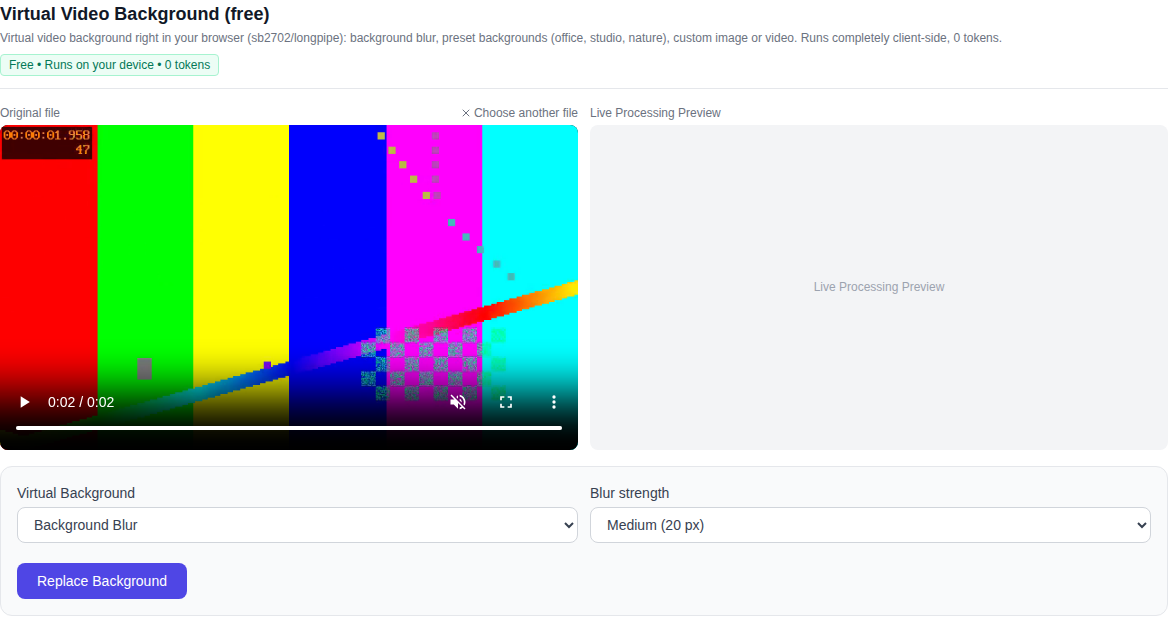
Replace your video background online for free directly in your web browser: check out the Video section for the Virtual Video Background (free) tool (direct link: Replace Video Background Online). Blur your background just like on a video call, switch to a polished virtual office or studio interior, or upload your own background image or video — running entirely on your device with 0 tokens charged.
Key Features
- Background Blur (Bokeh) — hides personal surroundings and clutter, keeping full attention on the speaker. Three intensity presets are available: subtle blur (10 px), medium blur (20 px), and strong background separation (35 px).
- Virtual Interior Presets — stylized procedural environments including a modern corporate office with soft ambient window light, a clean photo studio, a cozy living room, nature bokeh, and a sleek tech gradient.
- Custom Image or Video — upload any photo backdrop or looping video background of your choice.
- Chroma Key & Solid Color — replace the background with a uniform solid color (default green screen) for convenient compositing in external video editors.
How to Replace Video Background: Step by Step
- Open the Video section and select Virtual Video Background (free) (or navigate directly to Replace Video Background) in the model list at the bottom.
- Upload your media: click the drop zone or drag and drop your video or photo into the browser. MP4, WebM, MOV, and common image formats are supported.
- Choose your background mode: Background Blur, Preset Background, Custom Image, Custom Video, or Chroma Key / Color.
- Configure the mode options: set blur radius (10, 20, or 35 px), pick an interior preset, or upload your custom backdrop file.
- Click "Replace Background". A live rendering canvas will show real-time processing frame by frame.
- Once finished, review the output in the built-in video player and click "Download Video".
Complete Privacy: Zero Server Uploads
The primary advantage of client-side processing is total privacy. Your video footage, faces, voices, and confidential documents are never uploaded to remote servers or sent to cloud APIs. Person segmentation is calculated locally by MediaPipe Selfie Segmenter via WebGPU and WebAssembly right inside your browser, while video encoding streams smoothly through WebCodecs.
No account sign-up is required, zero tokens are consumed, there are no paid paywalls, and usage is completely unlimited.
Tips for Crisp Separation
- Balanced Lighting: avoid strong backlighting from windows behind you or heavy facial shadows — soft frontal light ensures clean alpha edges around hair and shoulders.
- Contrasting Background: wearing clothing that clearly contrasts with your wall color helps the neural model detect precise silhouettes.
- Stable Camera: mounting your camera on a desk stand or tripod prevents camera shake and keeps mask transitions smooth between frames.
What the Tool Does Not Do
Honest boundaries: this tool is specifically tuned for people in front of a camera (vloggers, presenters, tutorials, video meetings, and webinars). It is not built for segmenting complex inanimate objects, vehicles, or small pets. If you need transparent background removal or frame rate boosting, check our free video background remover and frame interpolation tools in the Video section.
Supported Browsers
Because the tool relies on modern WebCodecs and hardware-accelerated WebGL/WebGPU graphics, it runs fastest in Google Chrome, Microsoft Edge, and modern Chromium-based browsers, as well as Safari on macOS and iOS.
Frequently Asked Questions
Is this really free? Yes, the tool is 100% free with unlimited runs, zero tokens charged, and no registration required.
Does my video get uploaded to a server? No. Video processing occurs strictly within your local browser memory.
What output format is generated? You can download high-quality MP4 (H.264) or WebM files with preserved original audio tracks.
Can I use this on mobile devices? Yes, modern mobile browsers on iOS and Android with WebGPU/WASM support run the tool smoothly.