Remove Video Background Online Free
You can now remove a video background online for free right in your browser: the Video Background Remover (free) tool has arrived in the Video section. It cuts the background out of a clip and cuts an object out of a photo, runs entirely on your own device and spends no tokens.
Why it is free
Regular background removers process your file on their own servers and charge money or tokens for it. Here the models are loaded into the browser and run on your computer: for video the person's background is found by browser segmentation, for a photo the object is cut out by a separate model. The server only serves the tool's code and the model weights — it has nothing to compute, so no tokens are charged and the number of runs is unlimited.
Privacy comes for free too: your video and photos never leave your computer. That matters when you remove the background from personal clips, work materials or client files.
How to remove a video background: step by step
- Open the Video section and pick Video Background Remover (free) in the model list — it sits at the very bottom, next to the other free tools.
- Upload a video or an image: click the picker or drop the file right into it.
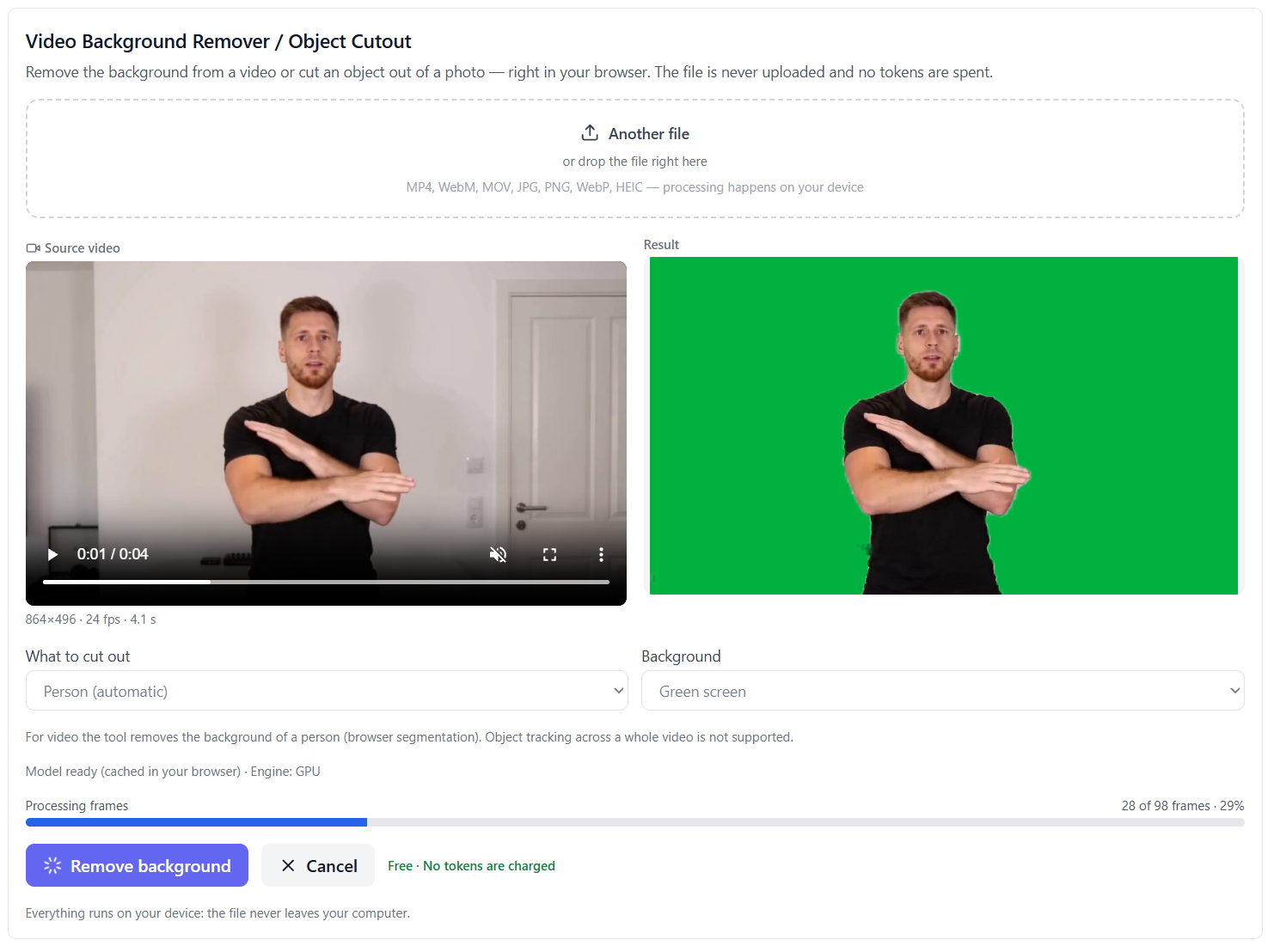
- Choose what to cut out: for video — "Person (automatic)", for a photo — the person or "Object by click".
- Choose the background: transparent, green, blue, a custom color, your own image or your own video.
- Press "Remove background" and wait for it to finish. You can preview the result on the page and download it as a file.
What the tool can do
- Video and images. One tool for both kinds of files.
- The person is found automatically. For video the person's background is removed with no clicking.
- Object by click — for photos. Click the item in the photo and the mask is built for exactly that object.
- Transparent background. Video is saved as transparent WebM, a photo as a transparent PNG.
- Chroma key and your own background. Green, blue, any custom color, your own image or your own video behind the subject.
- Live preview. Finished frames are visible while processing, and the progress bar shows where it is.
What the tool does not do
Honestly about the limits: for video it removes a person's background, and tracking an arbitrary object across a whole clip is not supported — that is a limit of in-browser processing, not a paid feature. Cutting any object out by click works on a photo.
Which files work
Video: MP4, WebM, MOV and other common formats. Images: JPG, PNG, WebP, HEIC and more. Video needs a recent Chrome or Edge — frames are processed in the browser, and in an unsuitable browser the tool warns you honestly instead of failing with a cryptic error. If the browser cannot save transparent video, it offers a green or blue screen instead.
What to know before the first run
- First run. The browser downloads the model weights once and caches them — later runs start immediately.
- Time. A photo is quick; video is processed frame by frame, so a short clip may take a few minutes.
- Memory. Everything runs on your device, so on a weaker computer pick a shorter clip.
Who it is for
The tool helps when you need to cut a person out of a clip and put them on another background, prepare footage for editing, make a picture for a product card, or simply clean up a photo. If the file also needs enlarging, the same section has the video and image upscaler, the depth map and text to speech — all of them run right in the browser too.
Frequently asked questions
Is it really free? Yes. No tokens are charged for this tool and it has no paid API — your computer does the work.
Is my file uploaded? No. Video and photos never leave your device; only the tool's code and the model weights come from the server.
Can I cut any object out of a video? No. In video the tool removes a person's background; cutting an arbitrary object out by click works on photos.
Why does video take so long? Frames are processed one by one on your device. A short clip usually takes a few minutes, and the progress bar shows where it is.