Free Photo Relighting Online
You can now relight photos right in your browser: the Photo Relighting (free) tool has arrived in the Video section. It computes the depth and surface normals of your shot and applies custom studio lighting — completely on your device and with no tokens spent.
Why it is free
Changing the light on an existing picture usually requires paid cloud AI subscriptions or tedious manual retouching. Here the depth model runs directly in your browser, while light angles and surface normals are computed by a WebGL shader on your graphics card. Our server merely delivers the tool code and lightweight model weights — there are no backend calculations, so no tokens are charged and usage is completely unlimited.
This also guarantees complete privacy: your photo never leaves your computer. That is essential when handling private portraits or sensitive client assets.
How to relight a photo: step by step
- Open the Video section and select Photo Relighting (free) in the model list — the tool is located at the bottom alongside other free tools.
- Upload your photo: click the drop zone or drag and drop your file into the browser. Supported formats include JPG, PNG, WebP, and other standard formats.
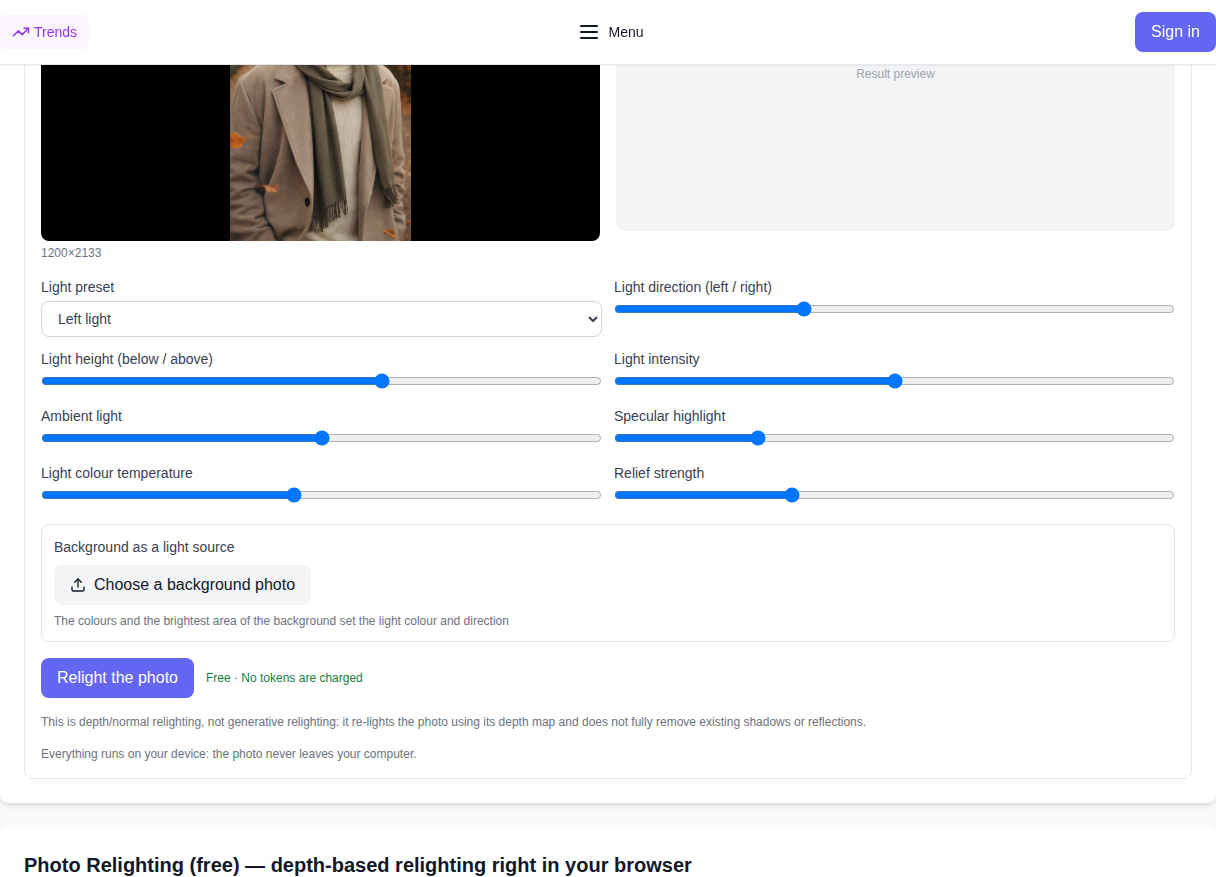
- Select a lighting preset: Left Light, Right Light, Top Light, Bottom Light, or Back Light.
- Fine-tune the controls: adjust light azimuth and elevation angles, ambient fill light, specular shine, and color temperature (warm sunset or cool daylight).
- Optionally add a background image: the tool detects the background's dominant tint and brightest spot, directing light onto your subject to match.
- Click "Relight the photo", review the real-time preview, and download your finished PNG in full original resolution.
Lighting presets and manual controls
- Light presets: immediately switch the key light to left, right, top, bottom, or create a stylish rim light silhouette.
- Direction and height: smoothly orbit the virtual light source around the subject from any angle.
- Intensity and Ambient: balance the strong directional beam with soft ambient fill light in shadowed areas.
- Specular highlights: add crisp, realistic shine to glossy or smooth surfaces.
- Color temperature: smoothly shift lighting from warm golden hour hues to cool daylight tones.
Background as a light source
To seamlessly blend your subject into a new environment, use the "Background as light source" feature. Upload any background picture: the tool automatically pinpoints the brightest area and extracts the primary color palette. The foreground subject is then lit to match the direction and mood of your background scene.
How it works in your browser
Your file is never uploaded: depth is calculated locally by Depth Anything V2 Small using ONNX Runtime Web with WebGPU acceleration (or WASM on CPU as a fallback). Surface normals are derived from the depth map, and a custom WebGL shader re-shades every pixel in real time. Everything happens locally on your computer.
What the tool does not do
Being honest about limits: this is photometric depth-and-normal relighting, not generative AI like IC-Light. The tool does not invent unseen textures and cannot fully erase deep shadows or hard reflections baked into the original camera exposure. It realistically adds directional illumination, highlights, and colored lighting based on the subject's 3D geometry while preserving original detail.
Best photos to use
The tool works best on portraits, product shots, sculptures, and objects with clear shapes and balanced original contrast. You will need a modern browser that supports local WebGPU/WebGL processing (such as Chrome or Edge).
Who is this for
This tool is ideal for photographers, graphic designers, e-commerce sellers, and digital creators looking to adjust lighting, add dramatic highlights, or bring depth to flat images. If you need other free tools, check the Video section for our depth map generator, background remover, and video upscaler — all running locally in your browser.
Frequently Asked Questions
Is this really free? Yes. No tokens are charged and no paid API is used — all computation is performed locally by your browser.
Is my photo sent to a server? No. Both the source photo and the result remain strictly on your machine, ensuring full privacy.
Is this a generative AI model? No. It is normal-and-depth-based relighting: it re-calculates lighting using surface 3D relief without distorting facial features or object textures.
What resolution is the download? Images are exported as high-quality PNGs preserving the original input resolution.
Why does the first run take a few seconds? The browser downloads the compact depth model weights once and caches them locally; subsequent runs start immediately.