Offline Text Translation Free: Right in Your Browser
Offline text translation free is now available right in your browser: the Other tools page has a Text translation tab. It translates the text you paste entirely on your device — the source text is never sent anywhere and no tokens are charged.
What the tool does
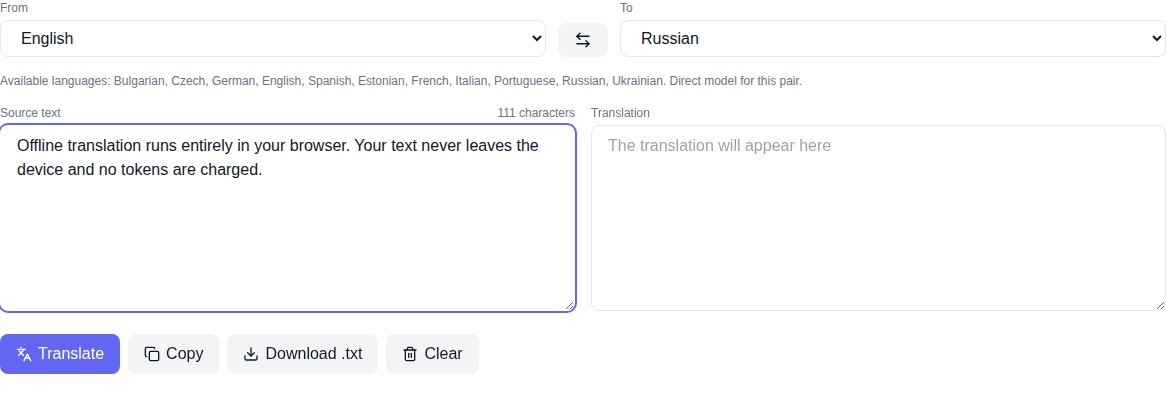
- Translates text between languages — paste your text, pick the source and target languages, press Translate and read the result in the second field.
- Copy and download — the finished translation can be copied with one button or downloaded as a TXT file.
- Swap direction — the arrow button swaps the languages and moves the translation into the input field.
The language list comes from the translation model registry itself rather than being invented: whatever really downloads is what you are offered.
How offline translation works
The Bergamot engine is compiled to WebAssembly and runs on the CPU — no GPU or video memory is needed. A single language-pair model is about 24 MB, downloaded once and cached by the browser; after that no internet is required.
When there is no direct model for the selected pair, the engine translates through English as a pivot language, so pairs like Russian → German still work.
How to translate text: step by step
- Open the Text translation page in the Other tools section.
- Pick the source language and the target language. The arrow button swaps them.
- Paste or type your text into the left field.
- Press Translate and wait for the result. On the first language pair, wait for the model to download — progress is shown on the page.
- Copy the translation or download it as TXT.
Privacy and price
Your text stays in the browser: no request carrying it is sent to our server. There is no paid API here and no tokens are charged — the translation is free with no usage limit. That matters when you translate personal messages, work documents or unpublished text.
What the tool does not do
Honestly about the limits. This is a translator, not a generative network: it will not write or rewrite text for you. Quality is good for major languages; for rare languages it is weaker than large paid services. The internet is needed only for the first download of the model for the chosen pair — after that it works offline.
Pairs with audio transcription
The same page has audio and video transcription into text. The recognized text can be handed to the translator with one button, "Translate the recognized text" — it is placed into the input field and translated into the site language.
Frequently asked questions
Is the translation really free? Yes. No tokens are charged and the tool has no paid API.
Is my text sent anywhere? No. The translation runs in your browser and your text never reaches our server.
Do I need an internet connection? Only for the first download of the language-pair model. After that it works offline.
Do I need a powerful GPU? No, the engine runs on the CPU and uses ordinary RAM.