Midjourney free: how to get similar images without a subscription
Midjourney is not free: the service has no free tier and no trial period — since 2023 generations are available only on a paid subscription. That does not mean you have to pay a fixed monthly fee for images of comparable quality, though. On NeuralSpace images are created in the image generation section, where there is no subscription at all: you pay in tokens for the generations you actually run, and new users receive starter tokens. Below we look at what a Midjourney subscription really buys, which models replace it, and how to move your prompts over.
Why Midjourney has no free tier
Midjourney started in 2022 as a closed beta inside Discord, and for a while newcomers did get a handful of free generations. In March 2023 the free access was closed: demand was overwhelming and free accounts were used for mass-producing images. Since then the service runs on subscriptions only — from a basic plan at roughly $10 a month up to Pro and Mega at $60 and $120. A plan includes hours of fast generation, and the pricier tiers unlock Relax mode: unlimited generations, but queued and still inside the month you paid for. There is no separate free entry point, neither in Discord nor in the web app.
What you are actually paying for
The point of the subscription is not "access to images" but a specific model and workflow. Midjourney v7 arrived in 2025: it draws more cleanly than earlier versions, understands longer descriptions and offers Draft Mode — a rough-sketch mode that is roughly ten times cheaper than a normal generation. On top of that come style references (--sref), character and object references (--cref, --oref), personalisation to your taste, moodboards, upscaling, variations and a web editor with inpainting. If you need exactly those features, the subscription is justified. If what you need is "a picture in comparable quality from my description", paying for a month is not obligatory at all.
How to get a similar result without a subscription
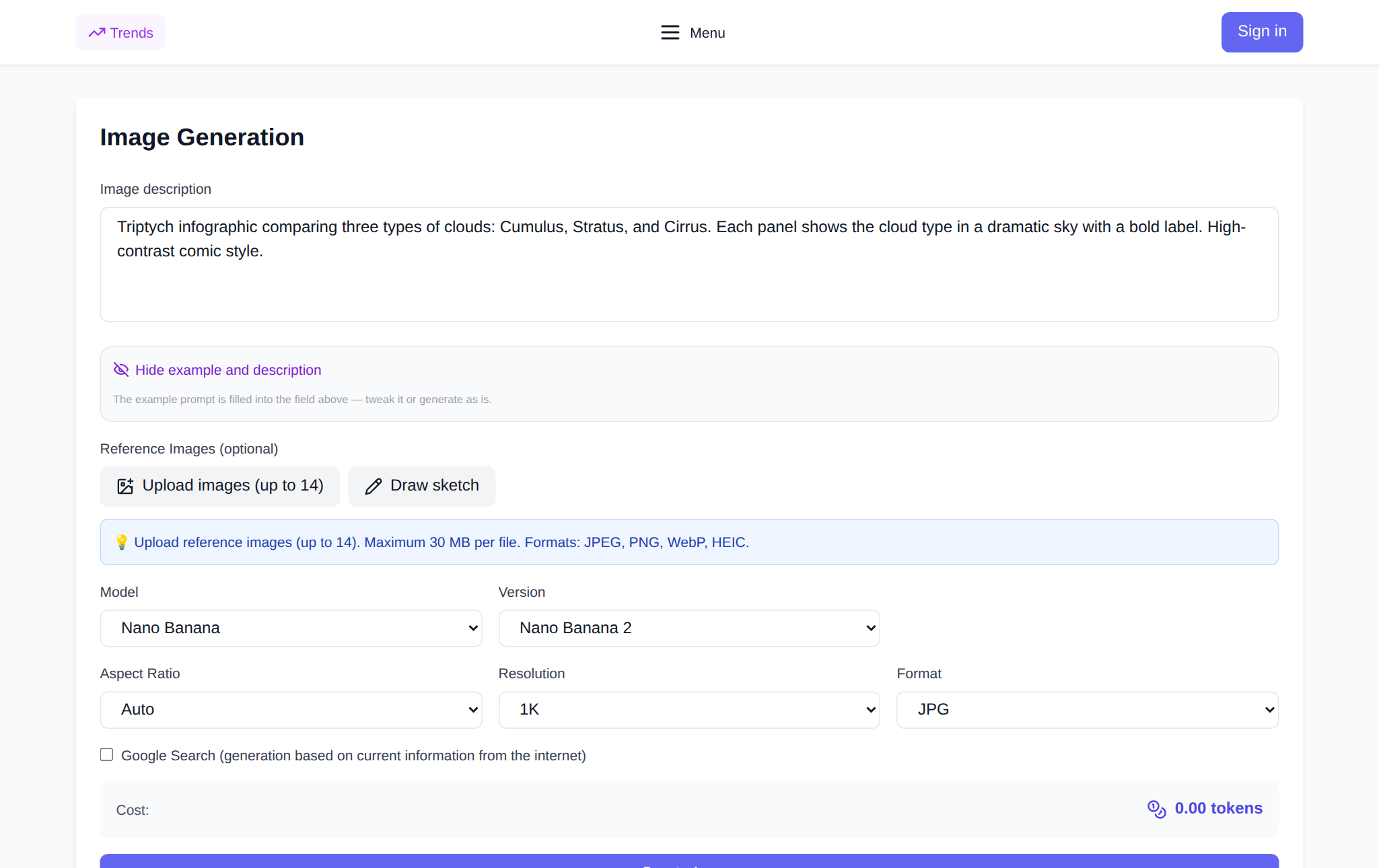
Open the NeuralSpace image generator and follow the steps:
- Sign up — new users receive starter tokens for their first runs.
- Type your prompt into the "Image description" field: the scene, who is in frame, the light, the style, the details. The models understand English and other languages, but English wording still gives slightly more predictable results.
- Pick a model in the "Model" list — see the next section.
- Set "Aspect Ratio", "Resolution" or "Quality": the exact set of fields depends on the model.
- Check the "Cost" in tokens — it is shown before you run, so a draft can be cheap and the final frame high quality.
- Hit "Create Image". The result lands in "Generation History", where you can download it or rerun the same prompt.
If you need a reference, upload images straight into the form — the model takes their style and content into account (JPEG, PNG, WebP and HEIC are supported, and the file limit depends on the model). Z-Image has no reference support: it works from the text description alone. Finished files stay in your history for 30 days, so download the good ones right away. If a generation fails, the tokens are returned to your balance.
Which model to pick instead of Midjourney
The section's catalog covers different jobs, and every model draws on the same token balance:
- Seedream 5 Pro — the closest to Midjourney's artistic feel: expressive composition, pleasant colour grading, and a layer-decomposition mode for later editing. A good pick for posters, covers and concept art.
- FLUX 2 Pro — photorealism and careful handling of light: portraits, product shots, interior scenes.
- Nano Banana 2 and Nano Banana Pro — all-rounders: they handle long descriptions, support references and editing, and output up to 4K. Handy when you need to fix an existing frame rather than generate from scratch.
- GPT Image 2 and GPT Image 2 Pro — tight prompt adherence and readable lettering inside the picture: diagrams, infographics, product cards.
- Z-Image — the cheapest option for drafts: check the composition fast, then rerun the winning prompt on a pricier model.
- Grok Imagine — quick ideas and unexpected takes when you want a stream of variants.
A practical money-saving loop: two or three drafts on Z-Image first, then the final frame on Seedream 5 Pro or Nano Banana 2. That way expensive tokens are not burned on exploring composition.
How to move your Midjourney prompts over
Other models do not understand the double-dash syntax — parameters have to be translated into interface fields:
--ar 16:9→ "Aspect Ratio" (on Nano Banana 2 the field is called "Size").--sref link→ upload a reference: the model picks up the style of the image.--crefand--oref→ a character or object reference plus the "preserve face / character" checkbox, if the chosen model has one.--no water, text→ drop the unwanted bits from the description and add "no text, no watermarks" to the prompt.--v 7→ choose the version or the model itself in the list.
The description itself transfers almost unchanged: Midjourney prompts are usually already written as "scene + light + style + details", which is exactly what other models expect. The only things worth deleting are the service tails with parameters and Discord links.
What it costs
NeuralSpace has no monthly fee: you pay in tokens for the generations you run, and the price depends on the model and settings — resolution, quality, format. The total in tokens is shown before you press the button, so the budget is easy to control: a draft on a light model costs pennies next to a final 4K frame. New users receive starter tokens, and failed generations do not eat your balance — the tokens come back.
FAQ
Does Midjourney have a free tier?
No. Free access was closed in 2023, the service now runs on subscriptions only, and there is no trial period either. The only way to get images without a monthly fee is to use other models with pay-as-you-go pricing.
Can I get Midjourney-style images without a subscription?
Yes. On NeuralSpace images are created in the image generation section: new users receive starter tokens, and after that each generation is paid for in tokens at a price shown before launch. There is no subscription and no monthly payment.
Which model should replace Midjourney?
For an artistic look — Seedream 5 Pro, for photorealism — FLUX 2 Pro, for all-round work with references and edits — Nano Banana 2 or Nano Banana Pro, for precise lettering — GPT Image 2. Drafts are convenient on Z-Image.
Do Midjourney prompts work in other models?
The description does, the double-dash parameters do not. Move --ar into "Aspect Ratio", --sref and --cref into reference uploads, and replace --no with a plain "no ..." phrase inside the prompt text.