Kling official site: where to use it legally and what it costs

People search for the “Kling official site” for two reasons: to make sure they are on the real service rather than a lookalike promising a “cracked Pro version”, and to find out where the model can be used legally. The official Kling site is klingai.com; the model is developed by Kuaishou. That is not the only legitimate way in, though. On NeuralSpace, Kling has its own page in the Video section, with a web interface, token-based payment and no subscription. Below we explain how to tell the official site from a fake, what the model page contains, which versions are available and what a run costs.
Which Kling site is official
The official site of the model is klingai.com. The official mobile apps, Kling AI, are distributed through app stores rather than third-party file-sharing sites. Anything that promises a “full version for your phone”, “lifetime Pro” or “a key with unlimited credits” is not official.
Why are there so many fakes? Kling is a cloud model, but people still look for it as if it were a program. Scammers exploit that with “download Kling free”, “activate Pro by SMS” and “cracked APK” offers. A cloud video model has no offline edition: the computation runs on servers, and your device only needs a browser or a thin app shell. If a site asks you to install a file, type your account password or pay for “activation” on someone else’s page, it is not the official Kling site — it is a good way to lose money and access.
There is a second lawful route: platforms that provide access to the public model through their own interface. NeuralSpace is one of them. It is not the official Kling site and not a mirror of it, but a separate service with its own terms, support and billing: you work in the NeuralSpace interface, using the same Kling model.
What is on the Kling page at NeuralSpace
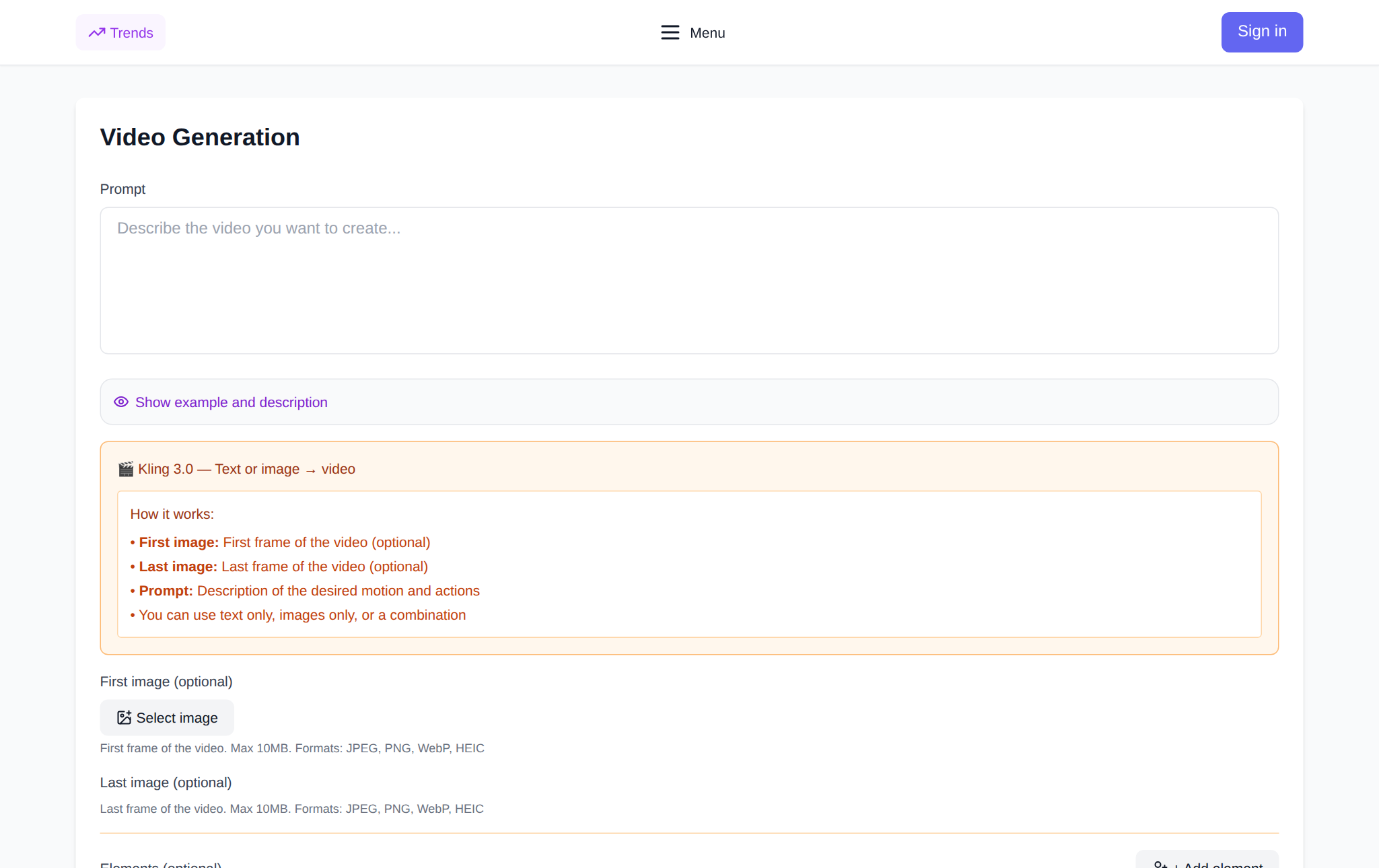
The model page is neuralspace.pro/en/video/kling-3.0. It gathers everything a run needs: the prompt field, image or video-reference upload, Kling version selection, duration, quality mode, sound and aspect ratio. The price is shown in the form before you submit a task, and the finished clip appears in your generation history, where you can download it.
One account covers the whole platform. The same account holds your token balance, payment history and work with other models, so Kling does not need a separate subscription or a separate app. All video models live in the Video section, and developers can reach the same models through the public API.
Kling versions: which one to choose
Kling is not a single button with settings; the catalogue contains several distinct tools:
- Kling 4.0 — the new universal version: 3–30 second clips, 720p and 1080p, native sound, reference images and videos.
- Kling O3 — text or image to video with maximum detail, up to 4K, plus native sound.
- Kling 3.0 — the workhorse: std and pro modes, 3–15 seconds, sound and multi-shot mode.
- Kling 3.0 Turbo — a faster member of the same family for drafts and idea exploration.
- Kling 3.0 and 2.6 Motion Control — transfer movement from a reference video onto your image.
- Kling O3 Pro / Std Video-Edit and O1 Video-Edit — edit an existing clip with a text instruction.
- Kling O1 Image-to-Video — animate a single image.
- Kling AI Avatar — a talking character from a photo and audio, in standard and pro modes.
A practical rule: for the first test, use Kling 3.0 in std for 5 seconds. That is enough to see how the model handles your idea. Pro and 4K are for a clip that has already been approved for publication; Motion Control is for when the movement must follow a reference instead of being invented.
Token pricing: what the cost consists of
There is no subscription on NeuralSpace: tokens are charged for a specific run. The price depends on the version, duration, quality mode, sound and input video. Benchmarks from the current site price list as of 2 November 2026: a five-second Kling 3.0 clip in std without sound is about 50 tokens, with sound about 72; in pro, about 65 and 97 respectively. Kling 3.0 Turbo for 5 seconds at 720p is about 65 tokens; Kling 4.0 for 5 seconds is about 102 at 720p and about 152 at 1080p.
Pricing is dynamic: it is recalculated with the exchange rate, so the exact amount is always shown in the form before launch. Another reference point is the average charge for successful runs: 75.6 tokens per Kling 3.0 generation over 90 days (422 successful generations out of 456 completed tasks from 4 August to 2 November 2026, anonymised site statistics). That mix includes short drafts and longer clips, so a single five-second run costs less.
New users receive starter tokens for their first tests. There is no separate free tier: after that, the balance is topped up on the payment page, per token, with no mandatory subscription.
How long it takes and how often it works first time
Across the same 456 completed Kling 3.0 tasks, 423 ended with a finished clip — 92.8% successful. Median waiting time is 127 seconds and p95 is 277 seconds (calculated over 338 generations with a recorded completion time). In practice, a five-second draft is usually ready in two to three minutes, but under heavy load you should allow up to five minutes and avoid starting a final clip at the last moment.
The figures are aggregated and anonymised: no prompts, accounts or links to work. They are there for honest expectations, not to promise “instant results”.
How to run Kling legally: step by step
- Open the Kling 3.0 page in the Video section.
- Sign in or register with your email.
- Choose a version: for the first run, Kling 3.0 in std mode.
- Describe the scene in the prompt or upload a photo. For a draft, set 5 seconds and turn sound off.
- Check the price in the form — it is visible before launch — and start the generation.
- Find the finished clip in your generation history and download it to your device.
The prompt formula: subject + action + environment + camera + light. Example: “a bartender in a dark vest moves a glass along the counter, the camera slides slowly to the right, warm lamp light, film-style commercial shoot”. This gives the model everything it needs: who is in frame, what is happening, where we are shooting, how the camera moves and what lights the scene.
How to tell an official page from a mirror
- Domain. The developer’s official site is klingai.com. The working page on NeuralSpace is neuralspace.pro/en/video/… Any third domain promising “Kling Pro free” is a reason to close the tab.
- Nothing gets installed. Generation needs no APK, EXE or “patch”. Only a browser, an account and a balance.
- Password only on your own page. If a third-party site asks for your Kling or NeuralSpace login, it is phishing.
- Verifiable terms. A legitimate service has payment, support and policy pages; “lifetime access for 100 roubles” usually does not.
If you need the developer’s official site, open klingai.com. If you want an interface in your language, token payment and all models in one account, open the Kling page on NeuralSpace. Both routes are legal; the third, “cracked” one does not exist.
FAQ
Where is the official Kling site?
The official site of the model is klingai.com, developed by Kuaishou. The official apps are called Kling AI and are distributed through app stores.
Is the Kling page on NeuralSpace the official site?
No. It is a separate platform that legally provides access to the model in its own interface. It has its own terms, support and token billing; Kling itself remains the same public model.
Can I buy Kling Pro cheaper on a third-party site?
No. “Lifetime Pro”, “unlimited” and “cracked version” offers are not official. The legal options are the developer’s site or a platform with token-based billing.
How much does it cost to try Kling?
There is no subscription. New accounts receive starter tokens; after that you pay per run: a five-second Kling 3.0 in std without sound is about 50 tokens as of early November 2026. The final price is shown in the form before launch.
Start with a short draft: open the Kling 3.0 page, describe the scene and run five seconds in standard mode. That tests the idea for the fewest tokens and shows whether you need the Pro version.