Interactive avatar: how to hold a live conversation with an avatar in real time
The interactive avatar is a streaming session in the Avatar Video section: the avatar speaks live from your text or an uploaded audio file, and the result is available right away as a stream link. It differs from a regular avatar video in a fundamental way: a finished clip renders for minutes, while a live session starts talking in seconds — and you can keep feeding it text mid-stream. Below: what the tool is, which modes it has, how to start a session and what it costs.
What it is and who it is for
A regular avatar video is a recording: you set the text, wait for the render and get a finished file. The interactive avatar works differently — like a live broadcast. The session opens, the avatar starts speaking at once, and you drive it in real time: feed it new lines, stop it or close it. This format shines where the moment matters: greeting a visitor on a landing page, answering a question live, a short demo, rehearsing a script before the final recording, a virtual host at a meeting or in training.
How much faster the live format is shows in the platform's own measurements: per telemetry dated 07.09.2026, a 5-second 1080p clip renders in about 115 seconds on average and stays within 165 seconds in 95% of cases. A finished avatar video also runs in the background for minutes — per the platform's generation log for 30 days (3 September – 2 October 2026), 3,304 video jobs were started and 2,377 completed successfully. A live session is not tied to that wait: it begins immediately.
Three speech sources
The tool has three modes — pick the one that fits the task:
- Script. Enter ready text and the avatar reads it as is. Good for greetings, announcements and prepared lines.
- Streaming text. Set an opening line, then keep sending new lines as the session runs — the avatar keeps talking, like in a live dialogue. Handy when the answer is made up on the fly.
- Audio. Upload a ready audio file and the avatar repeats it with precise articulation (lip-sync). Useful when the voice-over is already recorded in your own voice or a clone.
Text in the Script and Streaming text modes runs up to 5,000 characters. Voices are picked from a catalogue with search and preview: click the preview button next to a voice to hear it before you start.
How to start: step by step
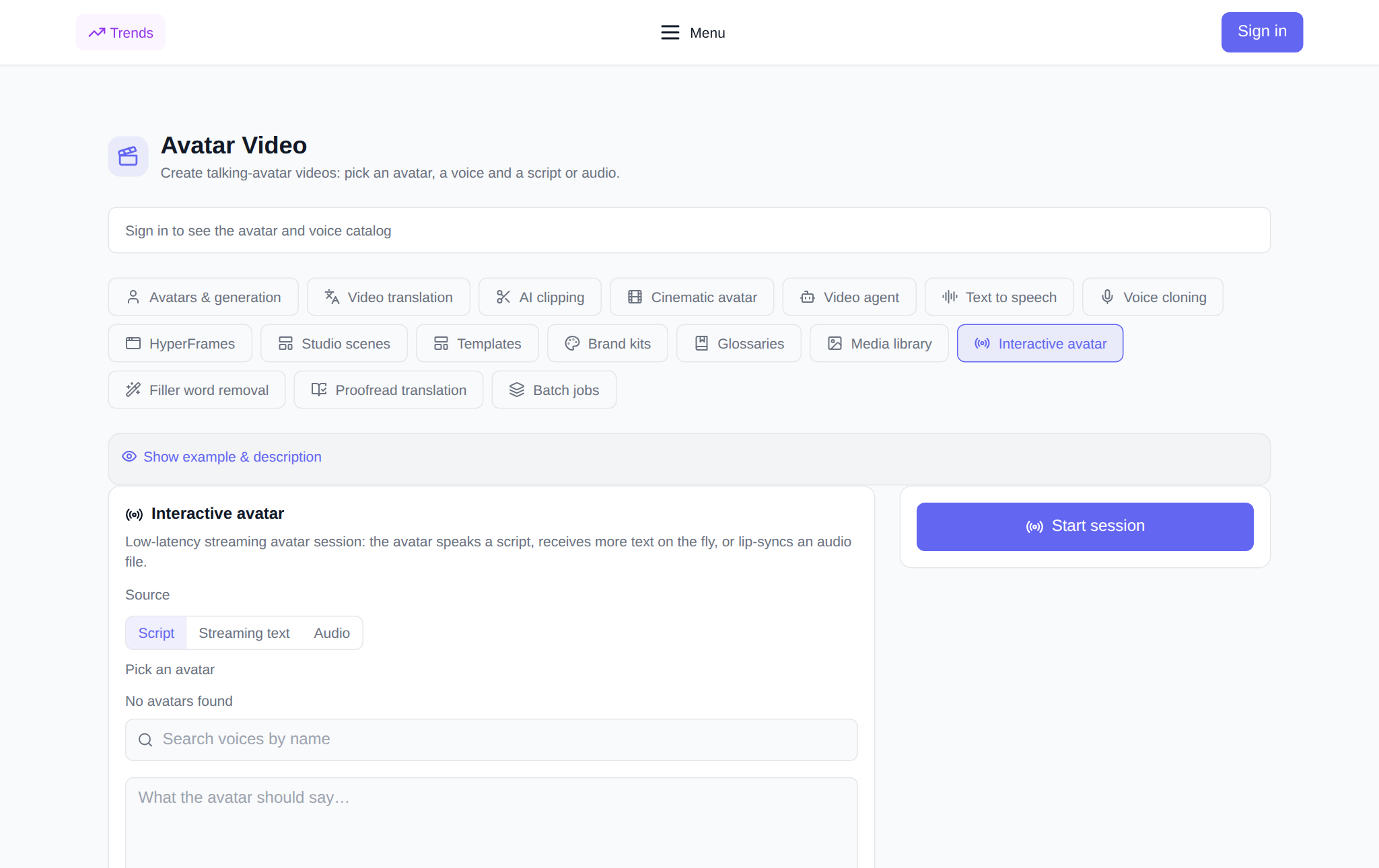
- Open the Interactive avatar tab in the Avatar Video section.
- Sign in to your account: a guest can browse the section, but starting a session needs a login.
- Choose a speech source — Script, Streaming text or Audio.
- Pick an avatar from the gallery of ready looks.
- For the text modes choose a voice and enter a line — you can preview the voice first.
- For the Audio mode attach an audio file.
- Check the token price — it is shown before launch and calculated from the session length.
- Click Start session. The avatar starts speaking, and the session appears in the history.
Running a session
A live session is a stream, not a file, so in the history it carries a status: Live, Finished or Error. A finished session can be opened by its stream link and watched right in the card through the built-in player. In Streaming text mode, while the session is active, a field appears for sending new lines — so the conversation continues without a restart. Any session can be stopped with a button and deleted from the history.
What it costs
You are charged per second of the session, with a one-minute minimum block. The token price is shown before launch and is calculated from the same data that goes into the charge, so the shown amount equals the actual one for any allowed input. If a session fails, the charge is returned. There is no subscription: new users get starter tokens for their first tries, then you top up the balance with the amount you need.
Pairs well with
- Avatars & generation — record a regular avatar video.
- Text to speech — prepare audio to feed into a live session.
- Voice cloning — speak in your own voice.
- Studio scenes — assemble a video from several scenes.
Frequently asked questions
How is the interactive avatar different from a regular avatar video?
A regular video is a recording: the text is set in advance, then it renders, and you get a finished file. A live session is a stream: the avatar starts speaking at once, and you can send more text during the broadcast. The first is for a finished video, the second for dialogue and answers in the moment.
Do I need to keep the tab open?
The session runs on the service side and the result is available by its stream link — you can return to it from the history. Sending new lines in Streaming text mode is handier from an open tab.
Which voices and languages are available?
Voices come from a catalogue filtered by language: you can search and preview them before launch. The voice language is chosen separately from the mode, so you can voice text in the language you need.
How much does a session cost?
Per second with a one-minute minimum block; the token price is shown before launch and equals the charge. There is no subscription, and new users get starter tokens.