Gemini TTS dialogue voiceover: 30 voices and every setting
The Audio section has a new tool — Gemini TTS dialogue voiceover. It turns a finished script into sound: you define the speakers, their voices and character, and the service voices the lines in order and returns a ready MP3.
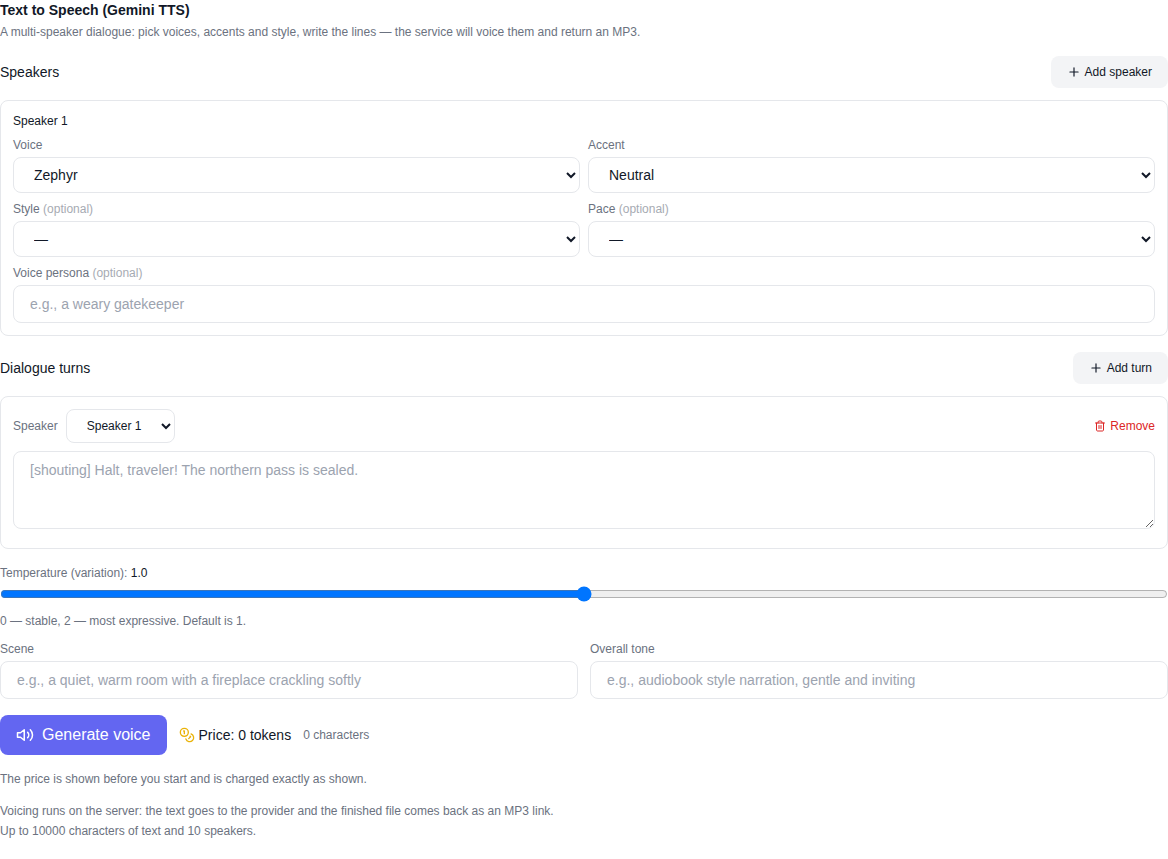
What the tool does
This is not a single voice reading one text — it is a real multi-speaker dialogue. Every character gets their own voice, accent, delivery style and pace, so the lines sound the way you intended: a host conversation, a skit, an interview, character lines for a video.
Two models are available:
- Gemini 3.8 Flash TTS — expressive voiceover: richer emotion, more natural rhythm, finer control over delivery. Great for podcasts, audiobooks and video narration.
- Gemini 3.8 Flash-Lite TTS — the same mechanics, cheaper and faster: for high volumes, drafts and read-aloud text.
Every setting the model offers
The interface exposes all parameters the voice model provides:
- Speakers. From one to several characters; each has a label such as "Speaker 1", "Speaker 2" that links lines to the voice.
- 30 voices — from soft narrative timbres to energetic, newscaster-like ones.
- 8 accents — Neutral, American (General, Valley, South), British (RP and Brixton), Transatlantic and Australian.
- 6 delivery styles — Vocal Smile, Newscaster, Whisper, Empathetic, Promo/Hype and Deadpan.
- 4 paces — Natural, Rapid Fire, The Drift and Staccato.
- Audio profile — a free-form character description such as "a warm narrator" or "a stern, weary gatekeeper".
- Temperature — from 0 to 2: lower is steadier and more predictable, higher is livelier and more varied.
- Scene and overall tone — a description of the setting ("a quiet room with a fireplace crackling") and of the narration manner ("audiobook style, gentle and inviting").
- Dialogue turns — each line up to 10,000 characters; the order of the lines is preserved.
How to voice a dialogue: step by step
- Open the Audio section and pick Gemini 3.8 Flash TTS or Flash-Lite TTS — they sit at the bottom of the model list.
- Add speakers and set each one's voice, accent, style and pace.
- Write the dialogue lines and assign each to a speaker.
- Optionally fill in the scene description, the overall tone and the temperature.
- Check the price — it is shown BEFORE you start and recalculates as you type.
- Press "Voice it" and, once ready, listen to the result and download the MP3.
What it costs
The price is based on the actual amount of text: the longer the lines, the higher the cost, and it is visible before you start — no surprises after generation. Payment uses the site's tokens like any other paid generation, and if something fails the tokens are refunded automatically. You can watch the estimate right in the form: it updates while you type the script.
Frequently asked questions
Can I voice a dialogue with two or more characters? Yes — each speaker has their own voice and settings, and the lines are voiced in order.
What format is the result? MP3 — listen on the page and download with one button.
Which languages does the model speak? The model is multilingual: it voices text in dozens of languages, Russian and English included.
Flash or Flash-Lite? For expressive projects choose Flash; for high volumes and drafts choose Flash-Lite — same mechanics, cheaper and faster.
Do I pay for trying? Tokens are charged when the voiceover starts, and if it fails they are refunded automatically.