Audio/Video to Text and Subtitles Free — Transcription
You can now turn audio or video into text for free right in your browser: the Audio/Video → Text + Subtitles (free) tool has arrived in the Video section. It recognizes speech, shows it as text with timestamps and hands you ready-made subtitles — and spends no tokens.
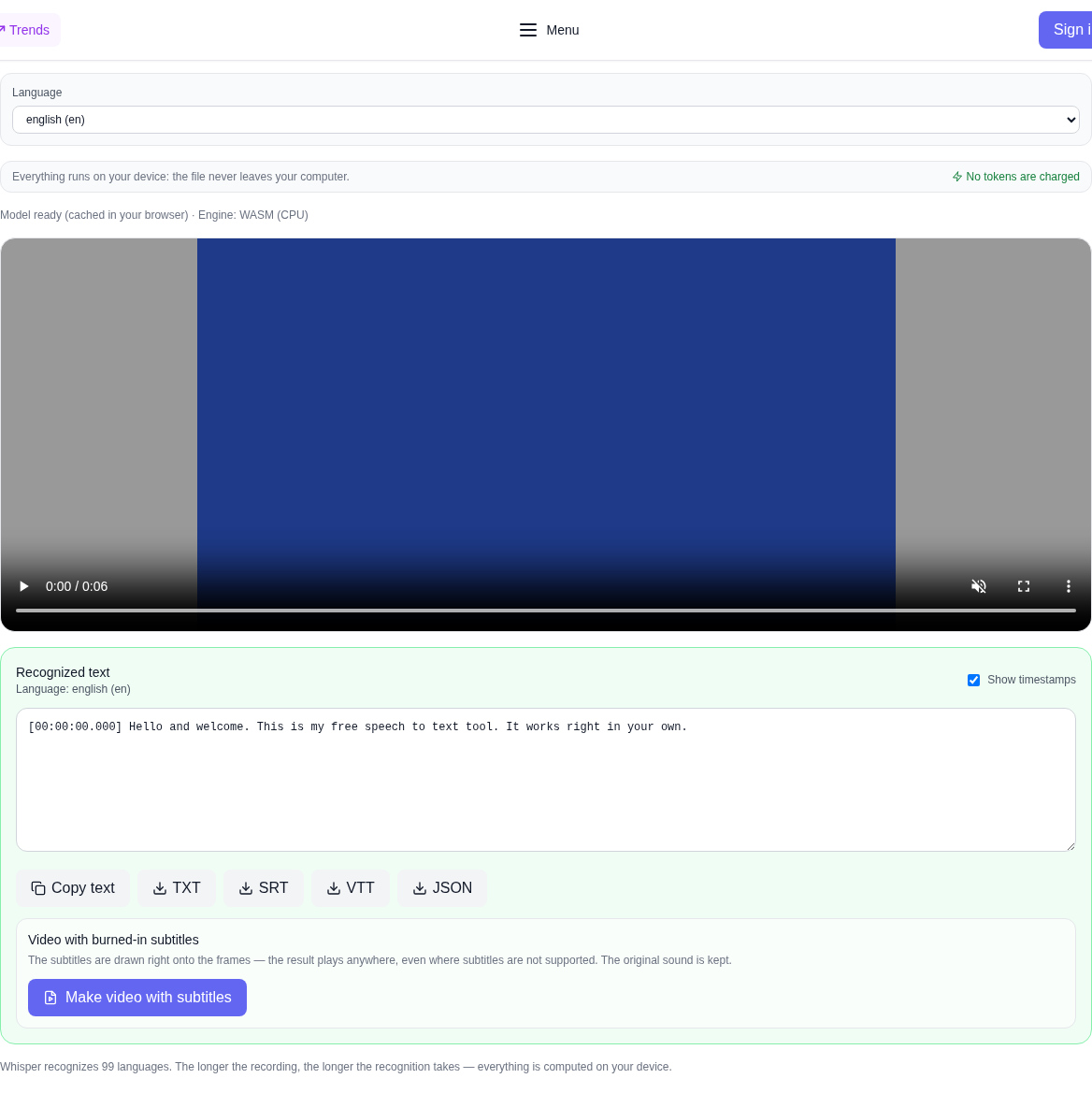
Why it is free
Usually transcription runs on a paid service's server: the file is uploaded, the minutes are counted, and every minute is billed. Here the speech recognition model is loaded into the browser and runs on your computer. The server only serves the tool's code and the model weights — it has nothing to compute, so no tokens are charged and the number of transcriptions is unlimited.
Privacy comes for free too: your recording never leaves your computer. That matters when you transcribe interviews, work calls, lectures or personal notes.
How to transcribe audio or video: step by step
- Open the Video section and pick Audio/Video → Text + Subtitles (free) in the model list — it sits at the very bottom, next to the other free tools.
- Upload a file: click the picker or drop an audio or video file right into it.
- Choose the speech language — or leave "Detect automatically". The site's interface language is preselected, but you can always change it by hand.
- Press "Recognize speech" and wait for it to finish. The first run takes longer: the browser downloads the model once and caches it.
- Check the text, turn the timestamps off if you do not need them, and copy the result.
- Download the subtitles in the format you need — TXT, SRT, VTT or JSON. For a video you can also build a clip with burned-in subtitles right away.
Which files work
Audio: MP3, WAV, M4A, AAC, OGG, OPUS, FLAC and other common formats. Video: MP4, MOV, M4V, MKV, AVI, OGV, WebM. The sound is extracted from the video right in the browser, so there is no need to convert the file first.
What you get
- Speech text — a transcript with timestamps that you can switch off to get clean text.
- Copy — the whole recognized text to the clipboard with one button.
- TXT — plain text for notes and documents.
- SRT — subtitles for most players and video editors.
- VTT — subtitles for the web and HTML players.
- JSON — marked-up segments with timings for your own scripts.
Video with burned-in subtitles
If you upload a video, the tool can burn the subtitles right onto the frames: such a video plays anywhere, even where subtitles are not supported. The original sound is kept. The burning happens on your device, and the file is never sent anywhere.
Everything runs on your device
Speech is recognized by the Whisper model through Transformers.js: it first tries WebGPU (your graphics card) and, if there is no adapter, honestly falls back to WASM and computes on the processor. There is no paid API, no tokens are charged, and the recording never goes to the server. Long recordings take longer — everything is computed on your computer.
What the tool does not do
Honestly about the limits: this is speech recognition, not translation. The tool does not translate the text into another language and does not dub it. Quality depends on the recording: clean speech without heavy noise or music gives a noticeably better result. A video with burned-in subtitles needs a modern browser — that step requires Chrome or Edge.
Who it is for
The tool helps everyone who works with recordings: journalists and podcasters transcribing interviews, students making lecture notes, editors adding subtitles to a clip, and anyone keeping minutes of meetings. If you need more from a recording, the Video section has background removal, upscaling and a depth map — they run right in the browser too.
Frequently asked questions
Is it really free? Yes. No tokens are charged for this tool and it has no paid API — your computer does the work.
Is my file uploaded? No. The recording and the result stay on your device; only the tool's code and the model weights come from the server.
How many languages are supported? Whisper recognizes 99 languages. You can pick the language by hand or let it detect automatically.
Can I get the subtitles as a file? Yes. TXT, SRT, VTT and JSON are downloaded with separate buttons.
Does the tool translate speech? No. It recognizes speech in the chosen language but does not translate it into another.
Why is the first run slower? The browser downloads the recognition model once and caches it — later runs start immediately.