AI image models: which one to choose for your style and task
The AI image section on NeuralSpace is the image generation page, where more than a dozen models sit in one window — from fast, cheap drafts to photoreal flagships. The first question a newcomer faces is which one to pick, because the model drives both the look of the picture and how many tokens it costs. Below is a practical map: which model fits which task, how to select it in the interface, and how to make your first run without burning your starter tokens.
How model selection works in the image section
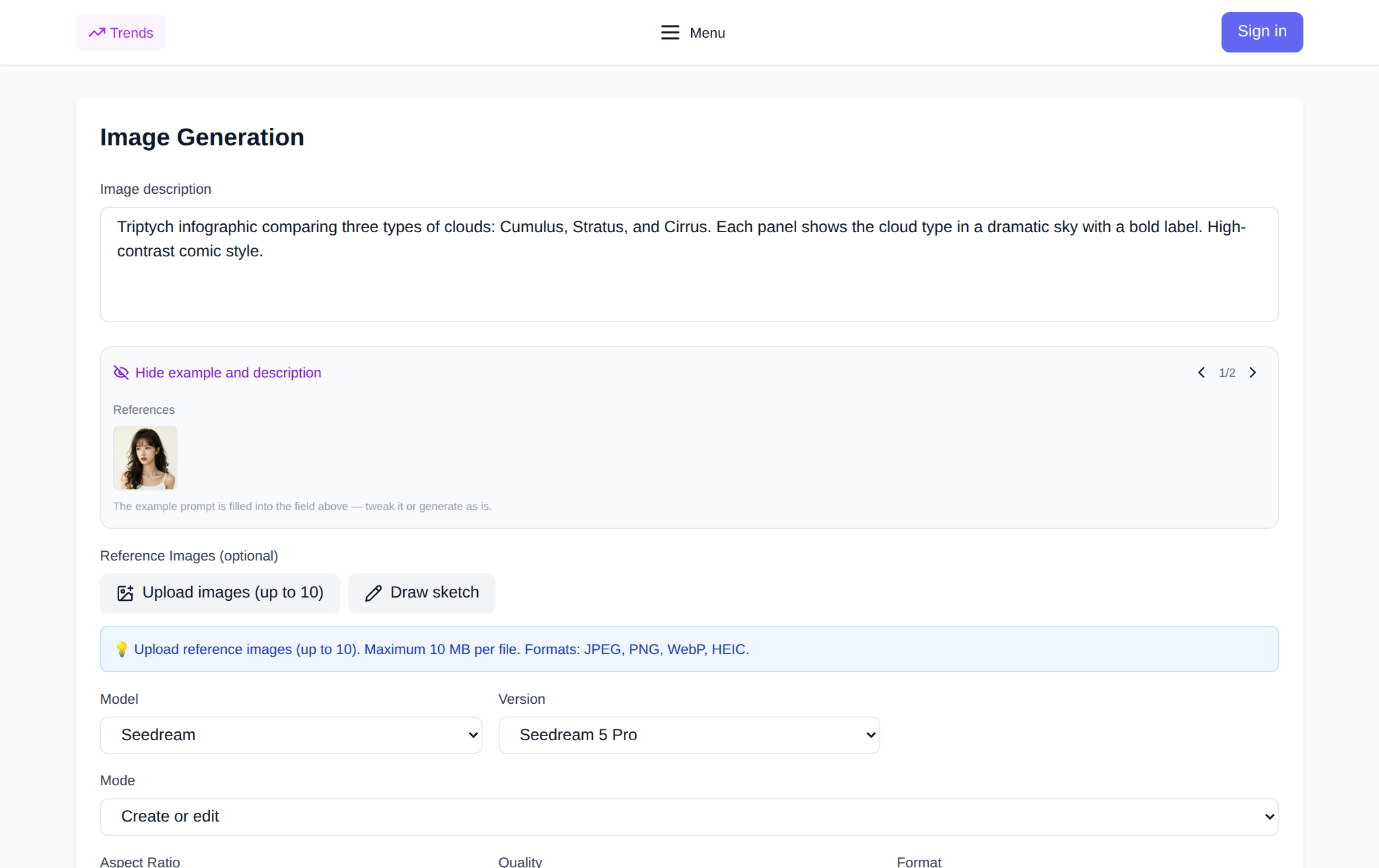
Open the image generator and look at the settings panel. The model is chosen with two dependent lists: first "Model" — the family (Seedream, Nano Banana, GPT Image, Ideogram, Flux, Grok, Midjourney, Z-Image, Jimeng, NS-Image) — then "Version", the exact model inside that family, such as "Seedream 5 Pro" or "GPT Image 2". If a family has only one version, the second list does not appear. Below are the prompt field, the aspect ratio and the run button. The reference-photo upload appears only for models that support it.
Which model for which task
There is no single "best" model: each is stronger at something. A practical map by task:
- Photorealism, portraits, product shots. The Seedream family (Seedream 5 Pro, Seedream 4.5) and Flux 2 Pro are the strongest: natural skin, light and materials. For a shot with a specific face or object, pick a model with reference support — GPT Image (GPT Image 1.5, GPT Image 2, GPT Image 2 Pro) or Nano Banana (Nano Banana Pro, Nano Banana 2).
- Text and lettering on the image. Signs, posters, covers, logos — that is Ideogram: it renders whole words instead of random symbols. Put the exact wording in quotes right in the prompt.
- Artistic style, illustration, art. Midjourney and Jimeng (Jimeng 4.5, Jimeng 5.0) give an expressive painterly look; Flux 2 Pro and Z-Image hold a requested style and composition well.
- Fast drafts and saving tokens. Seedream 5 Lite, Nano Banana 2 Lite and Z-Image are the light versions: ideal for exploring ideas and locking the composition, then finishing on a stronger model.
- Maximum quality for the final frame. Seedream 5 Pro, GPT Image 2 Pro, Nano Banana Pro — switch here once the composition is found.
Choose by style, not by name
A model name tells a newcomer very little, so test on your own task. Take one prompt and run it on two or three models in a cheap mode: one frame, standard quality. Compare concrete signs rather than "beauty in general" — how photographic it looks, whether it hit the style, whether details drifted. In a couple of runs you will know which model suits your style, and you will not overpay for a flagship where a light version is enough.
Your first run, step by step
1) Open the image section and pick a family in the "Model" list, then a version in the "Version" list. 2) Set the aspect ratio: landscape for scenery and covers, square for avatars, portrait for stories. 3) Describe the scene: subject, setting, light, camera angle and style — for example, "a portrait of a woman in an autumn park, soft evening light, blurred background, film photography". 4) If you need a specific person or object, upload a reference photo (the button exists on models with reference support) and describe only the change. 5) Press the generate button and wait for the frame. New users receive starter tokens; after that each generation is paid for with tokens — there is no subscription, and the cost is shown before you run.
How to phrase a prompt for the style you want
The model does not guess a style — you have to name it. A simple formula works: subject + setting + light + angle + style. "A cat" is a lottery, while "a ginger cat asleep on a windowsill, morning light from the window, close-up, soft film photography" is a controlled result. For art, add the technique: "watercolor", "oil paint", "vector illustration", "isometric". For photorealism, add optics words: "wide angle", "shallow depth of field", "natural light". Change one element at a time, or you will not know what improved the frame.
How not to waste your starter tokens
Cost depends on the model and settings, so keep the first runs short: one frame instead of four, standard quality instead of maximum. Find the composition on a light model first, then generate the final frame on a strong one — that way you pay for quality only where it matters. Save good versions immediately: returning to a frame you like is cheaper than rebuilding it.
FAQ
Which AI image model is the best?
There is no single best one. For photorealism — Seedream and Flux; for text on an image — Ideogram; for art — Midjourney and Jimeng; for fast drafts — the light versions of Seedream and Nano Banana. Choose by task and test on your own prompt.
Do I need a subscription to generate images?
No. New users receive starter tokens; after that generations are paid for with tokens as you go, with no mandatory subscription. The cost is shown before you run.
Can I generate an image from my own photo?
Yes — models with reference support (GPT Image, Nano Banana and others) have an upload button. Upload the photo and describe only what should change; the model keeps the rest.
Where do I start on NeuralSpace?
In the image generation section: pick a model family and version, set the aspect ratio, describe the scene and run. For text there is the chat section, and to animate a finished picture — the video section.