AI agent on your own server: how to hire an AI employee

An AI agent is not another chat window with a model — it is a remote employee with its own computer: it lives on a dedicated server, browses the internet, installs software itself and gets tasks done, either on your request or on a schedule, with no browser tab left open. On NeuralSpace you set one up in a couple of minutes: give it a name, pick a server from 4 GB, optionally connect Telegram, and from then on you just message it like a person. Below: what you can delegate, how "on request" differs from "on a schedule", the setup steps, and what it costs in tokens.
Why an AI employee at all
The gap between "asking a model" and "running an agent" is the gap between a phone consultation and a hired person. A chat answers and goes quiet. An agent gets a workplace: a server with 4 GB of RAM and one vCPU or more, internet access, a browser and the right to install whatever software the task needs. Plus memory of previous assignments and a timer that brings it back to recurring work.
It reminds me of an intern who was handed a laptop and a task list. Except the intern sleeps, and this one works around the clock and never asks for a day off. And you don't have to explain where the buttons are — it figures out the service interface itself, as long as the task is stated clearly.
What it does on request
On request means you type "do this" in the chat and get a result. The usual set of jobs:
- write code, a program or a script and run it;
- build and publish a website — from a landing page to a small web app;
- sign up for a service, fill in a listing, publish an article;
- set up ads and keep an eye on their performance;
- collect information from open sources and turn it into a table or a report;
- send you a message in a messenger when the job is done;
- generate an image, video or voice-over — if you allowed generations at setup.
You can phrase things the human way: "find five contractors with prices and send me a table" works better than "analyse the market".
What it does on a schedule
The second mode is recurring. The agent wakes up on a timer and does the same job without reminders: a morning digest of news on your topic, a nightly file backup, a daily competitor price check, publishing on a schedule, a weekly report on tokens spent.
That is where the real saving shows up. One-off errands you won't forget anyway, but people usually drop recurring chores within a week. The agent doesn't. It keeps doing them until you say stop.
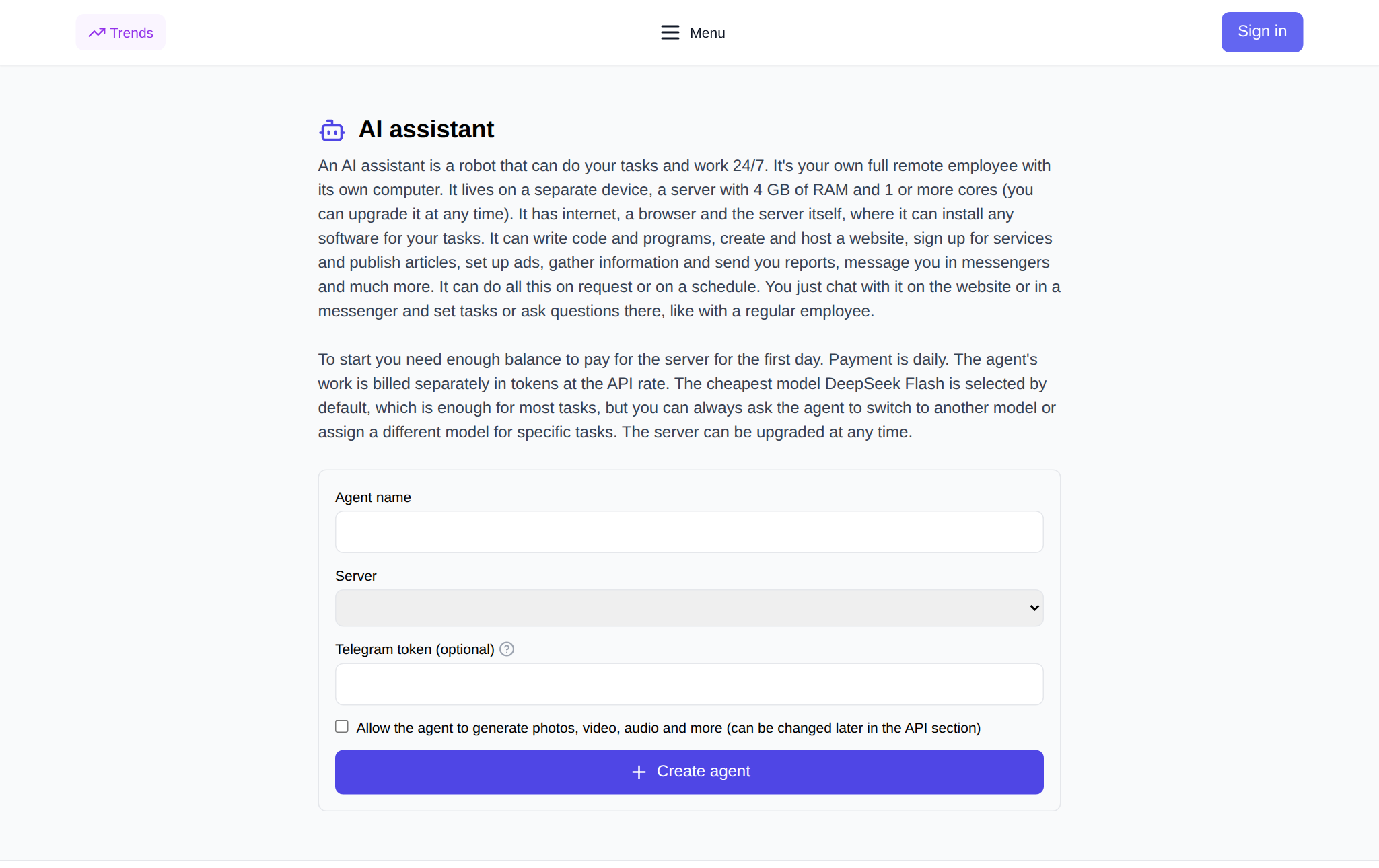
How to set up an agent on NeuralSpace
You don't buy or configure a server by hand — everything happens in the interface. The order is:
- Open the AI agent page — the "Add AI Agent" button under "New chat" leads there too.
- Sign in and enter the agent name — that is how you will recognise it in the list.
- Pick a server: the smallest plan is 2 vCPU / 4 GB / 40 GB. That is enough for most tasks, and you can upgrade at any time.
- Optionally paste a Telegram bot token from @BotFather — then you can message the agent in a messenger, not only in the browser.
- Tick whether the agent may generate photos, video and audio. You can change this later in the API section.
- Click "Create agent". Installation takes a couple of minutes — the agent software is installed on the server and the key is written in.
After that the agent lives in a permanent chat on the same page. Buttons let you stop it, start it again, reboot it, change the server plan or delete it together with the server. Files you exchange pass through to its own storage on the server and are not kept on our side.
Server and price
The agent's server is an ordinary virtual machine with internet access and a browser. The more resources, the heavier the tasks it can handle. Prices in tokens per day, from the catalogue as of 7 October 2026:
- 2 vCPU / 4 GB / 40 GB — 41 tokens per day;
- 4 vCPU / 8 GB / 80 GB — 64;
- 6 vCPU / 24 GB / 120 GB — 115;
- 8 vCPU / 48 GB / 240 GB — 212;
- 12 vCPU / 64 GB / 300 GB — 292;
- 16 vCPU / 96 GB / 400 GB — 406;
- 24 vCPU / 128 GB / 500 GB — 577;
- 32 vCPU / 256 GB / 600 GB — 1148.
Billing is daily: you need the first day's amount on your balance, then the cost is charged for every day the server runs. The agent's own work is billed separately, at API rates for the model's tokens. By default the cheapest model, DeepSeek Flash, is installed: it is enough for most tasks, and if you need something stronger the agent switches on your request. There is no subscription — you pay only for tokens, and new users get starter tokens for their first runs.
What it costs in practice
Dry price lists say nothing about real spending, so here are numbers from the platform's anonymised aggregates. On 4–5 October 2026, four agents were created on NeuralSpace — all on the smallest 4 GB plan and all on DeepSeek Flash; two of the four allowed generations, and none connected Telegram. Hosting charges for those days: 63 tokens over four days of operation, that is 23 and 40 tokens per day — the price depends on the exchange rate at the moment the server was created (source: the agent charges table).
The second number is about the model itself. Over 30 days (7 September – 6 October 2026) DeepSeek models handled 97 paid calls for a total of 21.2 tokens, about 0.22 tokens per call on average (source: the transactions log). That is why an agent can think for hours without draining your balance: the server is the expensive part, not the thinking.
How to assign tasks so the agent doesn't stall
A few practical rules that save both time and tokens.
- Give the outcome, not the process. "Send me a table of prices" instead of "search the internet".
- One request, one task. The agent will split a long list into steps itself, but checking the result gets harder.
- Ask for a report of what was done: the agent is happy to list the steps it took and where it got stuck.
- Check before anything goes public. Anything that leaves your account — an email, a post, an ad — is worth reading with your own eyes.
- Don't hand over money access unattended. The agent can sign up for services, and that is convenient right up to the first mistake.
What not to expect from an AI employee
Honestly: an agent does not replace a specialist and does not guarantee a flawless result. It works through a complex task step by step and sometimes takes a wrong turn — then you correct it, like a real employee. One agent reply is not one model call but a whole chain, so on an expensive model costs climb fast. And one more thing: the server is billed daily even when the agent is idle — for a one-off job, asking a regular chat is cheaper.
FAQ
Is an AI agent the same as a chatbot?
No. A chatbot replies with text and stops there. An agent acts: it runs code, opens websites, works with files and comes back with a finished result — a file, a link or a report.
Do I need my own server or VPS?
No. The server is provisioned when you create the agent on NeuralSpace and the software is installed automatically. The smallest plan is 4 GB, and you can upgrade at any time.
How much does it cost to keep an agent?
Two cost lines: server hosting per day (from 41 tokens per day in the catalogue as of 7 October 2026) and model usage at API rates. There is no subscription, you pay in tokens only; new users get starter tokens.
Can I talk to the agent in Telegram?
Yes, if you paste a bot token from @BotFather at setup. Then you can assign tasks straight from the messenger, and the agent will send its reports there.