Seedance official site: where to use the model

Seedance is a neural network for video generation, and it has no separate "site with a download button": the model runs in the cloud, so you can only reach it through platforms that open it right in your browser. The official Seedance page on NeuralSpace lives in the video section, and it gathers every version of the model — from the simple V1 to the flagship 2.5 with up to 1080p resolution. Below we explain what counts as official access to Seedance, how the versions differ, how pricing works, and how to avoid a clone site.
What "official site" means for a neural network
Seedance is a cloud model, not a program. It has no .exe or .dmg installer, so "official site" here does not mean a store where you download something, but a trusted platform where the model is available under its real name and runs on a server. All a user needs is a browser and an account. That is why searches like "official Seedance site download" lead nowhere: there is nothing to download, and the sites offering a "Seedance installer for Windows" almost always spread malware.
Official Seedance pages on NeuralSpace
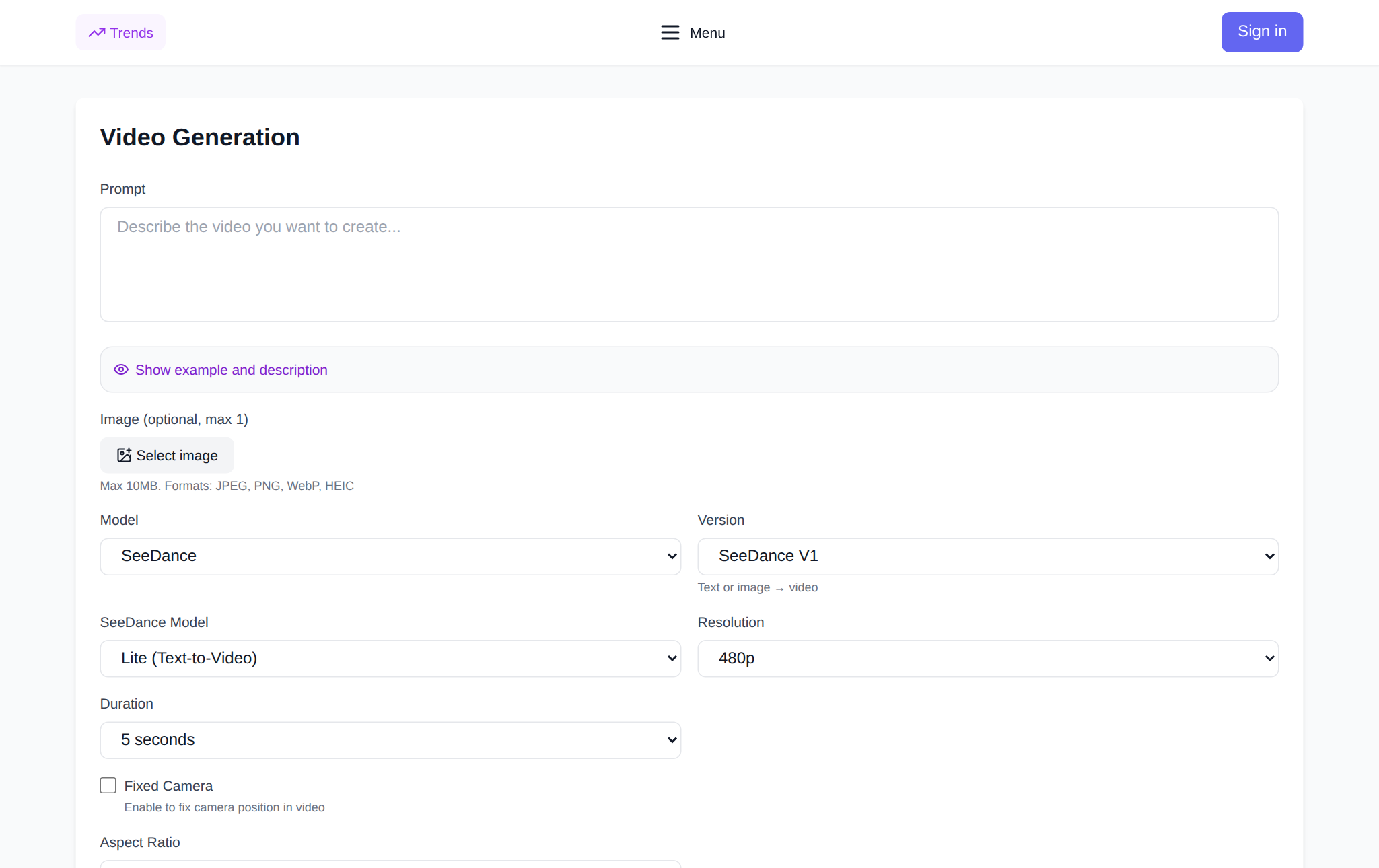
On NeuralSpace you reach Seedance from the video section, and each version has its own page with a description, examples and the same working interface:
- Seedance V1 — the basic version: text or a single image as input.
- Seedance V1.5 Pro — text plus one or two reference images.
- Seedance 2.0 — a multimodal model: text, images, video and audio.
- Seedance 2.5 — the flagship with clips up to 30 seconds and up to 1080p.
Checking that you are on the official page is easy: the address starts with neuralspace.pro, contains the path /video/seedance, the connection is secure, and the interface immediately asks you to pick a model, enter a description and sign in. No downloads and no installs.
How the Seedance versions differ
All versions do the same job — turn a description and materials into video — but they differ in input, quality and price.
Seedance V1 is the simplest entry: type a text description or upload one image and get a short clip. With almost no settings, V1 is the easiest place to start and to test an idea quickly.
Seedance V1.5 Pro lets the text set the story while one or two reference images define the exact look of a character or object. It offers 480p, 720p and 1080p, 4, 8 or 12 seconds of duration, a fixed-camera option and sound generation.
Seedance 2.0 is an Omni mode: you can feed it text, images, video clips and audio at once. It has two working modes — scene assembly from references and linking the first and last frame — plus fast or standard speed and 720p or 1080p resolution. Duration is set with a slider from 4 to 15 seconds.
Seedance 2.0 (less censorship) is a variant of the same model that refuses less often on tricky scenes: you work with text and references in text, image or reference mode.
Seedance 2.5 is the flagship. It understands text, images and video, can continue a source clip, transfer motion and style, link the first and last frame, and generate sound along with the picture. Duration runs from 4 to 30 seconds, resolution up to 1080p, and the output format is MP4 or MOV.
How pricing works
Seedance on NeuralSpace has no subscription. You top up your balance with tokens and pay only for the generations you run. The price depends on the model version, the resolution and the clip duration: the higher the quality and the longer the video, the more tokens one generation costs, so V1 and V1.5 Pro are the most economical while 2.5 is the most expensive. The exact cost is always shown in the interface before you press the generate button, so there are no surprises on the bill. New users get starting tokens to try the service; after that you pay as you generate.
How to pick a version for your task
If you need a quick draft or are just getting to know AI video, start with V1. When a character's or object's look matters but the budget is tight, use V1.5 Pro with one or two images. For complex scenes with several materials (photos, video, audio), 2.0 is the fit, and for stories where you need extra control over the content, take the 2.0 variant with less censorship. Maximum quality, sound and longer clips mean Seedance 2.5.
How to start on the official page
Step 1. Open the Seedance page, or the page of the exact version you want, and sign in. Step 2. Choose a model from the SeeDance list. Step 3. Pick a mode: text to video, image to video, or references. Step 4. Describe the scene and attach images if needed. Step 5. Set the resolution and duration — the total price in tokens appears under the button. Step 6. Hit "Generate" and wait for the finished clip: you can preview and download it right on the page.
How to avoid a fake page
The real Seedance is not sold as a separate file and needs no installation. Signs of a safe page: the address starts with neuralspace.pro, the connection is secure, and you sign in to your account instead of downloading an archive. Sites promising "Seedance without limits", a "cracked version" or a Windows installer are phishing and malware. Use only the official pages and never run suspicious installers.
Frequently asked questions
Does Seedance have an official site where you download the program?
No. Seedance is a cloud neural network with no installable file. Official access means working in your browser on a platform where the model is available under its real name.
Where can I find all Seedance versions?
On NeuralSpace every version has its own page: V1, V1.5 Pro, 2.0 and 2.5. All of them open from the video section and run in the same interface.
How much does it cost to use Seedance?
There is no subscription: you buy tokens and spend them on specific generations. The price depends on version, resolution and duration and is shown before you start. New users get starting tokens.
Can I use Seedance without signing up?
No, you need an account: it stores your generations and your token balance. Signing up takes a minute and starting tokens arrive immediately.