Generate Music Free and Unlimited — Right in Your Browser

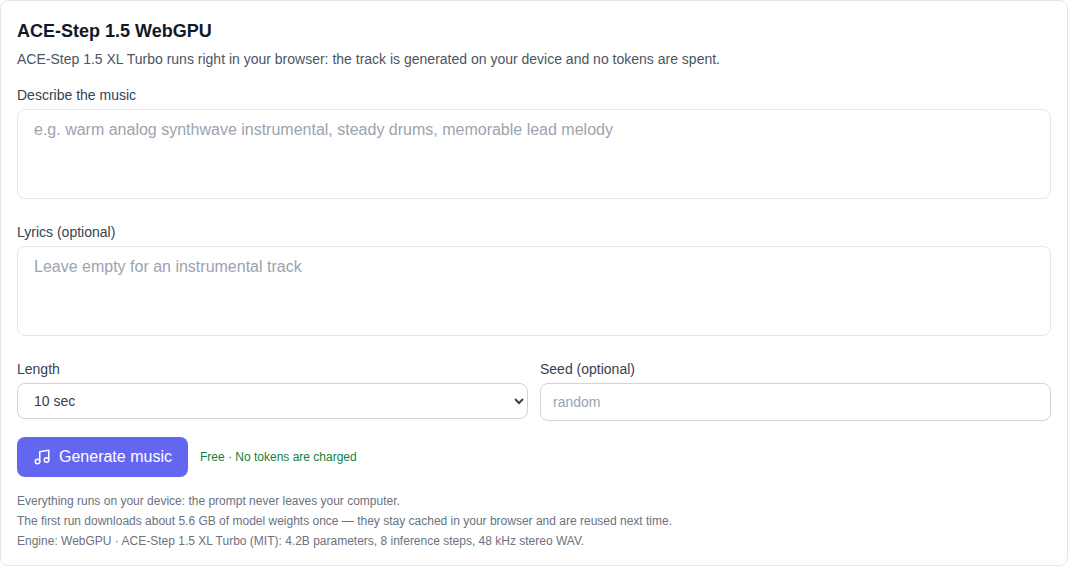
Yes — you can generate music and songs free and unlimited. The Music section on NeuralSpace includes ACE-Step 1.5 WebGPU: a free Suno alternative that runs entirely in your browser. The track is computed on your computer, your prompt never leaves your device, no tokens are charged, and there is no cap on how many tracks you can make. Pick the model at the bottom of the list, describe the genre and mood, and download a ready WAV file a few minutes later.
Why it is free
Typical AI music services (Suno and similar) run generation on expensive GPU servers — that is what tokens pay for. ACE-Step 1.5 works differently: it is an open model (MIT license) that fits entirely in the browser and uses your own GPU through WebGPU. The server only delivers the tool code and the model weights — it does no computing, so there is nothing to bill.
Two pleasant consequences: generation is unlimited, and your prompt and lyrics stay on your machine.
How to generate a song for free, step by step
Everything happens on one page — the Music section:
- Open the model list and choose ACE-Step 1.5 WebGPU — it sits at the very bottom, below the Suno models.
- Describe the track: genre, mood, instruments. For example: “warm lo-fi hip hop with vinyl crackle and soft piano”. That is enough for an instrumental.
- Want vocals with your own lyrics? Paste them into the second field — the model sings them.
- Choose the duration (10 seconds to 2 minutes) and, optionally, a seed — the same seed and description produce the same track.
- Hit generate and wait: the result downloads as a WAV file (48 kHz, stereo) straight from the browser.
What to know before the first run
The tool states its requirements up front. Here they are:
- Browser. A recent desktop Chrome or Edge with WebGPU enabled. Mobile browsers, Safari and Firefox are not supported — the tool will show a notice.
- Hardware. A reasonably modern GPU is required: inference runs on your card, so a weak laptop will be slow.
- First run. The browser downloads the model weights once (about 5.6 GB) and caches them. Every later generation starts instantly, with no re-download.
- Time. A 10-second track usually takes a few minutes; longer tracks take more. Progress is shown on a bar and generation can be cancelled.
A free Suno alternative — how it compares
Suno on NeuralSpace means paid, server-side models with strong vocals and fast results: tokens are charged and a track is ready in a minute or two. ACE-Step 1.5 WebGPU is free and unlimited, but it computes on your hardware and remains an experimental open model: the vocals are simpler, and it is worth listening to the whole result before using it. A practical workflow: ideas, drafts, demos and endless prompt experiments — free in ACE-Step; the final track for publication — on Suno, once the draft is found.
Both live on the same Music page — switching models is one click in the shared list.
Free tools are not just music
ACE-Step 1.5 WebGPU is part of a series of free tools that compute everything on your device. In the Video section the same approach powers the depth map (free, in-browser) and video background removal. Both are unlimited too — you only pay for server-side models when you actually need them.
FAQ
Is it really free and unlimited?
Yes. No tokens are ever charged for ACE-Step 1.5 WebGPU: the model has no paid API, and all generation happens on your computer. There is no limit on the number of generations.
Do I need an account?
No. Open the Music section, pick the model and generate. Registration and tokens are only needed for server-side models like Suno.
Where are my tracks stored?
Not on our side: a finished track is a WAV file your browser downloads to your disk. Neither your prompt, nor your lyrics, nor the result is ever uploaded.
Why does it not work on my phone?
The model requires WebGPU and several gigabytes of memory, so it targets desktop Chrome and Edge. On mobile browsers the tool shows an honest requirements notice.
Can I generate a song with my own lyrics?
Yes — paste the lyrics into the second field and the model will sing them. Leave the field empty for an instrumental.