Free QR Code Generator with Logo: Online in Your Browser
Creating branded, high-contrast QR codes is now available directly in your browser: the Other tools section features a free QR Code with Logo (Free) generator — https://neuralspace.pro/en/tools/qr. In just a few seconds, you can encode a website URL, Wi-Fi network credentials, or a digital contact card, insert your custom center logo, tune color palettes to your corporate style, and download crisp vector SVG or high-resolution PNG files. All processing happens entirely on your device with zero token consumption.
What the tool offers
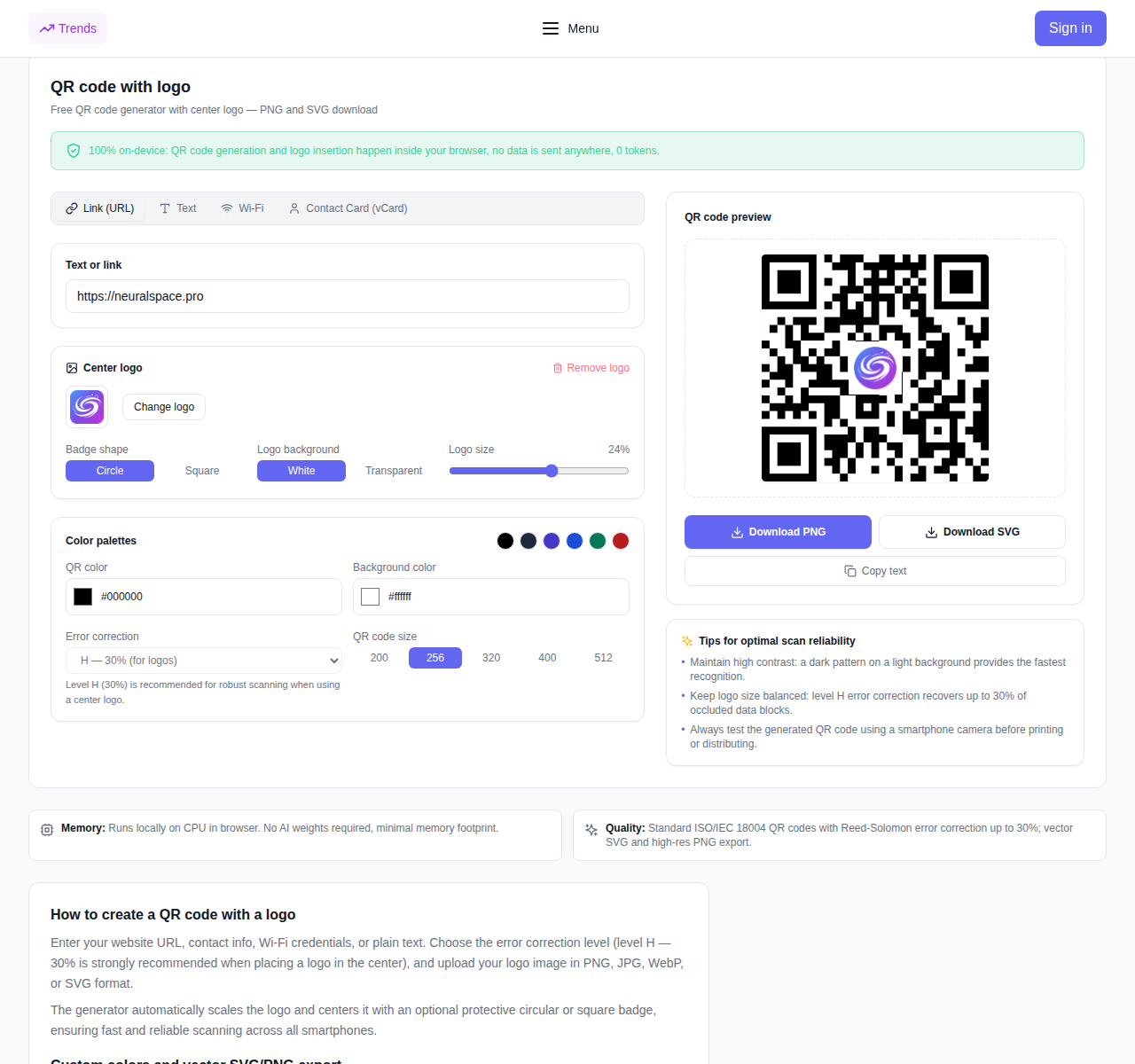
- Four content modes. Generate QR codes for regular web links (URL), raw text snippets, Wi-Fi network configuration (allowing instant guest access), and vCard contact cards (full name, phone, email).
- Center logo embedding. Upload your brand icon or mascot in PNG, JPG, WebP, or SVG format. The engine scales the graphic automatically and centers it inside the matrix.
- Protective badge shapes. Select a circular or square background badge with a solid white or transparent backing to maintain high contrast around the logo.
- Custom colors and palettes. Customize dark and light colors individually or pick one of five curated designer presets: Slate, Indigo, Blue, Emerald, or Crimson.
- Adjustable quiet zone and size. Fine-tune margin padding (Quiet Zone) and output dimensions to match your graphic layout requirements.
- Reed-Solomon error correction. Pick from four standard reliability levels: L (7%), M (15%), Q (25%), and H (30%). Level H is selected by default for logo codes, ensuring seamless scans even with central occlusion.
- Vector SVG and raster PNG export. Save your finished QR code as a PNG for websites, emails, and social media, or export a resolution-independent vector SVG for sharp professional printing on business cards, packaging, posters, and merchandise.
How to create a QR code with a logo: step-by-step
- Open the QR Code with Logo tool page.
- Choose the content type: "Link (URL)", "Text", "Wi-Fi", or "Contact Card (vCard)", and enter your details into the form.
- Under "Center logo", click "Upload logo" and select your image file. Adjust the logo size slider and pick a badge shape (circle or square).
- Customize your design: pick a preset color palette or define custom foreground and background colors.
- Review the live preview and test-scan it with your smartphone camera.
- Click "Download PNG" for digital media or "Download SVG" for high-resolution print production.
100% on-device privacy: zero server uploads
QR matrix synthesis and logo composition take place exclusively inside your web browser. Your URLs, confidential Wi-Fi passwords, personal contact records, and logo images are never uploaded to any remote server, never logged, and never stored. The utility requires no login and consumes zero tokens.
Best practices for scanning reliability
- Contrast. Dark pattern modules placed on a bright background guarantee the quickest scan recognition across diverse lighting environments.
- Level H correction. Always retain error correction level H when embedding a central emblem: it reserves up to 30% redundant data, allowing smartphone cameras to decode the payload effortlessly.
- Vector format for print. For business stationery, posters, and retail merchandise, download SVG files so your artwork scales infinitely without pixelation.
Frequently asked questions
Is this QR code generator truly free? Yes. It runs client-side in your browser, charges zero tokens, and requires no account.
Will smartphone cameras scan a QR code with a logo? Yes. By employing standard Reed-Solomon level H error correction, up to 30% of the surface can be covered while maintaining full scannability on modern iOS and Android devices.
Which format is best for print materials? SVG is strongly recommended for print because vector graphics scale losslessly to any billboard or business card resolution.