Free Online Motion Capture: Marker-less Webcam Tracking
Motion capture without a suit or sensors now runs right in your browser: the Other tools page has a free Marker-less motion capture tool — https://neuralspace.pro/en/tools/mocap. Turn on an ordinary webcam and a 3D mannequin in the preview mirrors your pose in real time. Your video stays on your device and no tokens are charged.
What the tool does
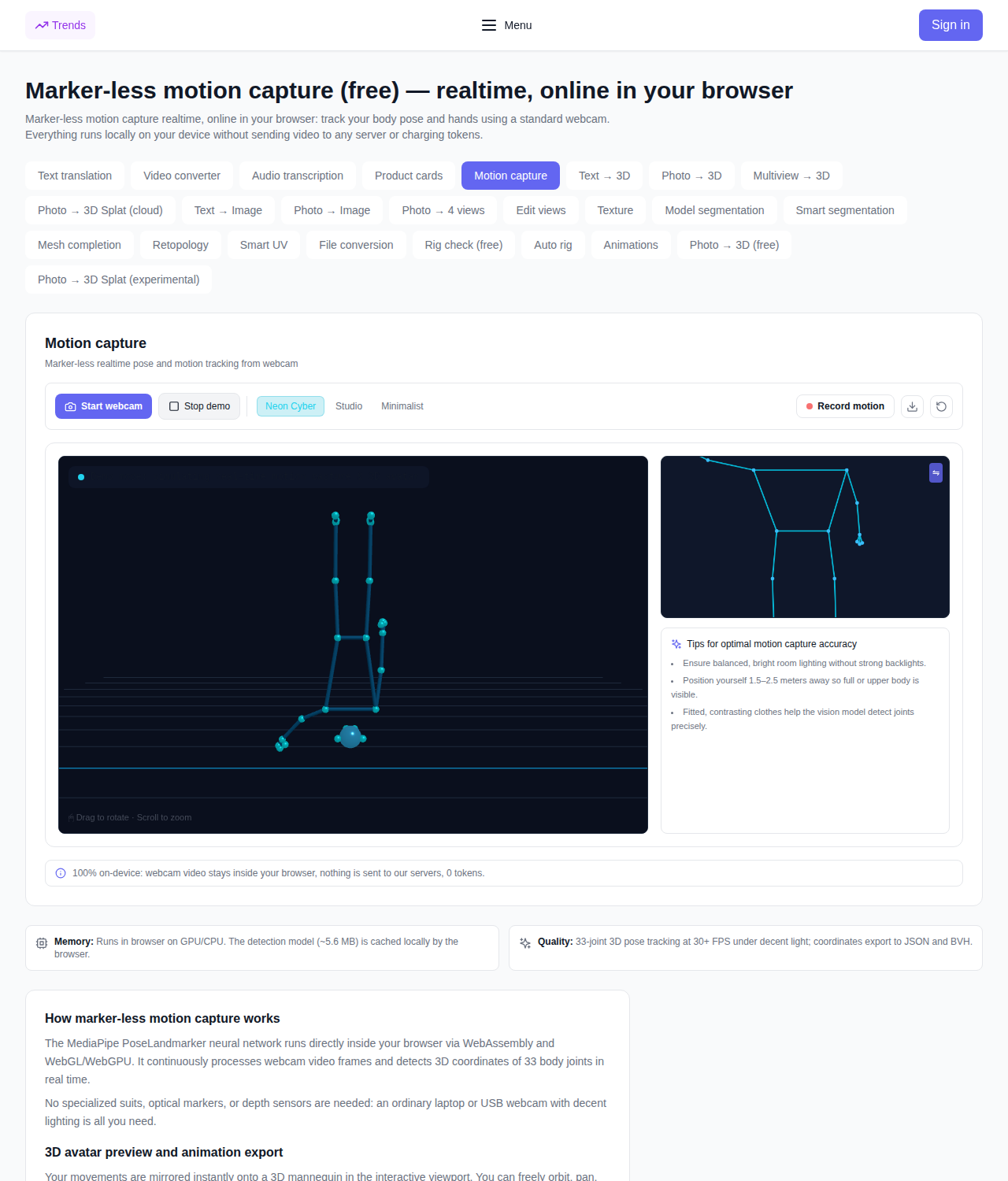
- Real-time tracking. A neural network locates 33 body joints in every webcam frame and shows the live frame rate.
- 3D mannequin and skeleton. Your movements are mapped instantly onto a three-dimensional figure. Orbit and zoom the scene with the mouse, and reset the view with one button.
- Three display styles: Neon Cyber, Studio and Minimalist.
- Motion recording. Press "Record motion", perform the action, stop — a counter shows how many frames and seconds you captured.
- Animation export. Download the recording as JSON or BVH, or save a snapshot of a single 3D pose.
- Demo motion. No camera at hand? The "Demo motion" button shows what capture looks like.
How to use it
- Open the tool page and click "Start webcam", allowing camera access in your browser.
- Wait a few seconds: on the first run a small recognition model (about 5.6 MB) is downloaded, and later it is kept in the browser cache.
- Step back so your body (or at least your upper body) is in frame and move — the mannequin follows. Turn on "Mirror video" or hide the video if you like.
- Press "Record motion", perform the action and stop the recording.
- Download the result with "Download JSON" or "Download BVH".
Tips for accurate tracking
- Light. Even, bright lighting without strong backlight behind you.
- Distance. Stand 1.5–2.5 meters from the camera so your full or upper body is visible.
- Clothing. Fitted, contrasting clothes help the model find joints precisely.
Privacy and cost
The video stream is processed locally: webcam frames are not sent to a server and are not stored anywhere. The tool is free and no tokens are charged. You need a browser with camera access and any laptop or USB webcam.
What it does not do
This is single-camera body pose tracking: without special suits or multi-camera rigs, accuracy is below professional studio capture, and fast moves or joints hidden by clothing or furniture may be detected with errors. For games, previsualization and quick animation sketches it is usually enough.
FAQ
Is it really free? Yes, processing runs on your device and no tokens are charged.
Does my video go to a server? No, the video stream stays in your browser.
What camera do I need? An ordinary laptop or USB webcam is enough.
How do I get the motion into a 3D editor? Record the motion and download the JSON or BVH file.