AI Text to Speech Free: Voice Your Text with a Neural
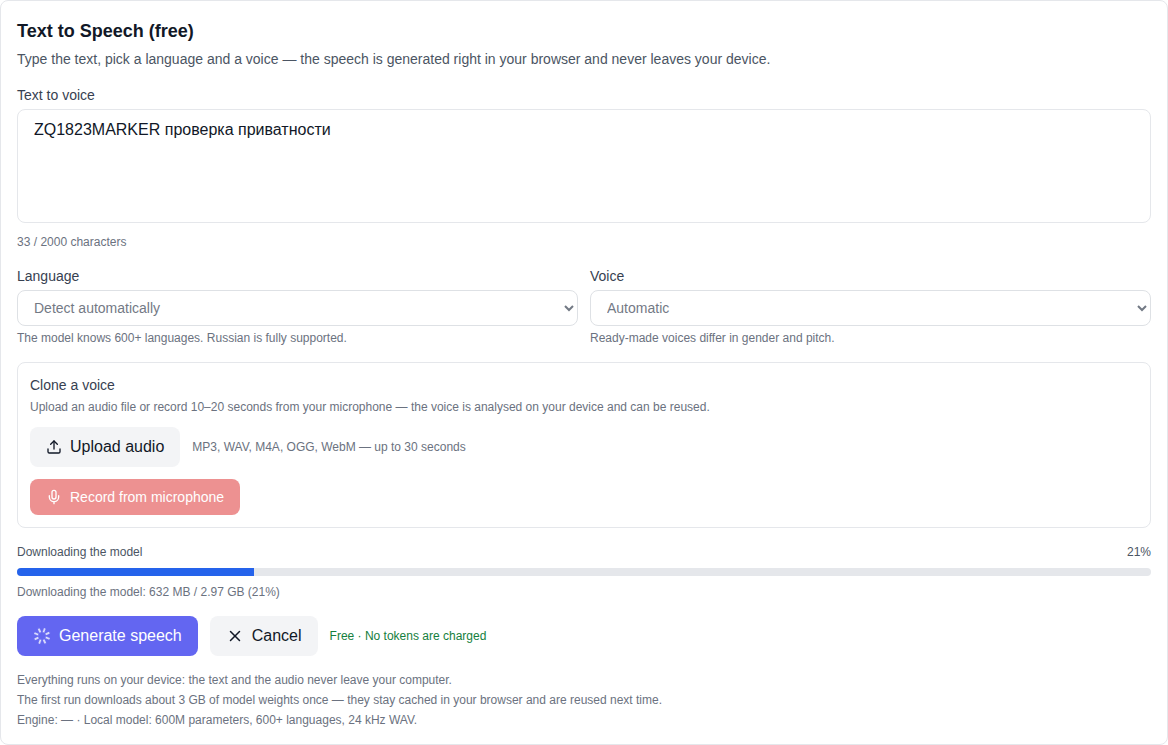
You can now voice your text with a neural network for free, with nothing to install: the Text to Speech (free) model has arrived in the Video section. It runs right in your browser — type the text, pick a language and a voice, and a few seconds later you listen to and download the finished audio file. Neither the text nor the voice recording is uploaded anywhere: everything is computed on your own device.
Why it is free
Regular speech services synthesise audio on their own servers and charge money or tokens for it. Here the model is loaded into the browser and uses your computer's graphics card (WebGPU, with the processor as a fallback). The server only serves the tool's code and the model weights — it has nothing to compute, so no tokens are charged and the number of generations is unlimited.
Privacy comes for free too: the text you voice and your voice recording stay on your device. That matters when you are voicing messages, documents or personal notes.
How to voice text with a neural network: step by step
- Open the Video section and pick Text to Speech (free) in the model list — it sits at the very bottom, next to the other free tools.
- Paste your text into the "Text to voice" field — up to 2000 characters at a time.
- Choose the language. If you are not sure, leave "Detect automatically".
- Choose a voice: female or male, higher or lower, a whisper — or one of your saved voices.
- Press "Generate speech" and wait for it to finish. You can play the result on the page and download it as a WAV file.
600+ languages
The model is multilingual: it knows more than 600 languages. For mixed text you can leave automatic language detection on, or pick the language you need — the list includes English, German, French, Spanish, Chinese, Japanese, Arabic and dozens more, handy when you voice videos for several countries.
How to clone a voice
You can clone a voice in two ways — both are free and both are computed on your device:
- Upload an audio file. MP3, WAV, M4A, OGG or WebM up to 30 seconds works well.
- Record from your microphone. 10–20 seconds of clean speech without music or noise is enough.
After the analysis the tool turns the recording into a voice profile and stores it in your browser. From then on you just pick that voice from the list and voice any text in your own voice without uploading the recording again. The profiles are kept locally and survive a page reload.
What to know before the first run
- Browser. A recent Chrome or Edge on a desktop works best. Without WebGPU the model falls back to the processor and is noticeably slower — the tool warns you about that honestly.
- First run. The browser downloads the model weights once (about 3 GB) and caches them. Later runs start immediately.
- Memory. About 3 GB of free memory is needed. On a weak device the tool shows a clear warning instead of crashing.
- Result. The finished file is a 24 kHz WAV, ready to drop into your editing timeline.
Who it is for
Neural text to speech covers plenty of everyday jobs: voicing a clip for social media, making an audio version of an article, narrating a presentation, checking how a script sounds, or simply listening to a document instead of reading it. If you need a specific person's voice, clone it from a short recording.
The same section has other free tools that run right in the browser: depth map, video background remover and video and image upscaler.
Frequently asked questions
Is it really free? Yes. No tokens are charged for this model and it has no paid API — your computer does the work.
Is my text uploaded? No. Neither the text nor the audio leaves your device; only the tool's code and the model weights come from the server.
How long does it take? A short phrase usually takes under a minute after the model has been downloaded once; longer text takes longer, and the progress bar shows where it is.