Semantic Text Search Online for Free
In a lengthy contract, a late payment fee may be called a “penalty”. In meeting notes, the answer to your question may use different words entirely. Free semantic text search finds relevant passages and ranks them by similarity. Choose exact keyword matching or search by meaning. Your text stays in the browser, and no tokens are charged.
When Find on Page comes up empty
Imagine a twenty-page meeting log. You remember the team moved an app launch, but the phrase “release date” never appears. Keyword search returns nothing. In semantic mode, a query like “when is the launch” can lead to “the rollout moves to next week”, even though the wording differs.
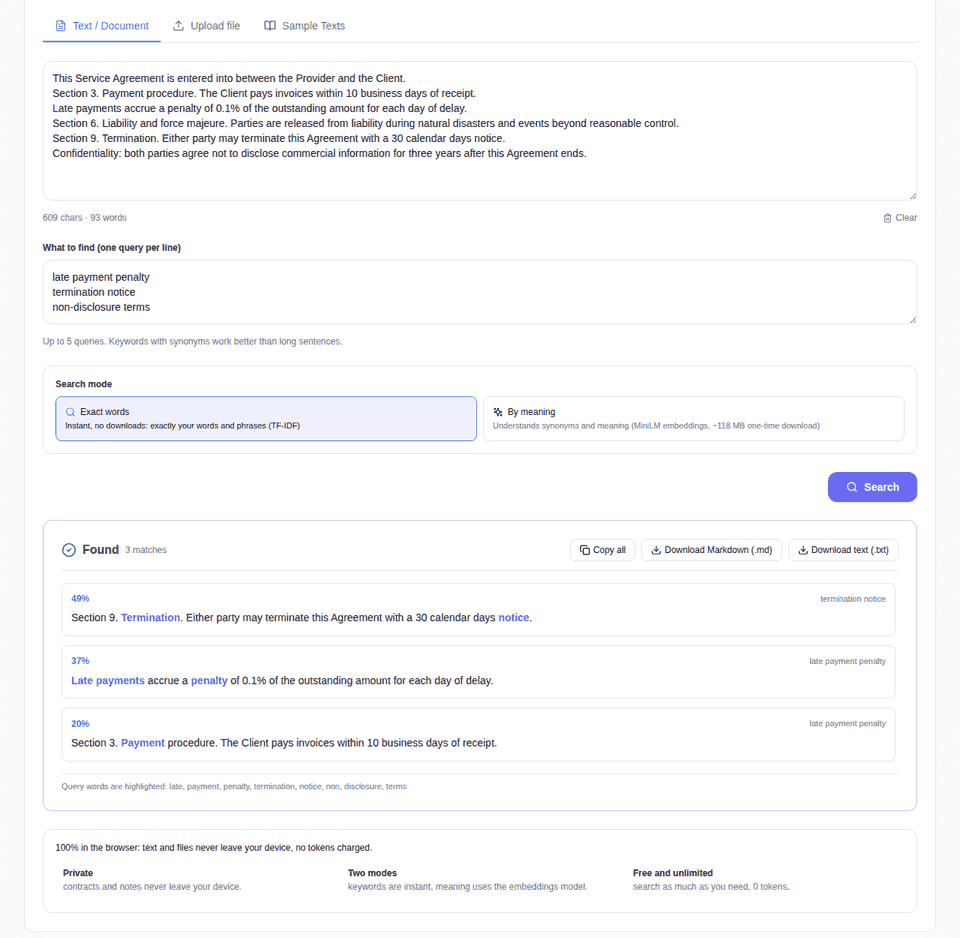
There are two modes. “Exact words” scores passages using the words in your query and their relative weight; it works immediately without a model download. “By meaning” compares text embeddings built by multilingual MiniLM. Its model files are roughly 118 MB. The first run downloads them; later runs can use the browser cache offline. For a short, plainly worded document, the first mode is faster. For synonyms, try the second.
Try it with your own document
- Open the search tool and paste text. You can also load TXT, Markdown, HTML or a PDF with a text layer. The file is read on your device.
- Enter up to five queries, one per line. For example: “late payment fee” and “ending the contract”.
- Select keyword or semantic mode and press Search. Results show matching passages, a similarity percentage and the query linked to each passage.
- Copy the matches or save them as TXT or Markdown.
Three sample documents are available: an agreement, research notes and a meeting log. They let you compare modes without preparing a file. I would start with the fast keyword mode and switch to semantic search if the document uses different terminology.
Your text stays with you
The tool splits the document into passages, scores each one against the queries and sorts the matches. All of this happens in your browser. Neither the document nor its contents go to the server. It also works for guests.
The text limit is 200,000 characters, with at least 80 needed for a search. A PDF needs selectable text; a page scan without a text layer cannot be read. Semantic search may take longer on a large document or a slower device. The similarity percentage helps rank passages, but it does not certify a fact: read important terms in their original context.
For example, in a research report you might ask separately about model accuracy and a clinician’s time savings. The tool can surface passages from different parts of the same document. It does not compare figures with outside sources or write a conclusion for you. Open the original PDF and check which experiment and time period each number belongs to before quoting it.
When you need a summary instead
This tool helps locate passages while keeping the document's wording. If you want a short digest of a whole page or PDF, use the summarizer. You can find more local tools in Other Tools. For a search, paste your document and try one concrete question.