What is an AI agent? Chatbot vs assistant, and cloud vs local

An AI agent is a program that does not just answer with text — it does the work: it has a language model for a brain, tools such as a browser and a terminal, memory of previous steps and a loop of "propose, act, check". That is why a chatbot will tell you how to build a price table, while an agent builds it and sends you the file. Below: what an agent is made of, how it differs from a chatbot and an assistant, what people hand over to it, and how a cloud agent differs from a local one.
What an AI agent is made of
An agent is not a new kind of neural network. It is four parts put together.
The model is the brain: it reads the task and decides what to do next. The tools are the hands: terminal, browser, files, search, image and video generation. Memory is what the agent keeps about you and about earlier steps, so it does not start from zero every time. The loop is the rule that keeps it going: the model proposes a step, the harness runs it, the result goes back to the model, and so on until the job is done.
Here is how it looks in practice. You write: "collect the prices of three models from our site into a table". The model decides it needs a browser. The harness opens the pages, pulls the numbers, writes them to a file. The model looks at the result, notices one model has no price, goes back to search again — and only then hands you the table. One agent reply is not one model call but a whole chain, and that matters when you count the cost.
Chatbot, assistant, agent: three levels
The difference is easiest to see on one and the same request — "find out what a subscription costs at three services and send me a table".
A chatbot answers with text: it tells you where to look and sketches the table structure. Advice, no action.
An assistant takes one step on your command: it opens a page and returns one price. Want three? Ask three times. It can act, but it does not carry the task itself.
An agent finishes the job: it visits all three services, puts the numbers into a table, checks that nothing is missing and sends the file. Ask it to, and it will repeat this every week on a schedule.
The line between an assistant and an agent is who holds the task in mind. With an assistant that is you; with an agent it is the agent.
What people hand over to an agent
It works best on jobs that need action and repetition rather than advice:
- collecting data — prices, news, updates — into a table or a report;
- code: write a script, fix a bug, deploy a simple site;
- texts: a draft article, emails, posts;
- content through the model: images, video, voice-over;
- recurring chores on a schedule: a morning digest, an uptime check, a folder backup.
An honest limitation: an agent errs in deeds, not in words. It can misread the task, open the wrong page or publish a draft too early, so check the result — especially before sending, publishing or paying. And one more thing: an agent does not replace a specialist, it takes over the routine.
Cloud agent vs local agent
Next comes the main practical question: where the agent will live. There are two options.
A local agent runs on your own computer or server. Upside: the data never leaves your machine, you keep full control, and you do not pay for someone else's hardware. The downsides are just as real: you install the environment yourself — runtime, dependencies, model keys — updates and security are on you, and if you close the laptop or lose the connection, the agent stops.
A cloud agent lives on a separate server that you do not configure. Upside: it runs around the clock, you reach it from a browser or a messenger, there is nothing to install, and you change its power in one click. Downsides: you pay per day, you need a connection, and the data passes through the platform's server.
A simple rule of thumb. A one-off task with sensitive data — go local. Constant routine you want to reach from your phone and laptop — go cloud.
On NeuralSpace agents are cloud-based. According to anonymized aggregates from the production database over 30 days (4–7 October 2026), 5 agents were created — all on the same cloud plan, 2 vCPU / 4 GB / 40 GB, and all on the default DeepSeek V4.1 Flash engine. Over the same days those agents exchanged 15 messages: 5 per agent on average, 9 at most. The daily charge for such a server in real records is 23, 40 and 41 tokens per day (9 daily charges from 4 to 8 October 2026, 127 tokens in total).
How to start on NeuralSpace
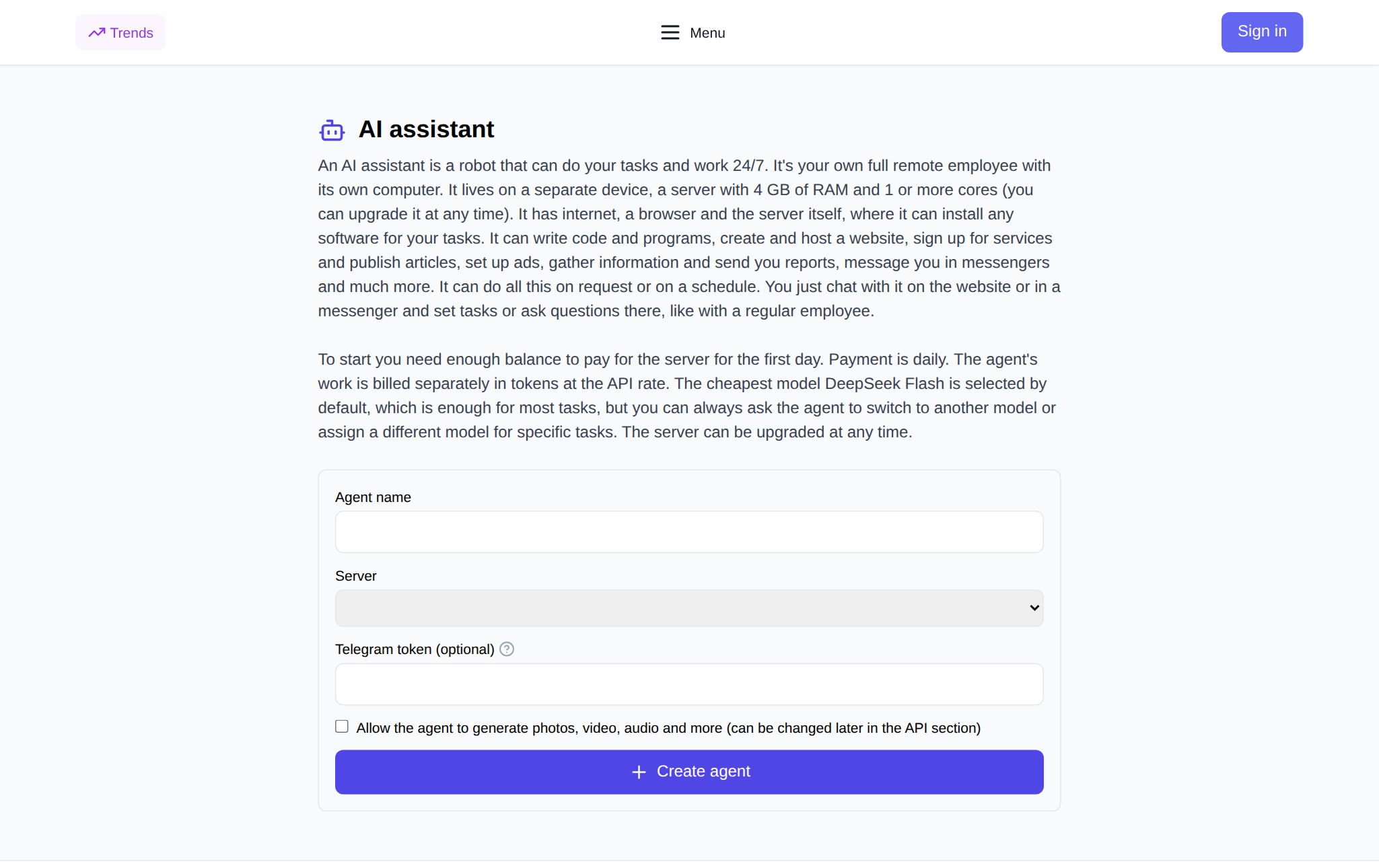
You do not buy or configure a server separately — the agent is created from the interface. Open the AI agent page (the same form opens from the "Add AI agent" button under "New chat"), sign in and fill in four fields:
- Agent name — anything up to 60 characters; this is how you will find it in the list.
- Server — a plan with 4 GB of RAM or more; the price in tokens per day is shown right in the list, and you can upgrade later.
- Telegram token — optional: paste a bot token from @BotFather and the agent can reply in the messenger.
- The "Allow generation" checkbox — if the agent will need images, video and audio.
Then hit "Create agent" and wait a couple of minutes — the server is provisioned for you. You talk to the agent in chat, just like any other model, while the agent page keeps three buttons: stop, delete, change plan.
Which model should you pick? By default the agent runs on DeepSeek V4.1 Flash — the most affordable model, and it is enough for most tasks; if you need more precision, ask the agent to switch to a stronger model. The money works like this: a daily charge for the server plus tokens for the agent's own work, no subscription, and new users get starter tokens for their first runs.
FAQ
Is an AI agent a separate neural network?
No. An agent is a harness around an ordinary language model: it gives the model tools, memory and an action loop. The model stays the brain.
How is an agent different from an assistant?
An assistant performs one step on your command and waits for the next. An agent holds the task itself: it plans the steps, checks the result and comes back only when everything is done.
Is a cloud agent safe?
The agent runs on a separate server allocated to it, and the conversation goes through that server. If your data must never leave your computer at all, choose the local option — but then you provide the setup and the round-the-clock operation yourself.
How much does a cloud agent cost?
A daily charge for the server plus tokens for the agent's work; the exact amount is shown before you create it. There is no subscription, and new users get starter tokens for their first runs.