Free AI agents: what you can really run without a subscription

There is no such thing as a fully free AI agent that runs forever at no cost: an agent is someone else's compute plus paid model calls. But you do not need a subscription to start. On NeuralSpace new users get starter tokens, after that you pay only for what you actually use, and the agent can live right in the chat or in your code editor with no separate server. Below are three working ways to run an agent without a monthly fee, real platform numbers on where the savings are, and an honest answer to when you genuinely need your own server.
What costs money in an AI agent, and what comes free
The word "free" causes the most confusion here. Let's split it into three parts.
The agent software is often free. Open clients such as OpenCode, Claude Code, Cursor or any MCP client install at no charge: you do not pay for the program itself.
Model calls always cost money. Every step an agent takes is a request to a language model, and models are billed: on NeuralSpace they are charged in tokens from your balance. This is where most of the budget goes, because one agent task is not one request but a chain of a dozen.
The server costs money only if the agent has to work around the clock. While the agent lives in the chat or on your own computer, no separate machine is needed at all.
So the honest takeaway: a "free agent" in practice means free software and a free start, not free model work. Here is how that looks on NeuralSpace.
Way 1: an agent in the chat — no server, no subscription
The fastest route is the NeuralSpace chat. Sign up and starter tokens land on your balance: enough to try an agent in real work instead of reading about it. The flow looks like this:
- open the Chat section and look at the model list — your agents sit at the very top, there is no separate page for them;
- if you have no agent yet, click "Add AI Agent", give it a name and optionally paste a bot token from @BotFather so you can message it in Telegram later;
- describe the task in plain words — "collect competitor prices into a table", "write a script to rename files", "draft an article";
- the dialogue happens right in the chat, just like with a regular model: the agent thinks, calls tools and returns the result.
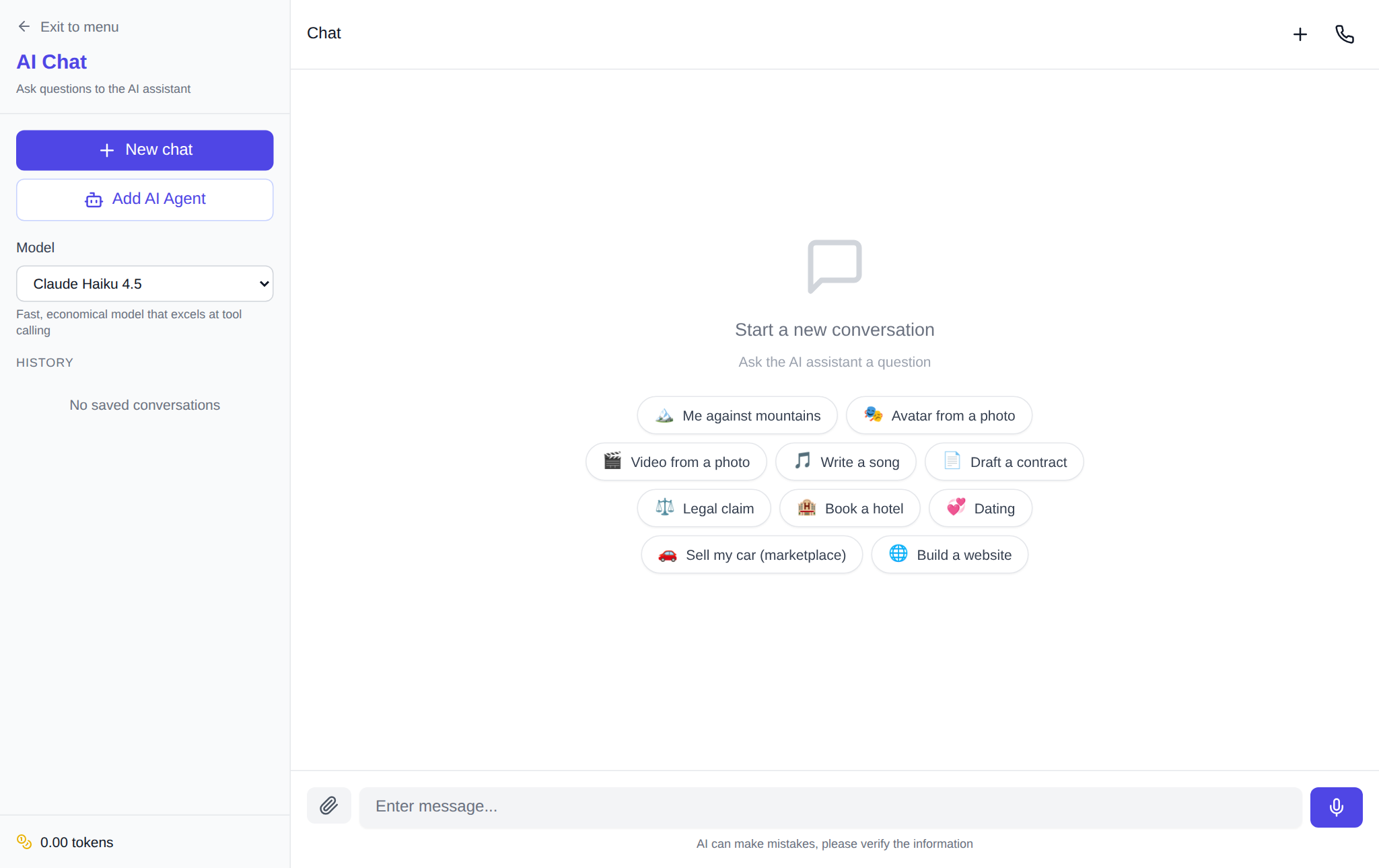
The upside is a zero barrier: nothing to install, no server, you pay only for the tokens you spend. The downside is just as honest: the agent works while you are talking to it. Close the tab and the task stops. That is fine for one-off jobs, not for "send me a summary every morning".
Way 2: your own agent in a code editor via an API key
If you already have a favourite agent client, you do not have to replace it. In the API and MCP section you create a key, and NeuralSpace plugs into Claude Code, Cursor, OpenCode, Claude Desktop or any other MCP client. The MCP server address is https://neuralspace.pro/mcp, authorised with the same key.
What that gives you in practice: your agent calls the platform's models and tools itself — list_models (models and prices), get_balance, chat, generate_image, generate_video, generate_music, text_to_speech, transcribe_audio. Payment is in tokens from your balance, with no subscription and no foreign card, and charges and refunds work exactly as with direct API calls.
The downside: setup takes a couple of minutes and a bit of care — the key is shown only once, and the MCP server config has to be pasted into the client. In exchange, the agent itself stays free software and you pay only for model work.
Way 3: an agent on its own server — when you really need it
The third option is an AI agent on a dedicated server. Here a second cost appears: the machine itself, billed per day. According to the server catalogue as of 9 October 2026, the entry plan — 2 vCPU, 4 GB RAM and 40 GB disk — costs 41 tokens per day, and the next one, 4 vCPU and 8 GB, costs 63 tokens per day. Model work is billed separately at API rates, and by default the agent runs on the cheapest model, DeepSeek Flash.
A dedicated server is worth it when the agent must live without you:
- scheduled jobs — a morning digest, checking that a site responds, backing up a folder;
- talking to it through Telegram rather than an open tab;
- installing your own software and working with a browser and files on a permanent machine;
- long tasks you would rather not keep in an open chat.
And the reverse: for a one-off task a server is wasted money. Try the agent in the chat first, and only move it to a dedicated machine if it becomes part of your daily routine. Plans can be upgraded in one click, so starting small is a perfectly good strategy.
Where the real savings are: numbers from the platform
The most expensive line in an agent's budget is not the server, it is the model. And the platform statistics are blunt about it: most people pick cheap models. Over 30 days of chat replies (9 September – 8 October 2026, 610 assistant replies from 73 users) the leaders are gpt-5-4-mini with 114 replies, or 19%, and gpt-5-6-balanced with 104 replies (17%); third place goes to the expensive claude-opus-5 with 60 replies (10%), while the cheap deepseek-v4.1-flash collected 40. In short, a minority sits on top models while the routine goes to fast, inexpensive ones.
The second source of overspending is media. According to the generation cost table for the same 30 days, an image on z-image averaged 0.70 tokens (134 generations), while a video on seedance-2.5 averaged 258.88 tokens (243 generations). That is a difference of more than three hundred times. So letting an agent generate video "just in case" is the worst idea in the budget: let it make images freely, and video only for a specific task.
One pleasant detail: tokens are charged only for a successful result. If a generation fails, they return to your balance automatically — the transaction log shows 18 such refunds over 30 days. No need to write to support.
Honest limitations
An agent makes mistakes by doing, not by talking: it may misread the task, open the wrong page or publish a draft too early. Check the result, especially before sending, publishing or paying.
Failures happen too, and unevenly. Over 30 days (9 September – 8 October 2026) the platform logged 1,906 errors; video models failed most often — grok-image-to-video 555 times, gpt-image-15 338, seedance-2.5 204. Video drops out noticeably more often than images or text, so do not put heavy video jobs on a rigid "nine o'clock sharp" schedule — leave slack and a chance to retry.
And the main point: there are no free generations on the site. Your balance is spent for real, so a cheap model and the entry-level server save far more at the start than any clever trick.
FAQ
Are there completely free AI agents?
The agent software can be free — open clients and MCP connections cost nothing. Model work, however, is always paid: on NeuralSpace new users get starter tokens for their first runs, after that you pay only for what you use, with no subscription.
Can I run an agent without my own server?
Yes, and that is the smartest start. The agent works right in the chat, and if you already have an agent client, connect it through an API key and MCP. A dedicated server is only needed for round-the-clock work and scheduled jobs.
How much does an agent on a server cost?
According to the catalogue as of 9 October 2026, the entry plan (2 vCPU, 4 GB, 40 GB) is 41 tokens per day, and 4 vCPU with 8 GB is 63 tokens per day. Model work is billed separately at API rates.
How do I avoid burning my balance on an agent?
Three rules: keep the agent on a cheap model such as DeepSeek Flash, do not let it generate video by default, and check the final price before you run anything — it is shown before the start. Tokens for failed generations are refunded automatically.