Vibe coding from scratch: your first project in one evening

Vibe coding from scratch means starting not with a programming textbook but with one clear task — and taking it to a working website in a single evening. There is nothing to install: a browser, an account and an idea are enough. You describe in plain words what you want, the AI agent writes the code, starts the server and hands you a link, and you refine the result with short messages. Below is a step-by-step plan for your first evening: which project to pick, what exactly to type into the description field, which model to choose and what to do when something goes wrong. New users get starter tokens credited, after that you pay per token with no subscription.
What you actually need to start from zero
The beginner checklist is short. A browser — a phone will do. A NeuralSpace account — signing up takes a minute. One concrete idea you can describe in two or three sentences. And a free hour or two to walk the whole path to a result. What you do not need: installing a code editor, learning the terminal, knowing syntax, renting a server or configuring hosting. The platform handles all of that, so you work on the task instead of the infrastructure.
Pick your first project: the one-thing rule
The classic beginner mistake is starting with a marketplace killer. Your first project should be small enough to hold entirely in your head: that way you reach a result in one evening and understand the principle itself. Good first picks: a one-page landing with a request form; a survey page for collecting answers; a personal portfolio site; an event invitation page; a browser mini-game such as snake or a clicker; a Telegram bot that sends a reminder. Bad first picks: a social network, a marketplace, an app with payments and user accounts — too many connected parts, and the evening goes into debugging instead of a result.
The evening plan: from sign-up to a live link
Here is a concrete route for one evening, split into clear steps.
19:00 — sign in. Open the vibe coding page and create an account. Starter tokens are credited to your balance right after sign-up — enough to build a first project and judge the approach.
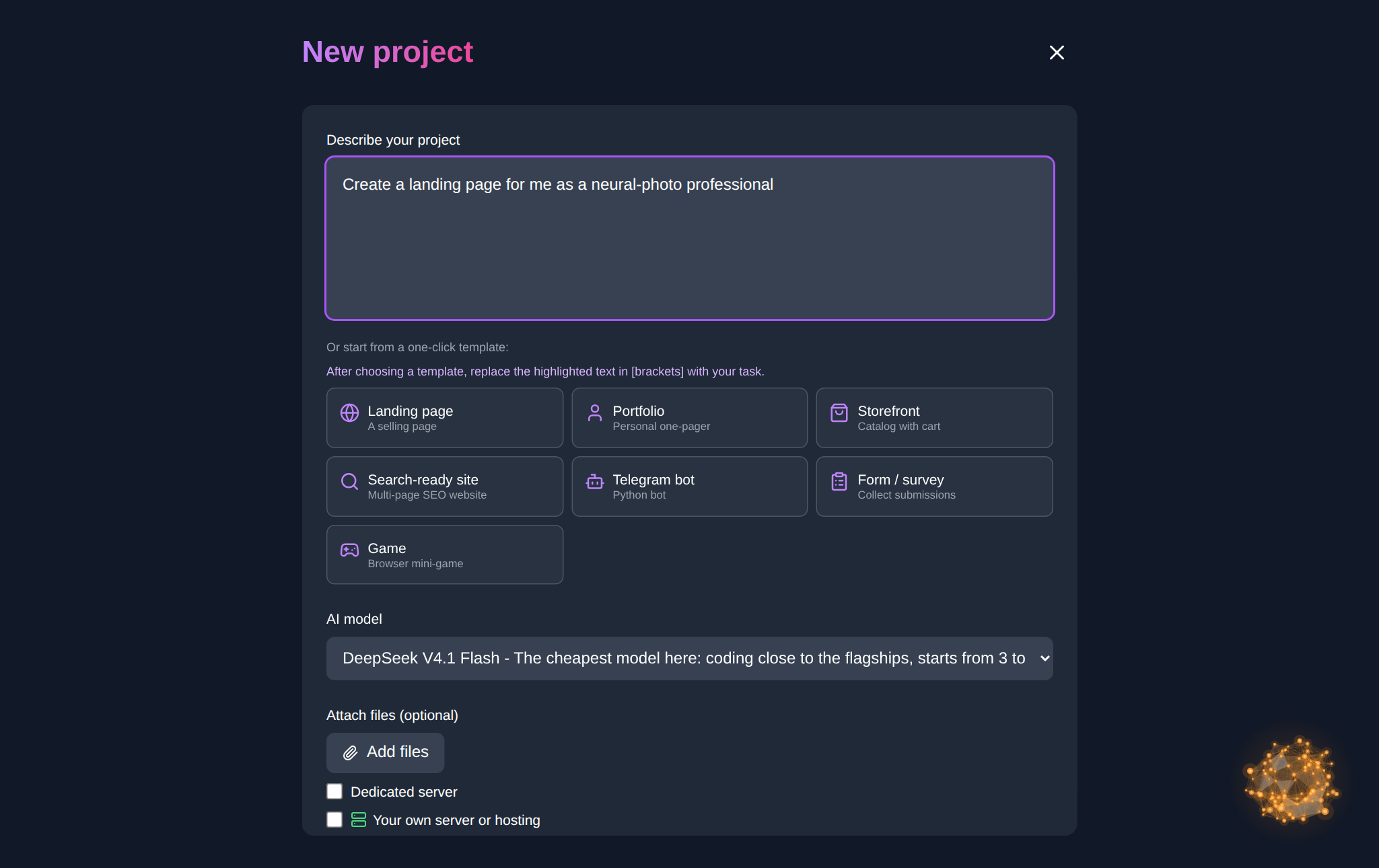
19:10 — new project. In the workspace of the Code section, click “New project”. You get a “Describe your project” field and one-click starter templates: landing page, portfolio, storefront, multi-page SEO site, Telegram bot, survey form and a browser game. For a first evening a template is handy: it inserts a ready-made prompt, and you only replace the text inside the square brackets with your own topic.
19:20 — model and launch. The model list defaults to DeepSeek V4.1 Flash — the cheapest option and the one with the lowest balance threshold to start a project. For a first run it is more than enough. Click “Create project”: the agent creates the files, writes the code and starts the server.
19:30 — first version. When the project is ready, open it with the “Open site” button. If the page does not respond yet, that is normal in the first minutes: click “Check again” or type “start the site” in the project chat and the agent will bring the server up.
20:00–21:30 — iterations. From here you do not rewrite the project; you improve it with short requests: “make the headline bigger”, “add a testimonials block”, “change the button colour to green”. One change — one message — check the result.
21:30 — wrap up. The “Share site” button gives you a link to send to a friend or a client. “Download project” grabs an archive with the code, “Connect domain” attaches your own address, and in “Project versions” you can roll back to any earlier build.
The formula for your first prompt
The quality of the first result depends almost entirely on the description. A workable formula has five parts: what the project is, who it is for, which blocks the page needs, what style you want and what matters on a phone. Here is a ready prompt you can copy and adapt: “Build a one-page site for [a bicycle repair workshop]. I need a hero section with the name and a ‘Book now’ button, a services block with prices, a gallery of work, three testimonials and a request form with name and phone. Style: light and calm, large headlines, responsive on mobile.” The more specific your list of blocks, the fewer fixes you will need later.
Three typical snags and how to handle them
The site does not open right away. In the first minutes after creation the server is still starting. Wait a minute, click “Check again”, and if more than five minutes have passed, type “start the site” in the chat.
The AI did the wrong thing. Do not say “redo everything” — the agent may break what already worked. Name the screen, the element and the behaviour you want: “on the hero section the button is too pale, make it high-contrast”.
Something broke after an edit. Open “Project versions” and roll back to the previous working build — faster than explaining what exactly went wrong. If you want to step away from the computer, switch on the autonomous “Allow everything” mode: the agent stops asking for confirmation on every action.
What your first evening costs
There is no subscription: you pay only for the tokens the generation spends. New users get starter tokens, so the first project can be built without topping up. A budget model drains the balance far more slowly than a flagship one, which is plenty for a learning project. One more thing to keep in mind: a running project site takes about two tokens per day of hosting; if you no longer need the project, you can archive it and the charge stops.
FAQ
Do I need to know how to program to start from scratch?
No. For a first project it is enough to describe in words what should be on the page. Understanding how web apps are structured helps you write better prompts, but it comes along the way.
How long does the first project take?
A simple landing page, survey or mini-game usually comes together in one evening: the first version appears a few minutes after launch, and the rest of the time goes into tweaks and checking it on a phone.
What if the AI misunderstands the task?
Split the task and refine one part at a time: page structure first, then blocks, then style. Attaching an example or a screenshot of what you like helps — the agent has an easier time hitting the mark.
Can I take the project away and keep working on it myself?
Yes. The code downloads as an archive via “Download project”, and you can connect your own domain. The project stays yours, and you can work on it both in the browser and in your own editor.