Vibe coding an app: from a description to a working web app

Vibe coding an app means describing the program you want in plain words right in your browser while an AI agent writes the code, starts the server and hands you a working link. There is nothing to install — no code editor, no Node.js, no terminal. To start you only need to sign up, spell out what the app should do and pick a model. After that you refine the result in iterations, much like a chat. Below is a concrete path from a single sentence to a running web app, using the features of NeuralSpace.
What «building an app» with vibe coding means
In traditional development an app appears through a long chain: installing tools, creating a project, writing code, starting a local server, debugging in the browser and only then publishing. Vibe coding collapses that chain into a single step. You state the task — for example, «an app for tracking personal expenses: a form with amount and category, a list of expenses, a monthly total and a category filter» — and the agent creates the files, writes the server and client side, starts the process and gives you a public link you can open on your phone or send to a client. Your job is to set the task and judge the result, not to type code line by line.
Why you don't need a dev environment
The classic stack requires an editor, an interpreter, a package manager and a local server to live on your machine, and their versions must match. In cloud vibe coding all of that is already set up and runs on the service side: you open the project in a browser, while compilation, dependencies and hosting are the platform's concern. This has two practical consequences. First, you can work from any device, including a phone or tablet — no need to carry a powerful laptop. Second, you don't have to figure out environment configuration to get a first result — you go straight to the idea of the app instead of its infrastructure.
Step by step on NeuralSpace
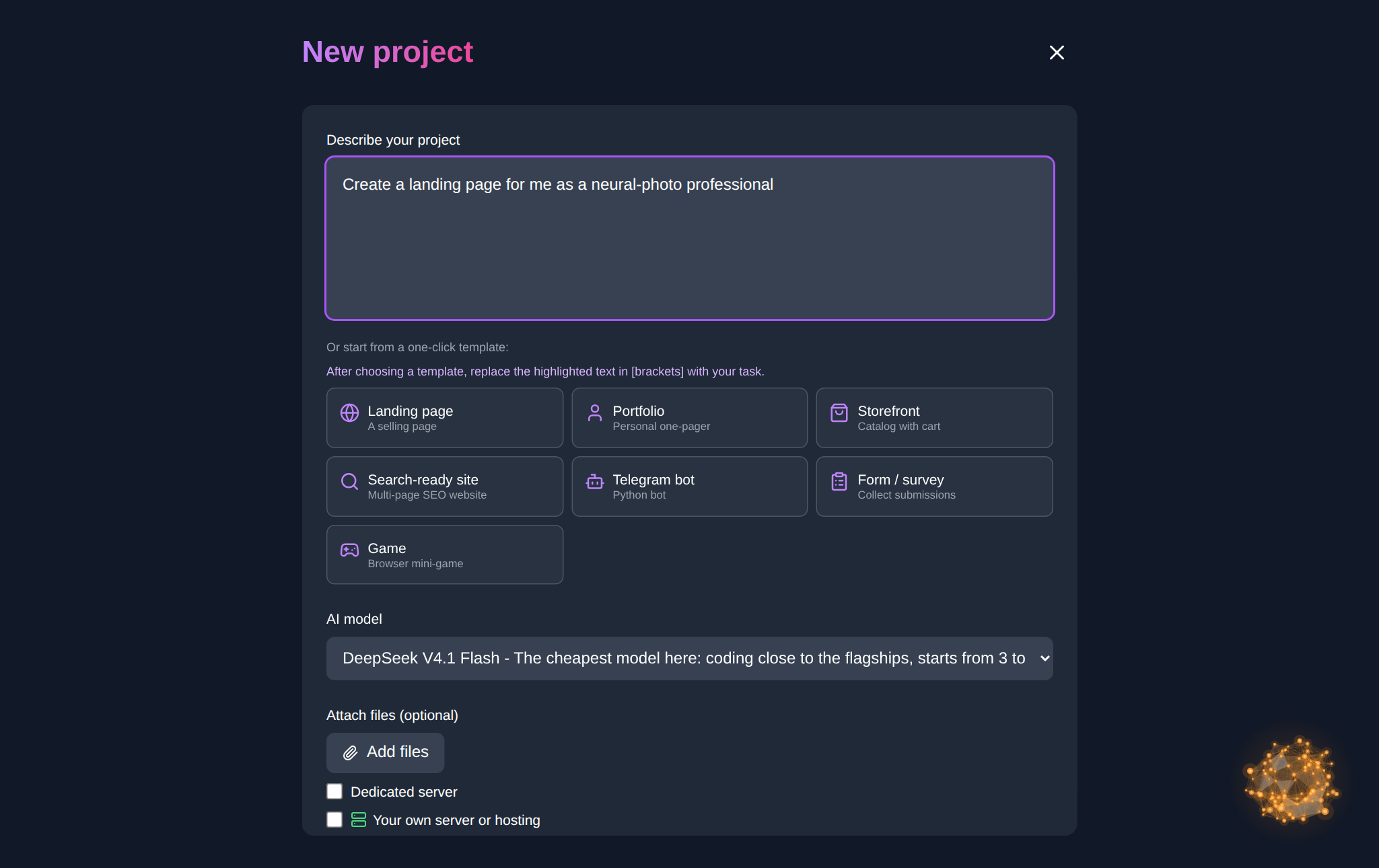
The vibe coding section lives at neuralspace.pro/en/vibecoding, and the working area is the «Code» section at neuralspace.pro/en/code. The order is simple. Sign up and open «New project». In the «Describe your project» field, write the task in ordinary language, or pick a ready template in one click — a landing page, a portfolio, a shop showcase or a multi-page site — and replace the text in square brackets with your own topic. Choose a model and a reasoning level, attach files if needed. Click «Create project» — the agent generates the files, starts the server and prepares a link. Use «Open site» to see the result, then keep working in the project chat: name the screen, the element and the behavior you want, and you get the change. The finished code can be downloaded at any time with «Download project», and you can bind your own domain to the project.
A built-in server or your own infrastructure
When creating a project you choose where it will live. For serious applications that need a build step and headroom under load, a dedicated server fits — the platform sets up the environment itself. The second option is to connect your own infrastructure: a VDS over SSH, where you keep full control and the AI works without restrictions, or ordinary hosting over SFTP so the AI edits an existing site file by file. The second mode is handy when a project is already hosted somewhere and you only need to add code. An important detail: when you work on your own VDS, you pay only for the AI's work — the platform does not bill you for the hosting itself.
Which model to pick
The «Code» section offers models of different tiers. For a start and simple apps it makes sense to take economical ones: DeepSeek V4.1 Flash or GLM 5.3 Flash — they have a low entry threshold and your balance lasts noticeably longer. Kimi works well for interfaces and typical pages. As a project grows — a database, authentication, business logic — switch to the flagship Claude Sonnet 5, Claude Opus 5 or GPT-5.6: they hold structure more accurately and break working parts less often. The reasoning level is adjustable: higher means deeper but slower and more expensive. You can switch model and level in the same interface, without recreating the project.
How to improve the app after launch
Don't try to describe the whole app in one giant message. The opposite approach works: ship a minimal version and grow it with short requests. First «add a page with a contact form», then «save the requests and show them in a list», then «add a date filter». Each change touches a small piece of code, so it's easy to check and roll back if needed. The project file panel shows what changed, and the chat keeps a history per project, so you can return to an earlier phrasing. This rhythm of «one task — one request — check» saves tokens and lowers the risk of breaking what already works.
Frequently asked questions
Do I need to know how to program to build an app?
For typical web apps, no: it's enough to describe clearly what should be on the screens and how they connect. Understanding app logic helps you phrase requests more precisely, but it comes along the way rather than being required up front.
Can I build a real app, not just a landing page?
Yes. Beyond static pages the agent assembles forms, lists, filters, data storage and server interaction. Complex high-load systems still need engineering work, but a working product with logic is a realistic task for vibe coding.
How much does it cost?
There is no subscription: you pay in tokens spent on code generation. The cost depends on the chosen model and the amount of editing, and new users receive starting tokens to build a first project and evaluate the approach.
Which device can I work from?
Any device with a browser, including a smartphone or tablet. No tool installation and no powerful computer are needed: the whole project lives in the service's cloud.