AI for Video: Text-to-Video, Photo Animation, and AI Dubbing
Modern AI for video covers the entire visual production workflow: generating cinematic scenes from scratch via text prompts (Text-to-Video), transforming static photos into dynamic clips (Image-to-Video), and translating finished videos into multiple languages with precise lip-syncing (Lip-Sync). The Video section on NeuralSpace brings together industry-leading generative video models — including the SeeDance family (2.5, 2.0, 1.5 Pro), Kling 3.0, Grok Video, VEO 3, and Wan 2.6. In this guide, we break down how to choose the right model for each task, how to structure prompts for consistent results, and how to navigate render speeds and technical requirements.
Three Core Video Generation Modes
Generative video has evolved far beyond short abstract loops. Today's production pipelines rely on three primary formats:
- Text-to-Video. Building complete cinematic shots, background atmospheres, and commercial concepts from scratch. The model synthesizes 3D geometry, lighting, materials, and camera motion purely based on your written description.
- Image-to-Video (Photo Animation). Uploading a still photograph or illustration and letting the model inject natural motion: flowing water, drifting clouds, hair blowing in the wind, or subtle facial expressions. The identity and composition of the original asset remain intact.
- Dubbing, Lip-Sync, and Video Translation. Translating an existing speaker's voice into foreign languages while automatically redrawing mouth movements to match the new audio track, enabling global video localization without reshooting.
Real Benchmark Data on Generation Latency and Stability
Rendering video is computationally intensive, and turnaround times depend directly on the chosen task. According to aggregated production metrics on NeuralSpace over the last 90 days (July 15 to October 15, 2026, across a sample of 9,194 video tasks from the anonymized video_generations log), the overall success rate for completed video renders stood at 69.1% (6,357 delivered clips).
Key speed and performance benchmarks by category:
- Photo animation (Image-to-Video) proved to be the most popular workflow, accounting for 3,384 successful clips. The average render latency was 125.4 seconds (~2.1 minutes), making it the fastest route to high-quality video content.
- Text-to-Video generation required deeper synthesis, averaging 258.2 seconds (~4.3 minutes) across 896 successful jobs. Within this category, Kling 3.0 and Grok Text-to-Video demonstrated high reliability, achieving 81.4% and 83.8% completion rates respectively.
- Video-to-Video and lip-sync dubbing tasks averaged 333.4 seconds (~5.5 minutes) due to synchronized frame-by-frame facial analysis and audio re-encoding.
Looking at user-side rejection reasons beyond transient provider downtimes, automated content safety filters triggered 153 prompt rejections, while strict human face detection policies accounted for 18 blocks. Refining prompt wording and using neutral references ensures smooth rendering.
How to Write an Effective Video Prompt
Unlike still image prompts, video descriptions must account for changes over time. A reliable prompt structure consists of five parts:
- Framing and shot size: "close-up shot", "eye-level angle", "drone tracking shot".
- Primary subject: character appearance, product material, or environmental details.
- Action and physics: clear dynamic movement (e.g., "waves crashing forcefully against dark wet cliffs with sea spray").
- Camera movement: slow push-in, orbital arc shot, smooth horizontal pan.
- Lighting and mood: warm golden hour light, cinematic backlight, 35mm film grain.
When animating an existing photo, avoid describing visual details already present in the source image (such as clothing color or eye shape). Focus solely on the desired movement: "the subject smiles subtly, shifts gaze toward the lens, gentle breeze moves loose hair, smooth push-in camera motion".
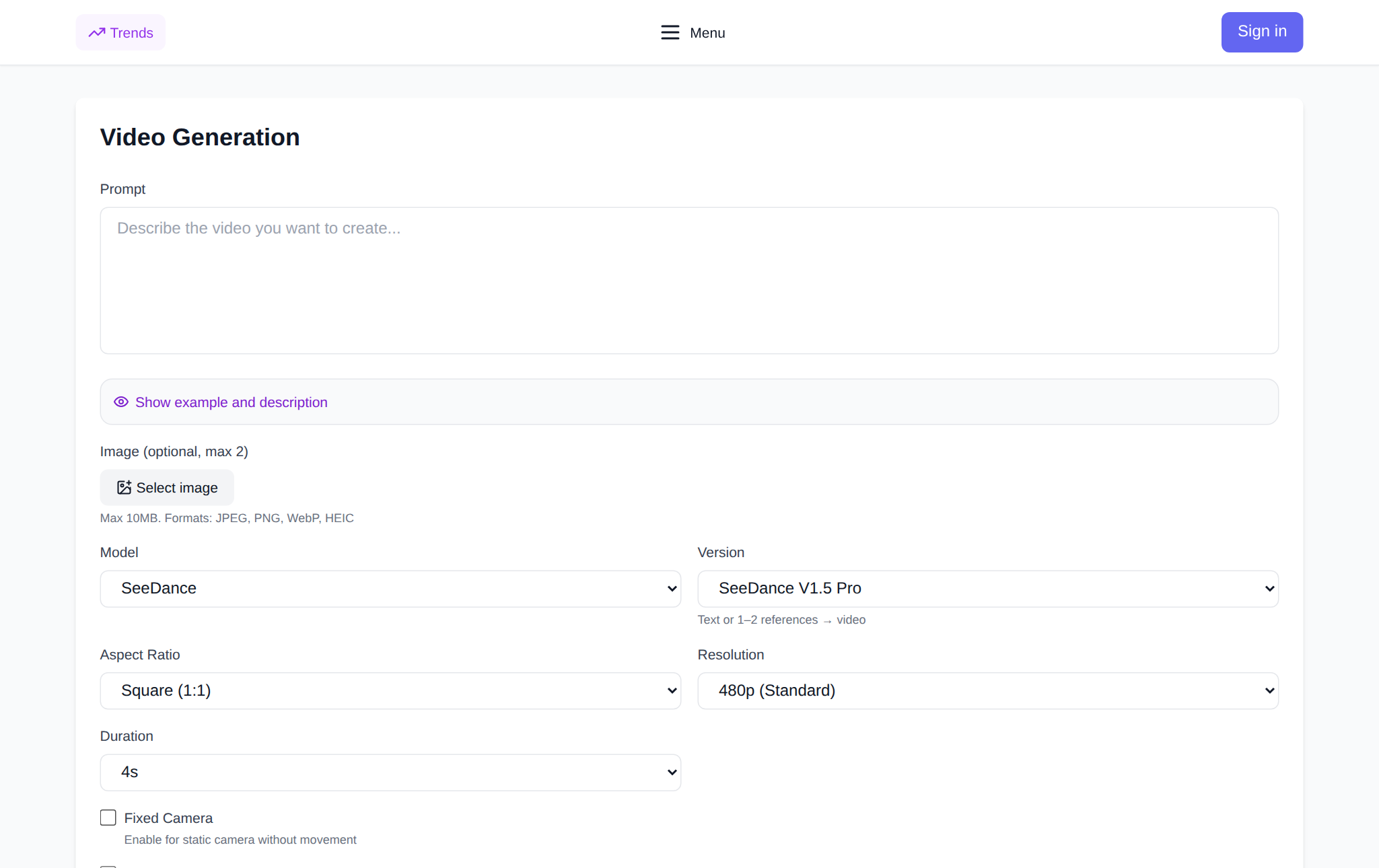
Step-by-Step Video Creation on NeuralSpace
Generating video on NeuralSpace requires no local GPU setup or complex software installation:
- Navigate to the Video section.
- Choose your workflow: select Text-to-Video to build a clip from scratch, or upload an image into the input field for Image-to-Video animation.
- Select the best model for your needs (SeeDance 2.5 for longer clips with audio, Kling 3.0 for realistic human motion, or Grok/Wan 2.6 for expressive photo animation).
- Configure settings: aspect ratio (16:9 for landscape platforms, 9:16 for vertical Shorts/Reels/TikTok), duration (4 to 15–30 seconds), and output resolution (720p for drafts, 1080p for final delivery).
- Click "Generate Video". The transparent token cost is displayed directly on the button before you start.
Your finished clip appears in the preview card and is saved to your Generation History, where you can download it as an MP4 file. NeuralSpace requires no monthly subscription: new users receive starter tokens to test the models, and further usage is billed on a pay-as-you-go basis per token.
Which Model Should You Choose?
Different models excel at different creative tasks. If you need a longer clip with generated sound effects and speech, or wish to supply up to 30 reference images, SeeDance 2.5 is the most flexible choice. When human motion fidelity, walking physics, and intricate hand gestures are critical, Kling 3.0 delivers unmatched realism. For fast, high-fidelity photo animation without stylistic distortion, Grok Image-to-Video and Wan 2.6 provide exceptional stability.
Frequently Asked Questions
Which AI model is best for animating photos?
Kling 3.0 and Grok Image-to-Video deliver outstanding results for photo animation. They respect the original facial features and lighting while introducing natural eye contact, subtle smiles, and smooth camera shifts.
What is the difference between Text-to-Video and Image-to-Video?
Text-to-Video invents the scene, composition, and subjects entirely from your words. Image-to-Video takes an existing static image as frame one and calculates how pixels should move over time, preserving visual consistency.
How long does it take to generate an AI video?
Based on real NeuralSpace production data, photo animation takes an average of 125.4 seconds (~2 minutes), while full text-to-video synthesis averages 258.2 seconds (~4.3 minutes).
Is a paid subscription required to generate video on NeuralSpace?
No subscription is required. New users receive starter tokens upon registration, and subsequent generations are paid per token without recurring monthly charges.