Its own VDS in vibe coding NeuralSpace: AI writes and deploys code directly on your server
Briefly about the main thing (BLUF)
Your VDS can be connected to vibe coding NeuralSpace via SSH: AI writes code and deploys it directly to your server, without manual copying. We show the connection step by step, discuss security and differences from other types of servers.
In the section "Code" for NeuralSpace a third type of server for projects has appeared: own VDS. Previously, AI would build your website either in a shared container or on a dedicated server that you rent through us. Now you can connect any of your own servers - a regular VPS for a few dollars a month, a home server with a white IP, or a machine in any cloud - and the AI will write, run and deploy code directly on it.
Why is this necessary?
- Hosting is free. The project lives on your hardware - NeuralSpace does not charge either space or traffic. You only pay for the AI's work, just like in a regular chat.
- No container restrictions. On its VDS AI agent works with full access: installs packages via apt, raises Docker, configures nginx and databases, installs services in systemd - everything that can be done manually via SSH.
- Full control. The project files are always with you. The project was disabled - everything remained on your server.
How to connect: step by step
Open "Code" section, click “New Project” and check the box "Own VDS". A connection form will appear:
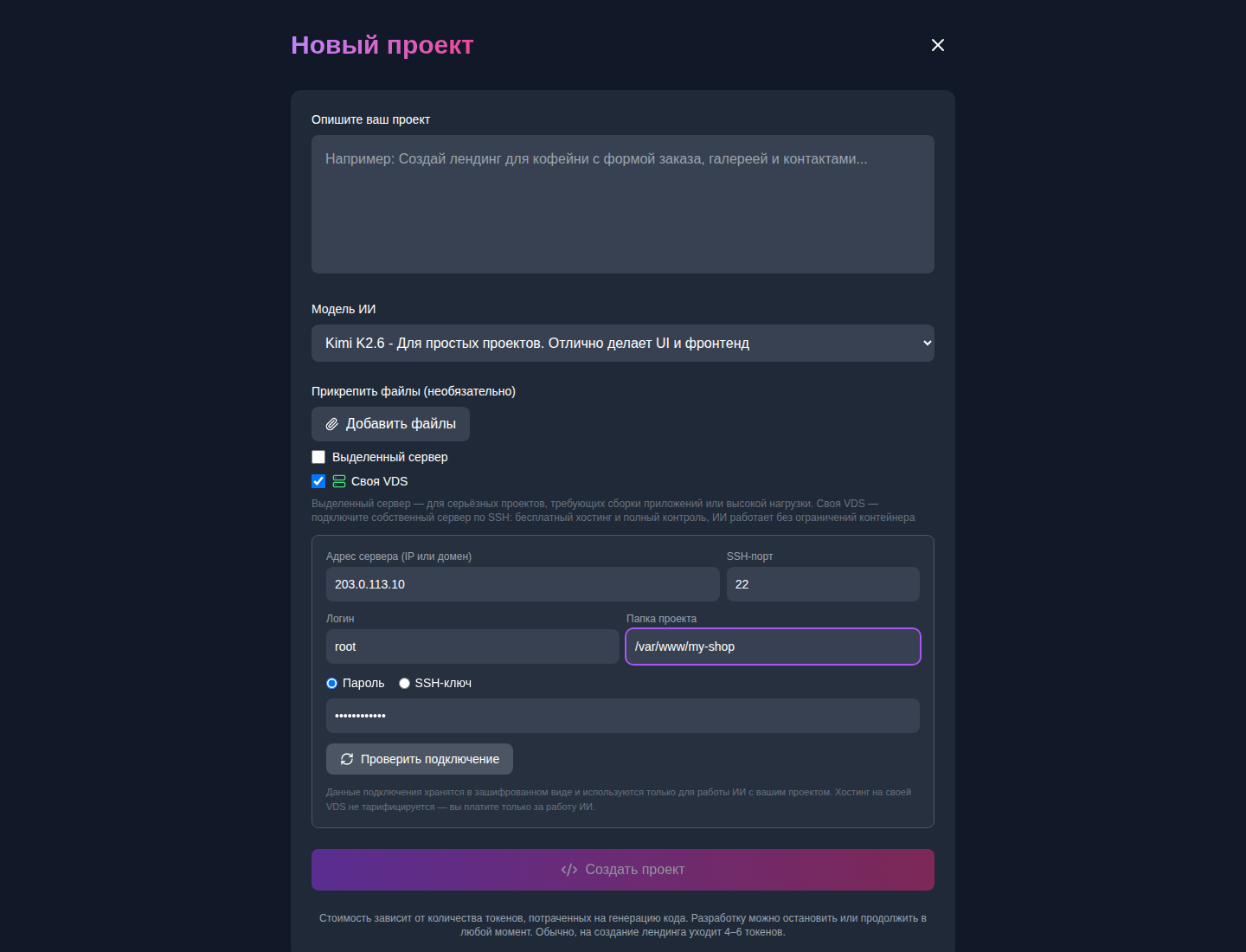
- Server address — IP address or domain of your VDS (the same one you use to log in via SSH).
- SSH port — default 22; if you transferred SSH to another port, specify it.
- Login — SSH user, usually BLK0. A regular user will also do if he has write rights to the project folder.
- Project folder - where the AI will put files, for example BLK1. If the folder does not exist, it will be created.
- Login method — password or private SSH key (inserted in its entirety, without passphrase).
Next click "Check connection" — the service will connect to the server, check the login and rights to write to the folder and show a green checkmark. After that, create a project as usual: describe the task, select a model, and the AI will start working on your server.
Doesn't connect? AI will figure it out on its own
Typical story: the password is correct, but the connection fails. There are different reasons - a closed port, fail2ban, prohibiting root login by password in the sshd config, cloud provider firewall. For this purpose, AI diagnostics are built right into the form:
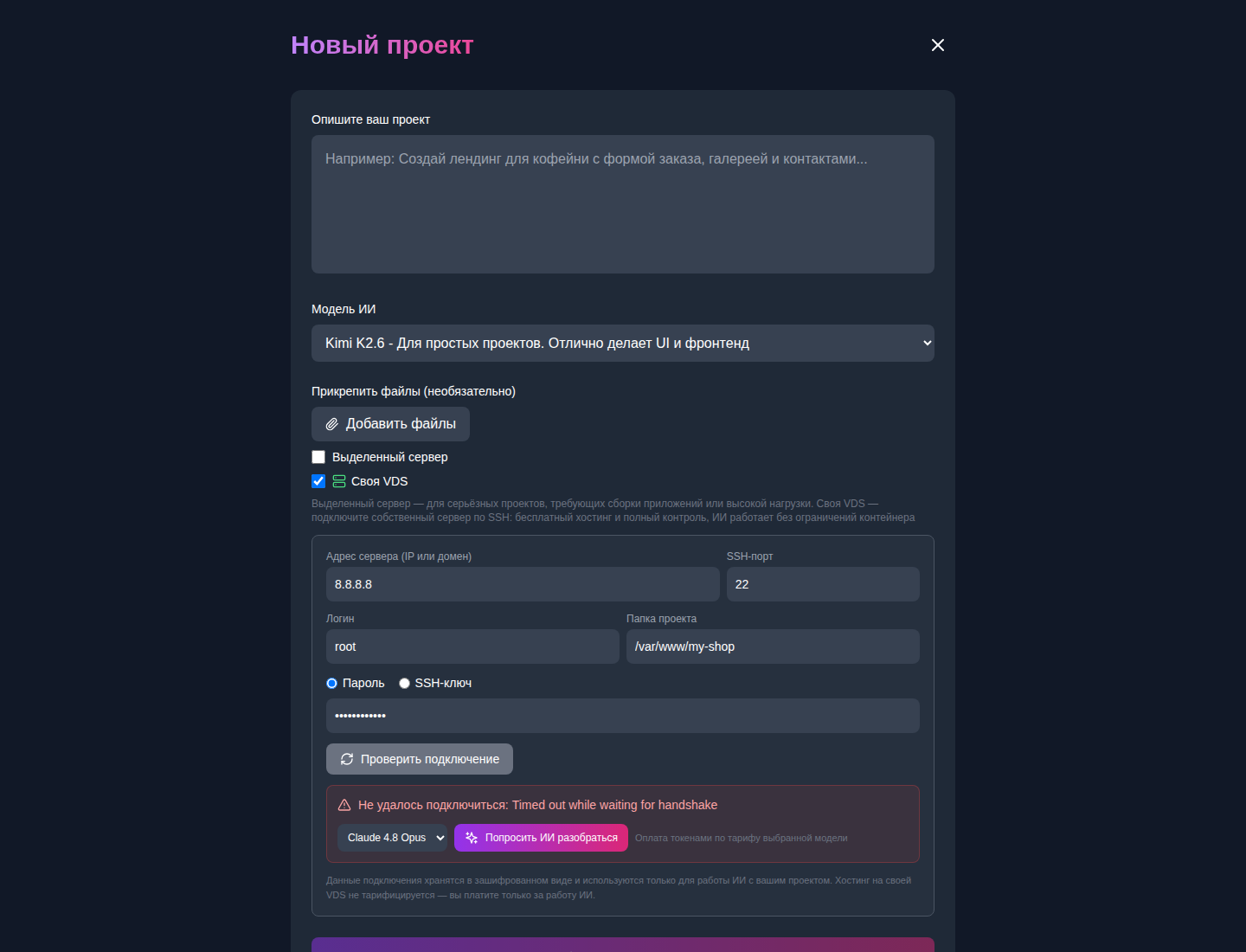
If the check fails, a button appears under the error "Ask the AI to figure it out". Choose a model - Claude 4.8 Opus or the latest Claude Fable 5 - and the AI itself rings the ports, analyzes the server’s response and explains in Russian what exactly is wrong and how to fix it: what line to correct in BLK2, what rule to add to the firewall, where to open the port in the provider panel. Diagnostics are paid for in tokens at the regular rate of the selected model - like a chat message.
What about security?
- Password and SSH key are stored only in encrypted form (AES-256-GCM) and are used solely for connection to your project.
- Credentials are never returned back to the browser and are not shown in the interface.
- Connections to private and local addresses are blocked—it is impossible to send an agent “inside” someone else’s infrastructure.
- We recommend creating a separate SSH user for the AI or a separate VDS for experiments - this is a good practice for any automation.
How is it different from other types of servers?
- General container (default) - instant start, no need to configure anything, but the environment is isolated and there are limits on the size of the project.
- Dedicated Server — rented in a couple of clicks via NeuralSpace, hourly payment, full access.
- Own VDS — your server, free hosting, full access without restrictions. Archiving and snapshots are not needed: the files already live with you.
Frequently asked questions
Is VPS from any provider suitable? Yes - you need any Linux server with SSH and public IP: reg.ru, Timeweb, Selectel, Hetzner, DigitalOcean, etc.
What is the price? Connection and hosting - $0. Only the work of AI models is charged, at the same prices as in cloud projects.
Is it possible to migrate an existing site? Yes: specify a folder with an existing project - the AI will see the files and continue working with them.
What happens if you delete a project in NeuralSpace? Only records on our side will be deleted. The files on your server will remain intact.
You can try it now - create a project on your VDS in the “Code” section.
Frequently asked questions (FAQ)
Question: How to get the best result from a neural network?
Answer: Use detailed prompts (descriptions) in English, set the style and details of the scene.
Question: Can these materials be used for commercial purposes?
Answer: Yes, the generated content is entirely yours.