Edit your old website yourself, without a freelancer: connect your hosting to AI
Briefly about the main thing (BLUF)
An old site without an admin panel usually means a freelancer for every minor edit. Now the hosting can be connected directly to the AI: the agent itself will find the files and make changes - you just write what to change. How it works, where the catch is and how much it costs.
Do you know this feeling? The site has been operating for three years now, everything is fine - but the old phone is still hanging on the main page. Or a promotion that ended in March. A trifle. For five minutes of work. And you go to your email, look for the freelancer who put together the site, and see that he hasn’t responded for a long time. Write to a new person - he will say “you need to understand your code, the minimum is 3000.”
For changing one line.
We made sure that this line (and the next hundred) was changed by AI. Directly on your hosting. You write whatever you want in words - it finds the necessary files and edits them itself.
Why is this such a sore subject?
Almost everyone has their own website - a manicurist, a car service center, a small store. They collected it once, paid for it, and then he lives on his own. Before the first edit.
And edits are needed constantly. Prices have changed. A new service has appeared. The “Order” button leads to the wrong place. The text on the main page is outdated. Every time it’s either a call to a freelancer and a wait of three days, or an attempt to get into FTP yourself and not completely break everything. Sound familiar?
The most annoying thing is that you need to change a little bit at a time. This is not “remake the site”, this is “fix this here”. But you have to pay for a full-fledged task.
How it works for us
NeuralSpace has a “Code” section - initially it’s about building new applications and sites from scratch. But we also added the ability to connect what you already have. It doesn’t matter what the site is built on or who made it.
Open “Code”, check the box “Your server or hosting” and select the “Regular hosting (SFTP)” tab. Next are the four fields that your hoster gave you when you registered.
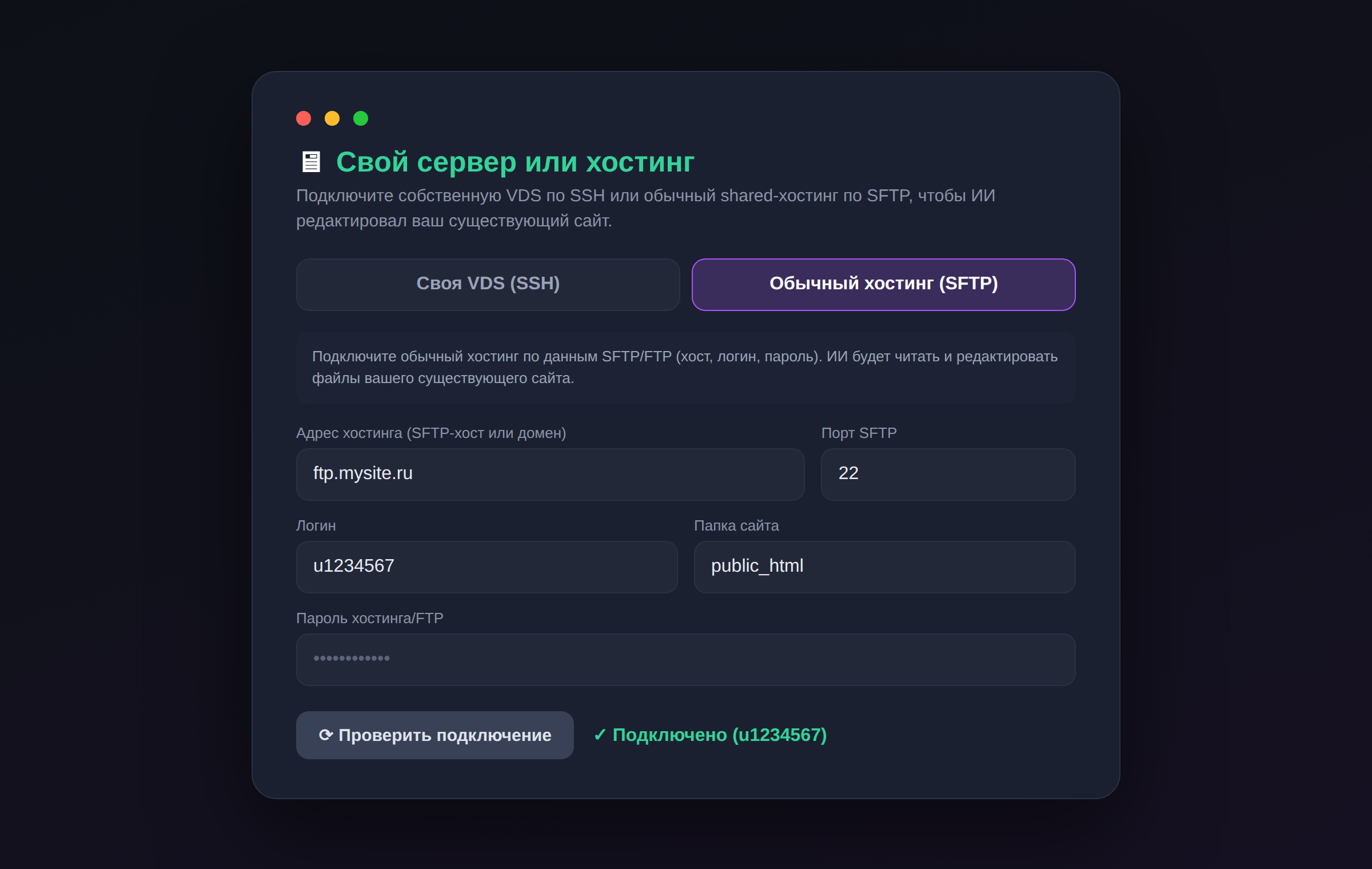
What to enter:
- Hosting address - usually something like BLK0 or just a domain.
- Port - almost always 22, sometimes 21. If you don’t know, leave 22.
- Login and password from hosting. The same ones from the letter upon registration.
- Site folder - most often this is BLK1 or BLK2. It’s also in the hoster’s panel.
Click “Test connection”. If the data is correct, you will see a green “Connected” checkmark. If something is wrong, a button “Ask AI to figure it out” will appear next to it - it will read the error and tell you where the typo is (no permissions to the folder, wrong port, and so on). It’s convenient when you get confused about these SFTP ports - I get confused.
Next, just write what you need
This is where the magic begins, for which everything was started. Connect - and speak in ordinary words:
- “Change the phone number in the header to +7 999 123-45-67”
- “Remove the block about the promotion, it’s over”
- “Make the “Sign up” button green and larger”
- “Add a block with reviews at the bottom of the page”
The AI itself goes into the files, finds the right place in HTML or CSS, edits and saves directly on the hosting. A second later, you refresh your site in your browser - the changes are already there.
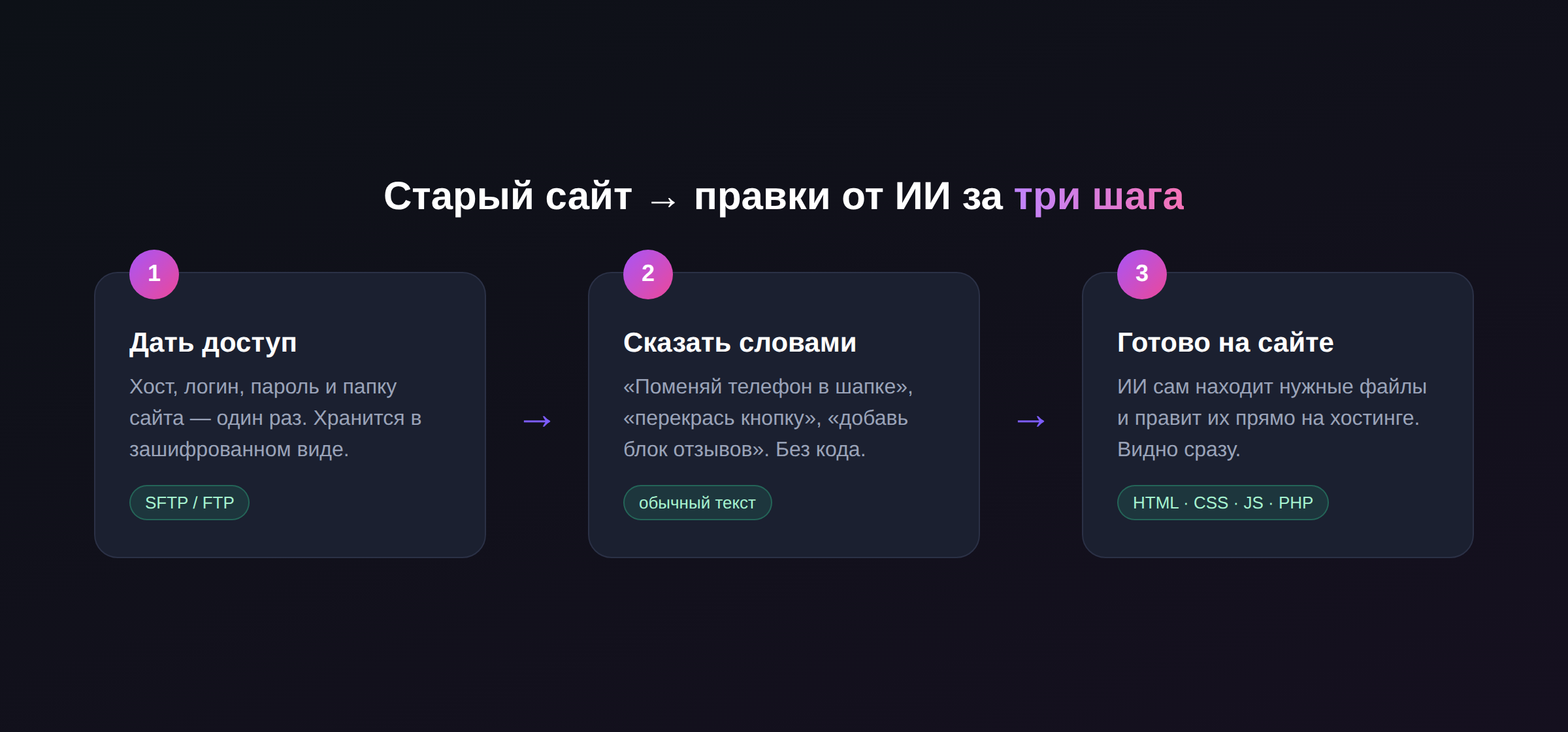
No FileZilla, no “download the file, open it in Notepad, don’t forget to download it back.” And most importantly, you don’t need to know where everything is in your code. That's the AI's concern.
Where's the catch (honestly)
Regular shared hosting is a limited thing, and I won’t pretend that it’s not so. AI can use it read and edit files: HTML, CSS, JavaScript, PHP. That is, everything related to appearance and texts is welcome.
But you cannot install any dependencies, run an application build, or raise a separate process on such hosting - this is a limitation of the hosting itself, not ours. If you need exactly this (for example, to deploy a full-fledged application in Node or Python), there is an adjacent tab “Your own VDS (SSH)” - there the AI has full access and no one has their hands tied. For a typical business card website or landing page, SFTP is sufficient.
Another point: the AI works directly with the combat site. Therefore, before major alterations, it is logical to ask him to first save a copy - he knows how to create an archive of the site and then restore it from it if something goes wrong.
How much does it cost
The very fact of connecting to hosting is free. You pay in tokens only for the work of the AI: for the fact that it actually read and corrected something. Changing a phone costs pennies. Your connection data is stored encrypted and is used only for working with your project, nothing else.
Do the math for yourself: one edit from a freelancer costs from $15–40 and a day or two of waiting. A dozen small edits in a year is already a significant amount of money for what you could do yourself in a minute by dictating one phrase.
Open the “Code” section, connect your site - and the next time you want to fix something, you won’t have to write to anyone or wait for anything. Say it and you're done.
Frequently asked questions (FAQ)
Question: How to get the best result from a neural network?
Answer: Use detailed prompts (descriptions) in English, set the style and details of the scene.
Question: Can these materials be used for commercial purposes?
Answer: Yes, the generated content is entirely yours.