AI chat: what to ask and how to get useful answers

An AI chat is a conversation where you type a question in plain language and the model answers with text: it explains, translates, writes, calculates and advises. The query “AI chat” is one of the most common searches, and behind it usually sits a simple goal: find a place to talk to an AI right now and actually get value from it. This guide covers what to ask a neural network in chat, how to phrase requests so the answer is useful on the first try, and how the NeuralSpace chat works — with model choice, web search, voice calls and file attachments.
What an AI chat actually is
Behind the chat window runs a large language model — the same technology behind ChatGPT, Claude and DeepSeek. It reads the whole conversation: it remembers what you said two messages ago and takes it into account in new answers. So a chat is not a rigid question-and-answer form but a live dialogue: you can ask it to rewrite, shorten, expand or re-tone a result without starting over. It is this context memory that makes follow-up questions work as well as the first one.
What to ask: categories that work
Neural networks are strongest where text and meaning are involved. These categories almost always pay off:
- Writing and correspondence. “Rewrite this email to a client — politer and twice shorter”, “Suggest 10 names for a coffee shop near a metro station”.
- Explanations and learning. “Explain how mortgages work in plain words, as if I were a teenager”, “Build a month-long Python study plan, hour by hour”.
- Review and analysis. “Here is a sales report — name the three biggest problems and propose fixes” (you can attach the report as a file).
- Code and tech. “Write an Excel formula that computes a markup”, “Find the bug in this script” — for coding there is also a dedicated Code section.
- Planning. “Make a week-long menu for a family of four with a shopping list”, “Break this project into milestones with deadlines”.
- Preparation. Interview questions for your profession, a presentation structure, a talk outline.
- Translation. Not literal but alive: “translate into English and make the tone business-like”.
What not to expect: without web search the model does not know events past its training cutoff, and it can slip on exact numbers — always double-check important figures and facts.
How to phrase a request: five rules
The difference between “the AI answers vaguely” and “the AI delivered a finished result” is almost always the phrasing. Five rules that work in any chat:
- Assign a role. “You are a magazine editor” or “Act as an experienced HR manager” — the model instantly adjusts vocabulary and depth.
- Give context. Who the text is for, why it is needed, what already exists, what to avoid.
- Specify the format. “A table with three columns”, “no longer than 200 words”, “a list of five bullets” — otherwise you get a lukewarm average answer.
- Show an example. A sample of the desired result saves several rounds of rewrites.
- Edit through the dialogue. Do not start over — ask: “cut it in half”, “make it friendlier”, “add concrete numbers”. The model remembers the context.
An example of the difference. Weak: “write a text about coffee”. Strong: “Write a 100-word post for a coffee shop’s Instagram: warm tone, about the morning brewing ritual, ending with a question for followers”. The second request very likely produces something publishable with minor edits.
What else a chat can do besides text
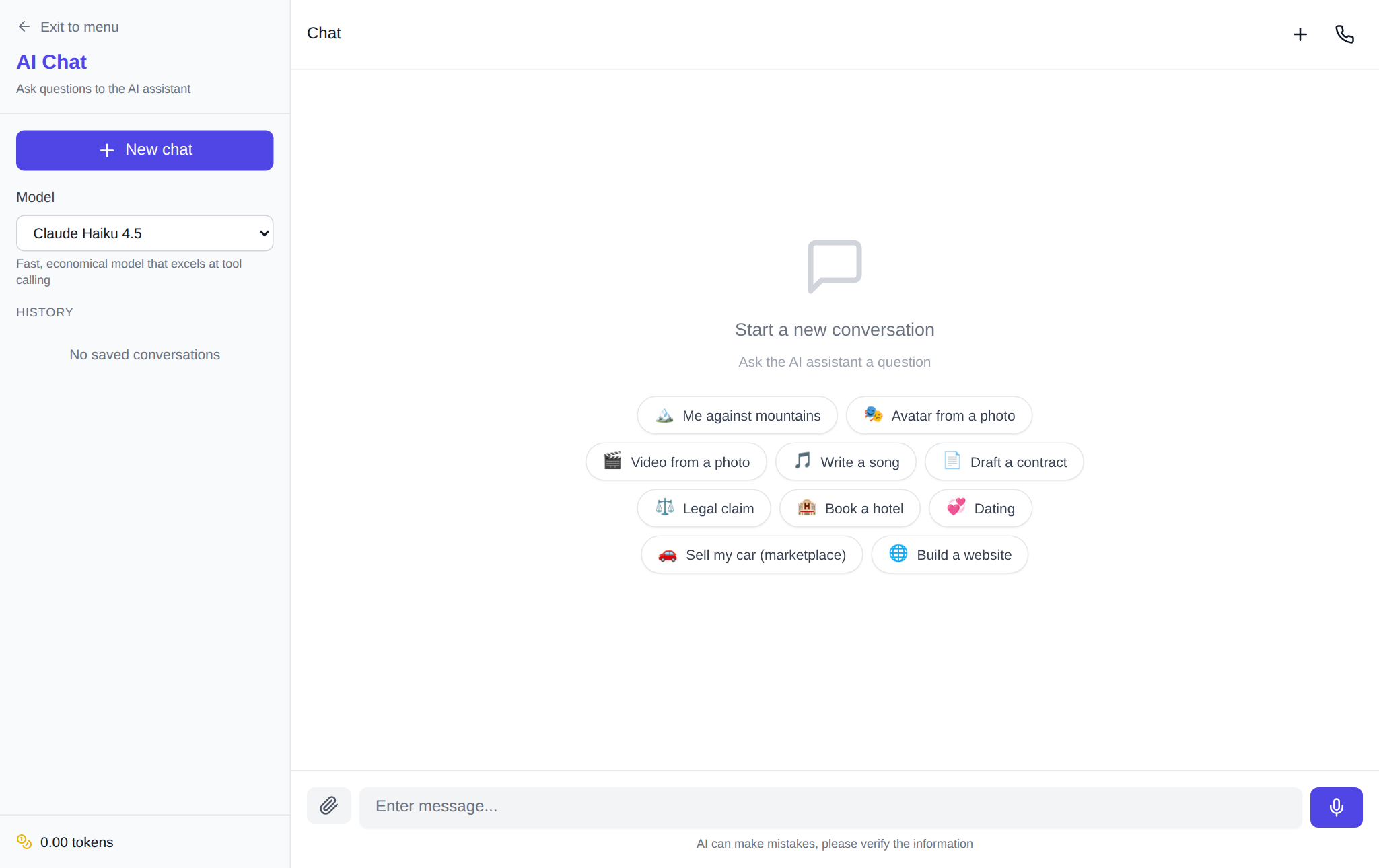
A modern AI chat is no longer limited to conversation. In NeuralSpace one window brings together: attachments — attach an image, document or audio and ask the model to analyze it; a web search toggle — the model looks up fresh data before answering; a deep-thinking mode for complex tasks that need multi-step reasoning; voice calls — talk to the model by voice, like a phone call; and generations right inside the dialogue — the assistant can draw an image, compose music or put together a video without leaving the chat.
How to start on NeuralSpace
The whole setup takes a minute: register and open the NeuralSpace chat. Then pick a model for the task and type your first question. The list is long: DeepSeek V4.1 Flash — fast and the most affordable, enough for everyday requests; Claude Sonnet 5 and GPT-5.6 — for complex tasks where precision of wording matters; separate voice models — for talking out loud. Switching models is one click inside the same conversation.
Pricing is transparent: there is no subscription, new users receive starter tokens, and after that you pay per token — only for what you actually generate. The cost depends on the chosen model and is shown before you run it.
FAQ
Does the chat understand languages other than English?
Yes. All models in NeuralSpace handle dozens of languages, and you can mix them freely: ask in one language, ask for the answer in another, or translate mid-conversation.
How much does an AI chat cost?
NeuralSpace has no subscription: new users get starter tokens, and after that you pay per token for actual requests. Tokens are spent on the volume of text and the chosen model — simple questions cost next to nothing, long generations cost more.
Can the AI answer questions about recent events?
Yes — turn on web search in the chat settings: the model first looks up fresh sources, then answers. Without web search it relies on its own knowledge, which has a cutoff date.
How is an AI chat different from a regular search engine?
Search gives you links to read and compare yourself. A chat gives a finished answer tailored to your exact question — and if something is off, you can refine and redo the answer on the spot.